Hi again @livl17017666,
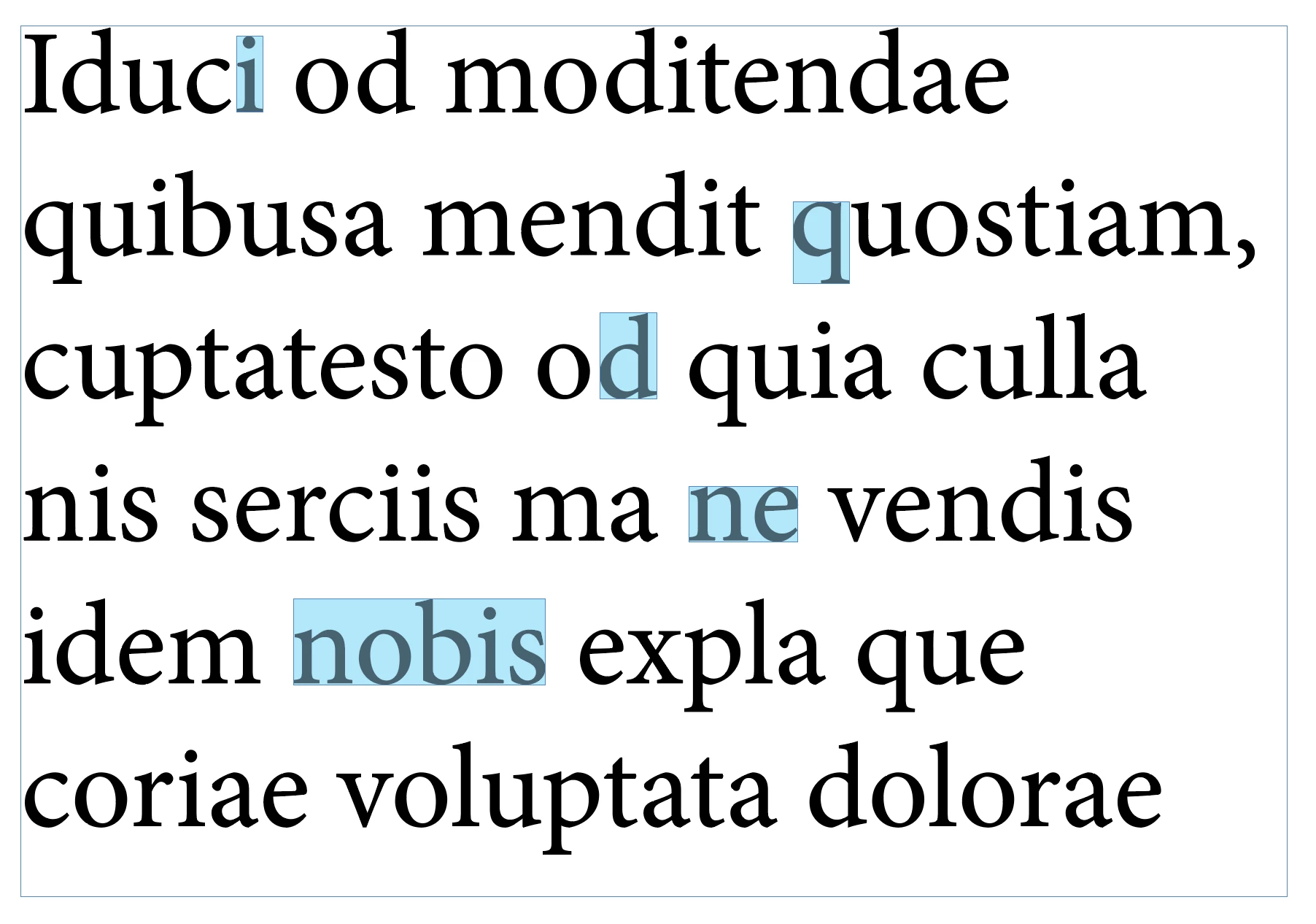
Well I wasn't satisfied, so I've written a new function getTextOutlineBounds(text) which does a much better job. First select some text and run script. So far the script works (on my system at least) even with text in anchored objects or tables, but I've no doubt it will fail in some cases. One limitation I have documented in script comments. Let me know if you find bugs and I will fix. Otherwise, I hope it is useful!
- Mark
/*
 * Draw rectangle showing selected text's bounds.
 * @author m1b
 * @discussion https://community.adobe.com/t5/indesign-discussions/how-to-get-bounds-of-particular-character/m-p/13713084
 */
function main() {

    var doc = app.activeDocument,
        text = doc.selection,
        bounds = getTextOutlineBounds(text);

    if (bounds == undefined) {
        alert('Could not calculate bounds. Please select some text and try again.');
        return;
    }

    // draw a rectangle just for showing the bounds
    var rect = doc.selection[0].parentTextFrames[0].parentPage.rectangles.add({
        geometricBounds: bounds,
        fillColor: doc.swatches[4],
    });
    rect.transparencySettings.blendingSettings.opacity = 30;

};

app.doScript(main, ScriptLanguage.JAVASCRIPT, undefined, UndoModes.ENTIRE_SCRIPT, 'Draw Rectangle Around Selected Text');


/**
 * Returns bounds of Text object [T, L, B, R].
 * Known limitations:
 * 1. Will return the wrong bounds in some cases
 * where the text's paragraph is split over multiple
 * textframes and uses a multi-line composer.
 * (You can simulate this problem by copy-pasting
 * the text frame - if the line breaks change and
 * `text` has moved, this function will return
 * the *moved* bounds. Script will warn when this
 * is a possibility.
 * @author m1b
 * @version 2023-04-11
 * @param {Text|Paragraph|Line|Word|Character} text - an Indesign text object.
 * @returns {Array<Number>} - the bounds [T, L, B, R].
 */
function getTextOutlineBounds(text) {

    app.scriptPreferences.measurementUnit = MeasurementUnits.POINTS;

    var bounds;

    // this property will be used to
    // (a) force createOutlines to make separate polygons, and
    // (b) identify the polygons after outlining
    var marker = 'fillTint';

    if (text.constructor.name == 'Array') {

        // process elements of array
        for (var i = 0; i < text.length; i++)
            bounds = expandBoundsForIndesign(bounds, getTextOutlineBounds(text[i]));

        return bounds;

    }

    else if (
        !text.hasOwnProperty('parentTextFrames')
        || !text.isValid
        || !text.hasOwnProperty('characters')
        || !text.hasOwnProperty(marker)
    )
        return;

    if (
        text.paragraphs[0].parentTextFrames.length > 1
        && text.paragraphs[0].parentTextFrames[0] !== text.parentTextFrames[0]
        && String(text.parentStory.composer).search(/single-line/i) == -1
    )
        alert('Caution\nYou are using a multi-line composer. Function may return erroneous results.');

    // store the original values before setting marker
    var originalValues = [];
    for (var i = 0; i < text.textStyleRanges.length; i++) {
        originalValues[i] = {};
        originalValues[i].value = text.textStyleRanges[i][marker];
        originalValues[i].start = text.textStyleRanges[i].index - text.index;
        originalValues[i].end = originalValues[i].start + text.textStyleRanges[i].length - 1;
    }

    var tf = text.parentTextFrames[0],
        arbitraryValue = 61.803;

    // mark the character so we can recognise it later
    text[marker] = arbitraryValue;

    // get the outermost textframe
    while (tf.parent.constructor.name == 'Character')
        tf = tf.parent.parentTextFrames[0];

    // outline the whole text frame because outlining
    // individual texts causes it to move left by the
    // glyph's left sidebearing amount which I don't
    // know how to determine
    var dup = tf.duplicate();
    outlines = dup.createOutlines();

    // add outlines of anchored text frames
    while (outlines[outlines.length - 1].textFrames.length > 0)
        outlines.push(outlines[outlines.length - 1].textFrames[0].createOutlines()[0]);

    // find the marked outlines
    for (var i = 0; i < outlines.length; i++) {

        var polygons;
        if (outlines[i].constructor.name == 'Polygon')
            // we get a Polygon if there is only one character in text frame
            polygons = [outlines[i]];
        else if (outlines[i].hasOwnProperty('polygons'))
            // a Group with polygons
            polygons = outlines[i].polygons;
        else
            continue;

        for (var j = 0; j < polygons.length; j++)
            if (polygons[j][marker] === arbitraryValue)
                bounds = expandBoundsForIndesign(bounds, polygons[j].visibleBounds);

    }

    // revert the text after marking
    for (var i = 0; i < originalValues.length; i++) {
        var end = Math.min(text.length-1, originalValues[i].end);
        text.characters.itemByRange(originalValues[i].start, end)[marker] = originalValues[i].value;
    }

    // delete all the outlines
    for (var i = outlines.length - 1; i >= 0; i--)
        outlines[i].remove();

    if (dup.isValid)
        // sometimes the duplicate is left behind
        // eg. when there is a table in the text frame
        dup.remove();

    return bounds;

};


/**
 * Returns bounds that encompass both bounds.
 * @author m1b
 * @version 2022-07-24
 * @param {Array<Number>} b1 - bounds array [t, l, r, b].
 * @param {Array<Number>} b2 - bounds array [t, l, r, b].
 * @returns {Array<Number>}
 */
function expandBoundsForIndesign(b1, b2) {

    if (b1 == undefined)
        return b2;
    if (b2 == undefined)
        return b1;

    var ex = [];

    ex[0] = b1[0] < b2[0] ? b1[0] : b2[0];
    ex[1] = b1[1] < b2[1] ? b1[1] : b2[1];
    ex[2] = b1[2] > b2[2] ? b1[2] : b2[2];
    ex[3] = b1[3] > b2[3] ? b1[3] : b2[3];

    return ex;

};
Edit 2023-04-11: added code to ensure that fillTint is preserved in case selected text has multiple fillTints.



 AdChoices