
Participating Frequently
March 17, 2025
Question

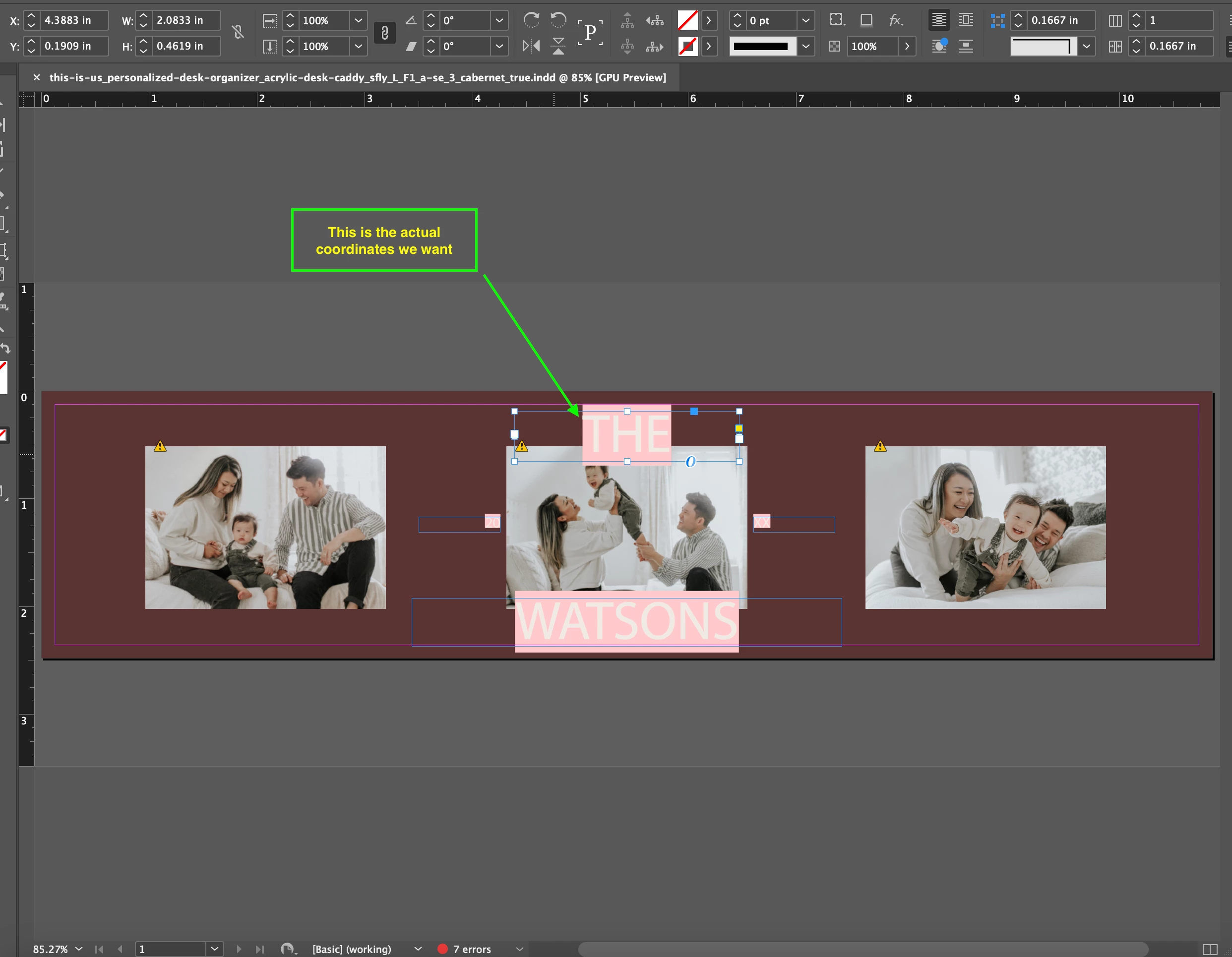
how to get exact x & y coordinates for the text inside the textframe

  • March 17, 2025
  • 3 replies
  • 920 views

Hii Team, 
We are using adobe extendScript to get the json data by parsing indesign file. We are trying to implement some logic based on exact text coordinates, we tried several options using font size , line height , offsets , but we are unable to get exact starting point of the text for each line in a textframe .
[P.S. - we are getting text frames coordinates, we need the coords for actual text inside].
One more consideration is the text alignment , both vertically and horizontally. 

Currently this is what we have implemented yet, but it is not working as expected, (mostly for Y -coordinate) 

function getXCoordinateForText(paragraph, bounds) {
var frameLeft = bounds[1]; // X position of the left edge of the frame
var frameRight = bounds[3]; // X position of the right edge of the frame
var frameCenter = (frameLeft + frameRight) / 2; // Center of the frame

// Get text properties
var startX = paragraph.horizontalOffset;
var endX = paragraph.horizontalOffset;
try {
endX = paragraph.endHorizontalOffset;
} catch (error) {
logInfo("Error while accessesing endHorizontalOffset (this issue is due to text being not properly formatted: \n "+error ,4121)
return 0;
}
var textWidth = endX - startX;

// Get paragraph alignment
var alignment = paragraph.justification;
var textX; // Final x-coordinate based on alignment

// Adjust x-coordinate based on alignment
if (alignment == Justification.LEFT_ALIGN) {
textX = startX; // Text starts at startX
} else if (alignment == Justification.RIGHT_ALIGN) {
textX = frameRight - textWidth; // Align text to the right edge
} else if (alignment == Justification.CENTER_ALIGN) {
textX = frameCenter - (textWidth / 2); // Center text in the frame
} else if (alignment == Justification.FULL_JUSTIFY || alignment == Justification.LEFT_JUSTIFIED) {
textX = startX; // Justified text starts at startX, spacing varies
}
return textX - frameLeft;
}
function getYcoordinateForText(textFrame, bounds) {
// y coordinate of text lines
// var y_offset = lineSpacing * font_size_in_points

// vAlign = alignmentAnchor.toString() //top/middle/bottom

// // numLines = <get number of lines after splitting the text with \n>

// var visibleLineCount = Math.floor(containerHeight / y_offset)

// var vShift = 0;
// switch (vAlign) {
// case "middle":
// case 'CENTER_ALIGN':
// vShift = (containerHeight - visibleLineCount * y_offset) / 2;
// break;
// case "bottom":
// vShift = containerHeight - visibleLineCount * y_offset
// break;
// default:
// vShift = 0;
// break;
// }

// var y_coordinate_of_a_line = vShift + ((line_index + 1) * (y_offset));
// return y_coordinate_of_a_line;

//Changed the logic of calculating y coordinate for the text frames
var paragraph = textFrame.paragraphs[0]; // Get the first paragraph
// Get text frame boundaries
var bounds = textFrame.geometricBounds;
var frameTop = bounds[0]; // Y position of the top edge of the frame
var frameBottom = bounds[2]; // Y position of the bottom edge of the frame
var frameCenter = (frameTop + frameBottom) / 2; // Center of the frame

// Get baseline position of the first line of text
var baselineY = paragraph.lines[0].baseline;

// Get paragraph alignment
var alignment = paragraph.justification;
var textY =baselineY; // Final y-coordinate based on alignment , default first lime's baseline position

// Adjust y-coordinate based on alignment
if (alignment == VerticalJustification.TOP_ALIGN) {
textY = baselineY; // Text starts at the first line's baseline
} else if (alignment == VerticalJustification.BOTTOM_ALIGN) {
textHeight = paragraph.lines[paragraph.lines.length-1].baseline - paragraph.lines[0].baseline; // Total text height
textY = frameBottom - textHeight; // Align text to the bottom edge
} else if (alignment == VerticalJustification.CENTER_ALIGN) {
textHeight = paragraph.lines[paragraph.lines.length-1].baseline - paragraph.lines[0].baseline;
textY = frameCenter - (textHeight / 2); // Center text vertically
} else if (alignment == VerticalJustification.JUSTIFY_ALIGN) {
textY = baselineY; // Justified text starts at baseline, but line spacing varies
}

return textY - frameTop; // actaul distance of the text from the text- frame's top 
}

We are attaching the the screenshot here , what we want to achieve. can anybody please help us on this one.
 

3 replies

Robert at ID-Tasker
Legend
March 17, 2025

@dattatray_dnyaneshwar9525


What's your end goal?


What will you do next with this information?


Why do you need this information? 


Can you give as a "whole picture" - not just one piece of the puzzle? 


Participating Frequently
March 18, 2025

we have service which uses this json data and additional associated fonts and assets data to create a svg preview of the same indesign file . so there we need these actual x, y coords of text inside the text frame

Robert at ID-Tasker
Legend
March 18, 2025

@dattatray_dnyaneshwar9525


I don't have time right now to check SVG's specification - but do you have to outline texts - or can you "draw" a frame filled with text?


And how precise do you have to be with your SVG? 


And if it's just a "preview" - why bother with SVG? 


Peter Kahrel
Community Expert
Community Expert
March 17, 2025

You can get a character's baseline and ascent, but unfortunately not its x- or cap-height. There's a rather brutal workaround: convert a character to outlines, get the outline's top, then undo:


outline = myTextFrame.characters[0].createOutlines()[0];
top = outline.geometricBounds[0];
app.documents[0].undo();


This works only for the top.  When you create the outline the character moves to the lefr or the right because its sidebearings are removed and (if it's not the first character in the frame) kerning with the previous character is cancelled.


[Mark beat me to it!]

m1b
Community Expert
Community Expert
March 17, 2025

Hi @dattatray_dnyaneshwar9525 I wrote a function that takes a Text object and returns the bounds [T, L, R, B]. See my answer here. I think that might be helpful in your case, but let me know if you need something different.

- Mark

Participating Frequently
March 18, 2025

we are already having that data, thanks for the info

m1b
Community Expert
Community Expert
March 18, 2025

Ah I see. Well, a good way to post that sort of question here is to attach (A) a simple example document and (B) the expected script output (eg. a JSON file?).


In the meantime, is this sort of script helpful?

- Mark

/**
 * Example of collecting "anchor coordinates" of each line of selected text.
 * 
 * @7111211 m1b
 * @discussion https://community.adobe.com/t5/indesign-discussions/how-to-get-exact-x-amp-y-coordinates-for-the-text-inside-the-textframe/m-p/15217792
 */
(function () {

    if (0 === app.documents.length)
        return alert('Please select some text and try again.');

    var doc = app.activeDocument,
        text = doc.selection[0];

    if (
        !text
        || !text.hasOwnProperty('lines')
        || 0 === text.lines.length
    )
        return alert('Please select some text and try again.');

    var textLineCoordinates = getTextLineCoordinates(text);

    alert(textLineCoordinates.join('\n'));

})();

/**
 * Returns array of [x,y] coordinates, one for each line of `text`.
 * For proof of concept only.
 * @7111211 m1b
 * @version 2025-03-19
 * @9397041 {Text} text - an Indesign text object.
 * @Returns {Array<point>} - the line coordinates.
 */
function getTextLineCoordinates(text) {

    var lines = text.lines,
        coordinates = [];

    for (var i = 0, line, x, y; i < lines.length; i++) {

        line = lines[i];

        if (0 === line.parentTextFrames.length)
            // the line is overset
            break;

        x = 0;
        y = line.baseline;

        switch (line.justification) {
            case Justification.LEFT_ALIGN:
                x = line.horizontalOffset;
                break;
            case Justification.RIGHT_ALIGN:
                x = line.endHorizontalOffset;
                break;
            case Justification.RIGHT_ALIGN:
                x = (line.horizontalOffset + line.endHorizontalOffset) / 2;
                break;
            case Justification.AWAY_FROM_BINDING_SIDE:
            case Justification.TO_BINDING_SIDE:
            case Justification.LEFT_JUSTIFIED:
            case Justification.CENTER_JUSTIFIED:
            case Justification.RIGHT_JUSTIFIED:
            case Justification.FULLY_JUSTIFIED:
                // do these for homework!
                break;
        }

        coordinates.push([x, y]);

    }

    return coordinates;

};