
Answered
How to load csv data into dropdown in UI Dialog window in indesign javascript
//UI starts here:
app.scriptPreferences.userInteractionLevel = UserInteractionLevels.NEVER_INTERACT;
var files =[];
var cA=['Select Template'];
var csvCells =[];
var AOBC_myfile;
var COBC_myfile;
//
var Bfilesr = [];
var myFiles ;

//
var myDia = new Window ("dialog", "tool UI....");
myDia.canCancel=true;
    // GROUP1
// ======
    var myPanel = myDia.add ("panel");

    var myGrp2=myPanel.add("group",undefined,"Group3",{orientation:"column"});
    var OBC=myGrp2.add("staticText",[0,0,140,20],"Fig path: ");
    var edt3=myGrp2.add("edittext",[0,0,363,20],"");
    var btn1=myGrp2.add("button",[0,0,60,20],"Browse");
    btn1.onClick=function(){
        AOBC_myfile=Folder.selectDialog();
        if(AOBC_myfile != null)
             {
            edt3.text=AOBC_myfile.relativeURI;
            filesB = GetFilesB(AOBC_myfile);
            }
        else  {
            alert ("Please Select Indesign Folder");
            }
 }

    myGrp2.alignment="left";

    var myGrp4=myPanel.add("group",undefined,"Group4",{orientation:"column"});
    var OBC5=myGrp4.add("staticText",[0,0,112,20],"CSV file path:");
    var edt5=myGrp4.add("edittext",[0,0,363,20],"");
    var btn2=myGrp4.add("button",[0,0,60,20],"Browse");
    myGrp4.alignment="left";
    btn2.onClick=function(){
        //???
      myDia.close();
         myfile=File.openDialog();
    if(myfile==null || myfile.name.match("\\.csv$","i")==null){
        alert("Please select csv file and to proceed!!!");
        edt1.text="";
        pgst1.visible=false;
        }
    else{
    //&&&&&&&&&&&&&&&&&&&&&&&&&&&&&&&&&&&&&& csv starts:
        if(myfile.length>0){
                        var my_csv_File = myfile;
                        my_csv_File.open("r"); // read the file
                        var content = my_csv_File.read(); // get the text in it
                        my_csv_File.close(); // close it again
                        var lines = content.split('\n');// split the lines (windows should be '\r')
                        var keys = lines[0].split(','); // get the heads
                        // loop the data
                        for(var i = 1; i < lines.length;i++){
                            var obj = {}; // temp object
                            if(lines[i].match(/\w/)!=null)  {//validate whether the entry contains any words(aphabets and numbers) or not)
                               var cells = lines[i].split(',');// get the cells
                               csvCells.push(cells);
                            }
                       }
         }
    }
    for(var c=0; c<csvCells.length; c++){
        var cellA = csvCells[c];
         cA.push(cellA[0]);
        }
      //???
        }

    //%%%%%
    // PANEL1
// ======
var panel1 = myDia.add("panel", undefined, undefined, {name: "panel1"});
    panel1.orientation = "column";
    panel1.alignment = "left";
    panel1.preferredSize.width = 600;

// GROUP4
// ======
var group4 = panel1.add("group", undefined, {name: "group4"});
    group4.orientation = "row";
    group4.alignChildren = ["left","center"];

var statictextq = group4.add("statictext",[0,0,300,20], undefined, {name: "statictextq"});
    statictextq.text = "Template Name:";
//var dropdown1_array = ["Item 1","-","Item 2"];
var dropdown1 = group4.add("dropdownlist", undefined, undefined, {name: "dropdown1", items: cA});
    dropdown1.selection = 0;
    dropdown1.preferredSize.width = 200;

// GROUP5
// ======
var group7 = panel1.add("group", undefined, {name: "group8"});
    group7.orientation = "row";
    group7.alignChildren = ["left","center"];

    //%%%%%

var myGrp=myDia.add("group",undefined,"Group9",{orientation:"row"});
var ok = myGrp.add("button",undefined,"OK");
var cancelA = myGrp.add("button",undefined,"Cancel");

if(myDia.show()==1){
okraman();
    }
else{
    alert("user cancelled this action");
     exit();
    }

//<<<<<<<<<
//????
function GetFilesB(theBFolder) {
    var fileListB = theBFolder.getFiles(),
    i, fileB;
    for (i = 0; i < fileListB.length; i++) {
        fileB = fileListB[i];
        if (fileB instanceof Folder) {
            Bfilesr = files.concat(GetFilesB(fileB));
        }
        else if (fileB instanceof File && fileB.name.match(/.*\.tif$/i)) {
            Bfilesr.push(fileB);
        }
        else if (fileB instanceof File && fileB.name.match(new RegExp(".*\\.tif$", "i"))) {
            Bfilesr.push(fileB);
        }
     else if (fileB instanceof File && fileB.name.match(new RegExp(".*\\.eps$", "i"))) {
            Bfilesr.push(fileB);
        }
    else if (fileB instanceof File && fileB.name.match(new RegExp(".*\\.png$", "i"))) {
            Bfilesr.push(fileB);
        }
    }
return Bfilesr;
}
//???
function okraman(){
var myDocument = app.documents.add();
            with (myDocument.documentPreferences) {
            pagesPerDocument =2;
            facingPages=false;
            }
    }
I am trying to load data recieved from the input csv and load it in dropdown to show user to select it. I tried to load but its not working for dropdown alone but it is working for editText alone. Please help me with this.
I also attached the sample csv for loading data with this post!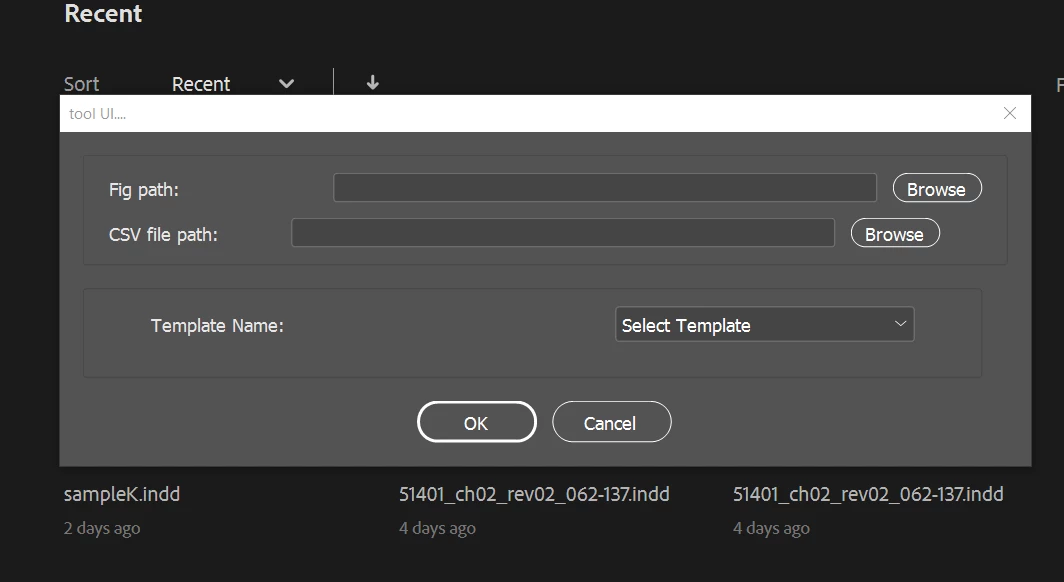


 AdChoices