

dublove
Legend
September 1, 2023
Question

How to use scripts or regexes to remove duplicate entries when creating an index?

  • September 1, 2023
  • 2 replies
  • 1154 views

How to use scripts or regexes to remove duplicate entries when creating an index?

As shown in the figure below, I want to convert A into C, which may pass through B.


It may not be possible to achieve A to C at once.

But it should be possible to achieve A to B in one step.

May I ask how to implement it using regular or script.


Here is an important question: how to find duplicate 【】
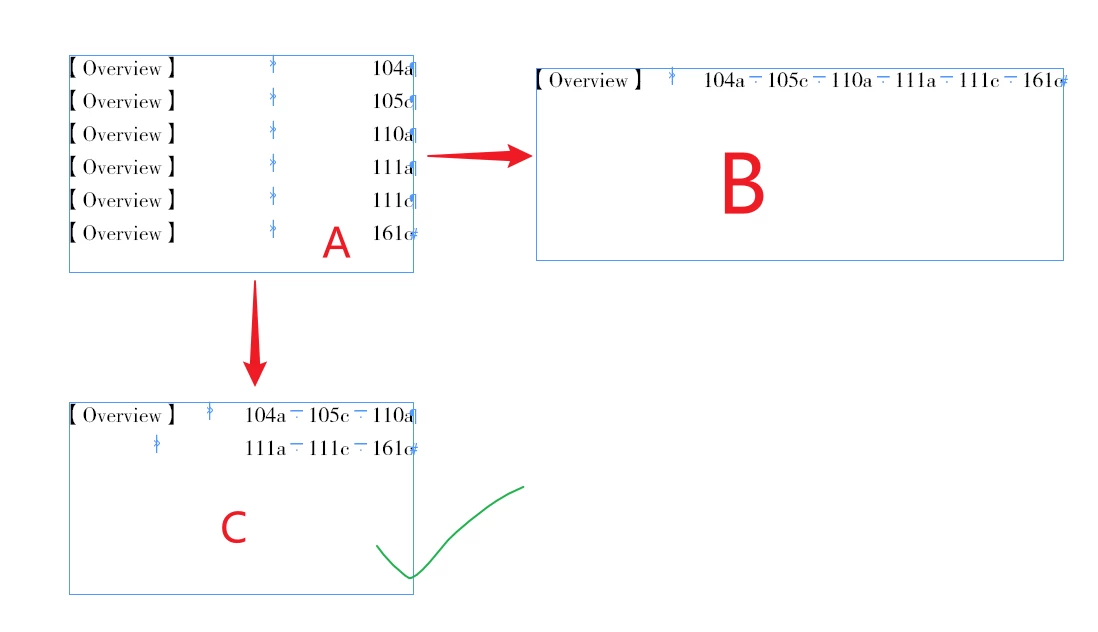
Thank you.

This topic has been closed for replies.

2 replies

brian_p_dts
Community Expert
Community Expert
September 1, 2023

Are you not using the built-in Index tool? Solves this problem for you. Otherwise, some kind of GREP in a couple rounds could work: 


If not, some variation of this regex code could help: https://community.adobe.com/t5/indesign-discussions/grep-for-duplicate-lines-and-then-replacing-it/m-p/12555165


Brighter GREP minds than mine could probably help sort it out. 


Community Expert
September 2, 2023

Are you not using the built-in Index tool?


InDesign's index function has many shortcomings, two of which are relevant here. First, you can't have page references with suffixed letters (though that would in itself be relatively easy to script). Second, a topic term can't (optionally) have two references to the same page.


Therefore the following approach is not possible:

1. Create three character styles, 1, 2, and 3.

2. Do a script that creates page references at words wrapped in brackets., and set the page number style override, matching the item's column number with a character style.

3. Generate the index.

4. In the generated index, look for numbers in character style 1, add 'a' to the page reference; llook for numbers in character style 2, add 'b' to the number; etc.

m1b
Community Expert
Community Expert
September 1, 2023

Hi @dublove, hope you are well. You should really attach a sample .indd whenever possible. Then people can check the file rather than guessing exactly how it is set up. (But make sure the demo is a good enough representation of the real document such that solving it in the demo will solve it in the real document.)

- Mark

dublove
dubloveAuthor
Legend
September 1, 2023

The ID file is here

Thank you.

By the way, where can I upload files for free and for longer storage?

brian_p_dts
Community Expert
Community Expert
September 2, 2023

Something like this could work. You could then use built in Sort Paragraph script to sort. The new text frame would be added in the upper left corner of the page with the text frame you select. The styling of the grafs probaly could be solve with some negative indentation/tab reconfiguration. Might need to sort the page numbers per custom object array. 


var main = function() {
    var o = {};
    try {
        var sel = app.selection[0];
        alert(sel.constructor.name);
        var ps = sel.parentStory;
    } catch(e) { 
        alert("Select a text frame and try again.");
        return; 
    }
    var pars = ps.paragraphs;
    var i = 0;
    var n = pars.length;
    var sp;
    for (i; i < n; i++) {
        sp = pars[i].contents.split("\t");

        if (!o.hasOwnProperty(sp[0])) {
            o[sp[0]] = [];
        }
        o[sp[0]].push(sp[1].contents.replace(/\r|\n/g,""));
    }
    var tf = sel.parentPage.textFrames.add({})
    for (var p in o) {
        tf.parentStory.contents += p + "\t" + o[p].join("\u2003") + "\r;
    }
}
main();