theresaw95383599
Participating Frequently
May 24, 2017
Question

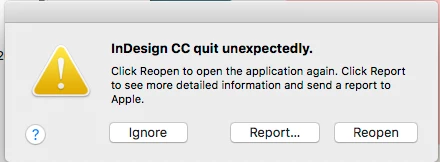
In Design crashing when trying to open large file

  • May 24, 2017
  • 2 replies
  • 2087 views

Hello!

I am trying to open a rather large catalog file in InDesign (2.27 GB). Every time I attempt to open it, it fails and crashes InDesign with a message about a serious error being detected. I have tried uninstalling and re-installing InDesign and clearing my cache - neither have worked. I have tried opening the file from two different source (my hard drive and my external drive) with the same result. The first time I tried opening it after re-installing InDesign, there was a progress bar indicting that it was converting the file - thought the file is the same type (2017) as the version I'm running. Any ideas what could be the problem? Is my file corrupt? And if it is, is there an option for recovering it?

Many thanks in advance for any thoughts or help you have to offer!

This topic has been closed for replies.

2 replies

BobLevine
Community Expert
Community Expert
May 24, 2017

How in the world did you create a file that large? The only way I can think of would be to embed all of the graphics which is not at all recommended. The fact that you can get this thing open at all in any version is surprising.

Open it and then unembed the images. Afterward, do a file save as to shrink the file up.

That should go a long way to fixing this.

theresaw95383599
Participating Frequently
May 24, 2017

It does appear that some of my images were embedded and I am un-embedding them. Thanks!

Monica Singh
Adobe Employee
Adobe Employee
May 24, 2017

Hi Theresaw,

Thanks for writing to us about the issue you are facing while working with InDesign.

Since this issue is specific to file. It would be more helpful if you can share your file for investigation.

Please share the indd file with placed images, since it is heavy file, you may have to share via dropbox, weshare etc for sharing.

You may drop your file at monsingh@adobe.com    

Thanks

Monica Singh

theresaw95383599
Participating Frequently
May 24, 2017

I just found that I can get the file to open in InDesign 2015 - is there any reason this would be the case?

theresaw95383599
Participating Frequently
May 24, 2017

Thanks for reverting really fast.

It's a great find dear that you are able to work fine in InDesign CC 2015, seems like something needs investigation at InDesign CC 2017 end.

Now I would recommend you to create the package of file using InDesign CC 2015 and share that with us,

To create a package, Open the file, Go to File-->Package.

Any help is appreciated.

Regards,

Monica Singh

InDesign Team


Would it be enough just to share the InDesign file? The package is too large to send this way.