
Participating Frequently
February 12, 2026
Answered

InDesign Not Recognizing Calibri After Windows Update

  • February 12, 2026
  • 32 replies
  • 5898 views

Hi,

Getting an issue with indesign and not recognising the calibri system font installed. 

From what I can see, there’s a new version of calibri with a latest windows update. V6.26 > V6.27.
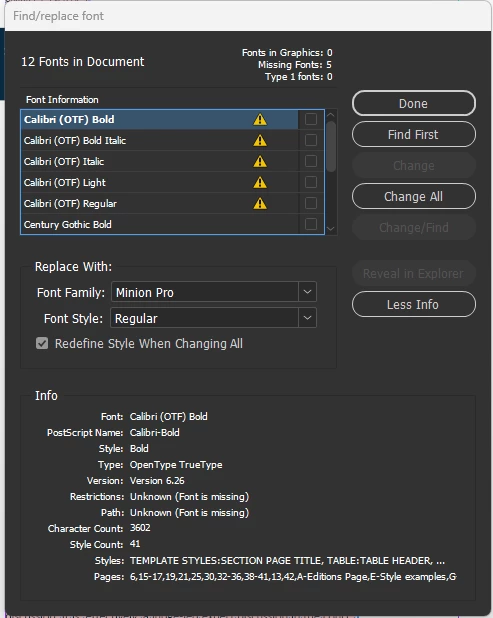
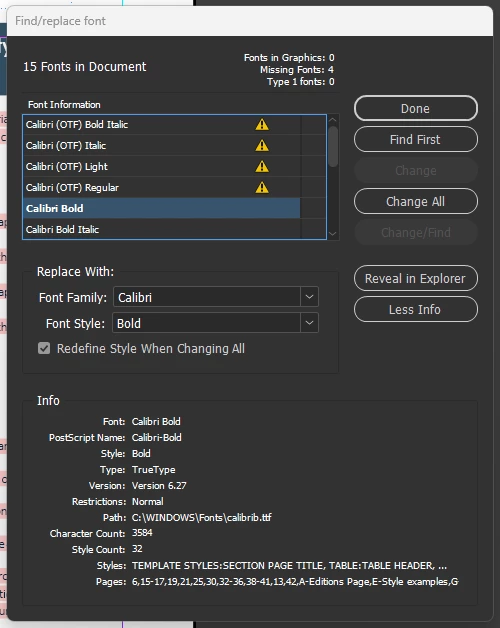


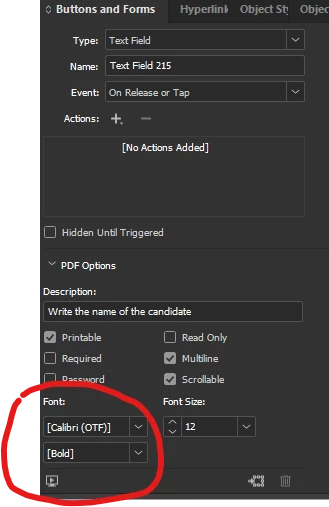
Myself and colleagues are effected, and this is spanning across a lot of our documents. Replacing the font does not fully solve the issue as any forms text fields will not update to the font box.


I’ve seen a similar post regarding this with the same issue on times new roman which is marked as resolved but it most certainly not.


FYI, installing calibri via adobe fonts does not work, we are getting a conflict likely due to it already being a system font.


We also running the latest version of indesign.


Any help on this?

    Correct answer Abhishek Rao

    Hi everyone,


    Thank you for your patience and for sharing your experiences. I wanted to share a quick update.

    Our team has confirmed that this is a known bug and is related to the same issue seen earlier with Times New Roman, where font changes after Windows updates affected how InDesign recognizes and matches system fonts. Ref:
    Times New Roman TTF replaced with OTF in InDesign 21.0, causing missing font errors | Community
    Similar recent updates to Calibri are also causing missing font warnings and substitution behavior in InDesign, and this is currently being worked on by the team.

    In the meantime, some users have found that opening the file in InDesign 2025, saving it there, and then reopening it in InDesign 2026 can help refresh the font reference as a temporary workaround. Additionally, if possible, you may try temporarily removing the Windows updates KB5077181 and KB5077869 and check if that helps.

    We’d also encourage you to upvote the related UserVoice report so the team can continue to track its impact:
    [ID-4272938] The new version of InDesign (21.0) does not recognize the Times New Roman font in files saved in the older version (20.5) – Adobe InDesign

    We understand how disruptive this has been, especially for teams relying on Calibri, and we really appreciate your patience.

    I will keep you posted with the updates and progress. 

    Abhishek


    <Marking this as correct to highlight on the top>

    32 replies

    Abhishek Rao
    Community Manager
    Community Manager
    February 13, 2026

    Hi everyone,


    Thank you again for your patience and for sharing all the details so far. I’m currently checking this internally with the product team. We’re trying to determine whether multiple versions or different outline formats of Calibri might be installed after the recent Windows updates, which could be causing the conflict in InDesign.

    If possible, please check whether more than one Calibri variant is installed on your system, such as different OTF or TTF versions, and let us know what you find. Also, could you confirm whether the issue started right after a specific Windows update? If feasible, please try temporarily rolling back that update and check whether the behavior changes.

    Your observations will help us narrow this down further.


    Looking forward to your update.

    Abhishek

    Legend
    February 13, 2026

    All in the screenshots of the original posting:

    The old version 6.26 with the name now bearing the suffix (OTF) to differentiate it from the system font would be the missing “used font” record from the document remembering type Opentype TT, while the newer system font now is 6.27 with type TT.

    Here one Windows 11 machine with a clean install from past October, I still got 6.26 and it dates back to 2024(!) like all the other fonts. The fonts are copies in a separate folder to see them as files with time stamp.


    @Tom25894182epyt already mentioned the version bump but missed the change of the type.

    Weeding out duplicates between installed fonts makes sense in general but it is unlikely here.

    Participating Frequently
    February 13, 2026

    For Windows 11, I downloaded the Calibri fonts from Adobe and saved them to the Windows font app (Type in “Font” into the search bar and drag the fonts over where shown), and shut off my computer overnight. This morning, the replace all option worked to replace the Calibri OTF fonts with normal Calibri fonts which had not worked prior to me adding the font. The only issue now is that I have to manually bold text in headings and defined terms.  This is a good patch I think but let me know if it works for others.  It could be a plot to stop such a woke font :)

    Participating Frequently
    February 13, 2026

    I am having the same issue and wasted almost 2 hours of billable time with two separate Adobe customer service reps who could not figure this out. Is it definitely tied to a Windows update and not an InDesign update?  I have never used Calibri (OTF) fonts, and I can still go through and replace those fonts with the original Calibri fonts but have to reformat for bold, etc. So tired of updates costing me money…..

    BobLevine
    Community Expert
    Community Expert
    February 13, 2026

    Nobody knows the cause just yet. I’ve asked a few workflow questions that nobody has answered.

    Is there a crossplatform workflow going on here? Is everyone on the exact same version of InDesign? Were files packaged with a document fonts folder?

    BobLevine
    Community Expert
    Community Expert
    February 13, 2026

    Question: Are any of the users involved here working on Mac? I wonder if there’s a mix of the Windows system font and perhaps a Mac user who may have added the Calibri font through Adobe Fonts.

    Is that a possibility?

    Participating Frequently
    February 17, 2026

    On Mac, it also loads Indesign files containing Calibri with a missing fonts message. It certainly doesn't indicate OTF, like it does in Windows Indesign, but that's the only difference. I didn't install Calibri from Adobe Fonts, (nor third party provider) and the Adobe version isn't added at the moment. It's worked so far, I've been working with these files for years.


    VenturaStarter
    Participant
    February 13, 2026

    The problem is InDesign.
    I opened the same document in version 21.2 and version 20.5.2. In the latter, Calibri fonts are fine. It's probably the same with Times New Roman (I haven't checked).
    So I'm waiting for a new version of InDesign (and another shakeup after the one last month when there was no Undo history and when text became invisible until you moved the screen).
    InDesign is a good tool, but lately we've been getting very unfinished versions. Where are the months of testing new features...

    Participating Frequently
    February 17, 2026

    Unfortunately, it still doesn't work for me, even after installing version Indesign 20.5.2, meaning it shows the same "error", missing Calibri (OTF). This is a big problem for us, because we have to use Calibri in the brand of one of our main clients (this is tens of thousands of pages of design and flowing text).

    Dave Creamer of IDEAS
    Community Expert
    Community Expert
    February 12, 2026

    My Calibri fonts do not show up with the (OTF) as part of the file name (nor do I remember ever have the OTF in the file name). Can you confirm that version of Calibri was not installed from a third-party site?

    David Creamer: Community Expert (ACI and ACE 1995-2023)
    BobLevine
    Community Expert
    Community Expert
    February 13, 2026

    Same. This really does sound like a crossplatform issue where a Mac user substituted the Adobe Fonts version instead of the file being packaged with a document fonts folder.

    Without further clarification from those seeing it, it’s impossible to know and there’s no way to add that font to Windows from Adobe fonts without deleting the Microsoft version first.

    Neil Elektra
    Participant
    February 12, 2026

    i also have this. I discovered that the 2025 verson of indesign still works, so we are using this old version for now. Its quite annoying though, as we have been using 2026 for a while so every time we open a file we need to convert it to the old 2025 format

    the fact that 2025 still works and still finds the fonts shows clearly that the fonts are there and installed, but it is InDesign 2026 that does not work. 

    Legend
    February 13, 2026

    Sounds like one possible solution. One theory without deep look:

    When you down-convert a document thru the online conversion service, the particular font might not be installed on the conversion machine. It will then be expressed in a neutral form, similar to placing a word file with that font on a machine that does not have the font.

    This would be close to an IDML roundtrip on a local machine that does not have the font in either version, difficult for a system font unless you go cross platform.

    Re-opening the new down-versioned file on your local machine then discovers the new font version, and accepts it on that turn. Maybe the info is even adjusted to become more specific, on first edit or later? Don’t know.

    Anyway, please try and tell us: when you reopen the new 2025 copy (or a copy) in 2026, could be that this conversion persists and you can continue with 2026.

    Reflow issues because of changed font characteristics will still remain, 2026 features stripped, but you could have discovered a solution for many cases. If it works that way, maybe ​@Abhishek Rao or his team can repurpose the downgrade process to a 2026 - 2026 font cleanup?

    Many if-s and may-bees, I know.

    Neil Elektra
    Participant
    February 13, 2026

    I’ll be honest, i didn’t follow a lot of this. However the gist of it was: you suggested opening the file with old 2025 version (lets be precise here: i opened with 20.5.1 x64), which forced it to convert. Then i saved it. 
    Then i opened with new 2026 version (which is 21.2 x64) and it worked - found the font, all its good. Saved it, opened again in 2026, it worked again. Hurrah. Thanks ! 

    Inspiring
    February 12, 2026

    I share your pain.  I opened one of my many documents with Calibri to find it plastered with pink highlighting. A marathon session, ending at 3am, ensued with Co pilot which gave me umpteen scripts to try and fix the situation, all of which failed.

    Apparently the Calibri fonts installed with Windows 11 25H2  are version 6.27. I then decided to try, with Copilot blessing, and reinstall the Calibri fonts from an image of my C: drive that I’d made a few days ago. That didn't work possibly due to the fact that the versions of Calibri in the image were 6.26 and may well have also been infected with that problem with a recent Windows update.

    Copilot suggested trying to locate versions 5.75 but I was too knackered at that stage and went to bed when I noticed that the sorry issue was exacerbated by how tiny the results text in Google under Firefox looked oddly smaller!

    I came to the conclusion that I'd probably be able to do the replace fonts manoeuvre on any of the documents that that I need to reopen because it would be probably faster than trying to search for and then implement a solution on the internet that may not work.

    Inspiring
    February 12, 2026

    I share your pain.  I opened one of my many documents with Calibri to find it plastered with pink highlighting. A marathon session, ending at 3am, ensued with Co pilot which gave me umpteen scripts to try and fix the situation, all of which failed.

    Apparently the Calibri fonts installed with Windows 11 25H2  are version 6.27. I then decided to try, with Copilot blessing, and reinstall the Calibri fonts from an image of my C: drive that I’d made a few days ago. That didn't work possibly due to thef act that the versions of Calibri in the image were 6.26 and may well have also been infected with that problem with a recent Windows update.

    Copilot suggested trying to locate versions 5.75 but I was too knackered at that stage and went to bed when I noticed that the sorry issue was exacerbated by how tiny the results text in Google under Firefox looked oddly smaller!

    I came to the conclusion that I'd probably be able to do the replace fonts mavoeuvre on any of the documents that that I need to reopen because it would be probably faster than trying to search for and then implement a solution on the internet that may not work.

    Abhishek Rao
    Community Manager
    Community Manager
    February 12, 2026

    Hi ​@Gummo Marx,


    I understand how frustrating this must be, especially with so many documents being affected. Thank you for sharing the details so far.

    To help me look into this further, could you please share the output of the Get-HotFix command from PowerShell so I can check which Windows updates are installed? Also, please let me know the exact InDesign version you’re using.

    In the meantime, kindly confirm whether this issue is limited to InDesign or if you’re seeing it in other Creative Cloud apps like Illustrator or Photoshop, and whether Calibri works correctly in apps like Word or Excel.


    Looking forward to your update.

    Abhishek

    Inspiring
    February 12, 2026

    @Gummo Marx Hello Abhishek.

    I’m on version 17.1.

    Illustrator and Photoshop are places I don’t think I ever use Calibri but I’ve gone in to see - nothing odd happened.  Office 2024 also seems unsaffected.

    Update           KB5066128     NT AUTHORITY\SYSTEM  Mon 29 Dec 25 12:00:00am
    Update           KB5054156     NT AUTHORITY\SYSTEM  Mon 29 Dec 25 12:00:00am
    Security Update  KB5077181     NT AUTHORITY\SYSTEM  Wed 11 Feb 26 12:00:00am
    Security Update  KB5077869     NT AUTHORITY\SYSTEM  Wed 11 Feb 26 12:00:00am

    Abhishek Rao
    Community Manager
    Community Manager
    February 12, 2026

    Hi ​@Tom25894182epyt,


    Thanks for sharing the details and screenshots. Since Calibri is a Windows system font, InDesign relies on the version installed in your C:\Windows\Fonts folder. Please check that the latest Calibri is visible there and in apps like Word and Excel. Then open the affected file in InDesign, allow it to use the installed version, and save the document to update the font reference. If it’s still flagged, please use Type > Find/Replace Font to map it to the current Calibri and save again.

    If the issue persists, I’d appreciate it if you could share the output of the Get-HotFix command from PowerShell along with a screenshot, so I can check which Windows updates are installed. If possible, you may also try uninstalling the recent update and test if that helps.


    Please let me know if this helps and share your update.

    Abhishek