Sheena Kaul
Community Manager
Community Manager
June 16, 2020
Answered

InDesign Share for Review - FAQ

  • June 16, 2020
  • 137 replies
  • 63439 views

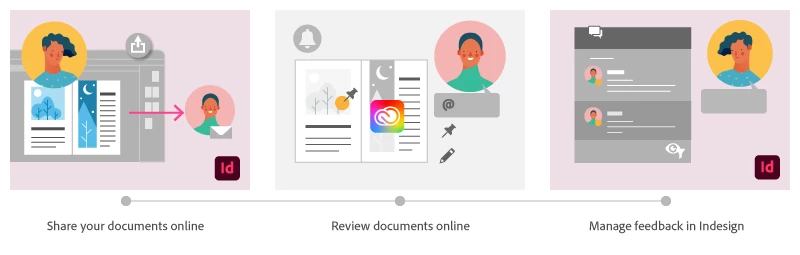
Using Share for Review in InDesign’s June 2020 release, you can share your designs for online review, and manage feedback right within the app. Stakeholders can open the shared document in a browser to provide feedback. Share for Review streamlines and simplifies the review process for both designers and their stakeholders 


The following FAQs provide clarity on common questions around Share for Review 

Share the document for review - FAQ

View reviewer comments - FAQ 

Review the document - FAQ

Best practices


How is Share for Review different from the ‘Integrated comment and review’ feature in InDesign CS5? How does it compare to the Import PDF Comments (IPC) feature?  

Adobe is investing in features and services that make creative collaboration easier and more enjoyable.  

With Share for Review, our aspiration is to make reviewing and editing InDesign creative more seamless, and address the following limitations in CS Review: 

  • Requirement for a flash plugin to use this feature 
  • Lack of support for key features such as email notifications 
  • User challenges with feature discoverability 

Compared to Import PDF Comments (IPC), Share for Review reduces time by eliminating the need to create and share PDFs and collate the resulting feedback. We will be working to enhance the reviewing features and capabilities in Share for Review, which will soon help this tool surpass the experience of IPC, from end to end.   


Does Share for Review include text commenting capabilities? 

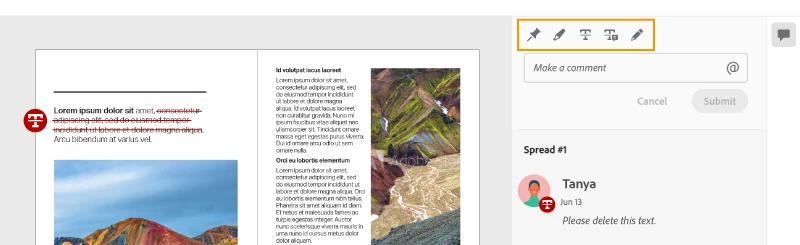
This first version of the feature allows you to provide feedback through the sticky note and pencil tools. We will continue to improve the experience, and we will soon incorporate more text commenting capabilities, including text highlight, text strikethrough, and the ability to accept text comments in a single click. 


Is this feature being introduced into InCopy?  

It is not. Instead, we’ll be making significant updates to InCopy by taking it to the Web to provide better collaboration capabilities. Stay tuned!    


What text capabilities do I have as a reviewer?  

As a reviewer, you will be able to highlight text, strikethrough text, and replace text corresponding to your comment. 


Let us know of any challenges, or questions you have for us around Share for Review and we’ll be happy to assist you. 

Correct answer Nathan Marroquin

This has worked for others:

  1. Save any work and close all open
  2. Sign out of InDesign (Help > Sign out). This will cause indesign to quit.
  3. Launch InDesign again, at which point you should be prompted to sign in again.

137 replies

Participant
July 2, 2020

As the author I really enjoy this feature however feedback from the engineering team has been mixed. 

  • There needs to be a "Track Changes" features so that when the author addresses something that has been commented on, the person who made the comment can see the before and after versions. 
  • One engineer advised that the line weight was so large he was unable to see what he had marked up. 
  • For people who do not wish to create Adobe ID's, allow a "guest" a way to return to the document and see/edit their comments. 
Sheena Kaul
Community Manager
Community Manager
July 7, 2020

Hi there, 


Thanks for all the feedback. Please make sure you upvote for these features on the UserVoice so the product team can look into it. 


Also, try creating a public link and send that to the reviewers and that should not ask for any Adobe ID. 


Regards,

Sheena


NeilPetrunia
Participant
July 2, 2020

I tried sharing a file for review, and set it to private. My user who I shared the file with was asked for a password, which I did not set when I shared the file. Why are they being asked for a password that has not been set?

Participating Frequently
July 2, 2020

I assume the share link is basically just like making and emailing a PDF to someone? So I cant send the link to my editor who can then proof read and change little bits of text saving him marking up a PDF and sending it to me to make the amends?

Sheena Kaul
Community Manager
Community Manager
July 7, 2020

Hi there,


Yes, you create a web link to your document and can invite people to review it and provide feedback. Additionally, if you want you can send the link yourself to the reviewer. 


Please see Share the document for review - FAQ for more details.


Regards,

Sheena

Participant
July 1, 2020

Hi, I have a presentation that I want to share for review using the new indd feature. However, it doesn't animate my MP4 or gif file. How can I make this work so my client can see the animation/video in the share for review system

Sheena Kaul
Community Manager
Community Manager
July 6, 2020

Hi there,


As far as I know, the animations or interactive features won't play in the document that is on the web to be reviewed. 

But I'd suggest posting about this functionality on our UserVoice so that the product team can look into it.


Regards,

Sheena

Participant
July 1, 2020

Is there a feature to donwload the review doc as a pdf with comments? I'm trying to figure out optimal workflow to have a local copy of comments for approval, adocumentation, and archiving purposes. 

Sheena Kaul
Community Manager
Community Manager
July 6, 2020

Hi there,


With this current Share for Review workflow that isn't possible but You can follow the old methods of exporting the document as PDF and then importing the comments into Indesign. 

Please refer to the help document for more details: https://helpx.adobe.com/in/indesign/using/import-pdf-comments.html


Regards,

Sheena

Participant
July 1, 2020

Hi, I love this feature! I've been looking at sharing files through third-party software and then I updated InDesign to find out I can directly share right from the native file without having to create a pdf. When I went to use it I had the Share for Review set to "Invite Only" and was told by a coworker that she was asked to enter a password when she clicked the link. I thought the password was only for the public option. Is this correct?

Sheena Kaul
Community Manager
Community Manager
July 6, 2020

Hi there,


Apologies for the delay in responding. 


It looks like your co-worker is being asked to enter the password for the Adobe ID. I'd suggest you ask them to refer to the Review the document - FAQ where this query has been answered. 


Let me know if that helps.


Regards,

Sheena

Participant
July 1, 2020

Hey, i like the new feature very much. It speeds up my workflow. 

When do you plan this for other CC Programs like Illustrator or Photoshop.

Sheena Kaul
Community Manager
Community Manager
July 6, 2020

Thanks for your kind words. 🙂


It is definitely being worked upon but it'd be best if you upvote for these features in the respective UserVoice forums.

Known Participant
July 1, 2020

Is there any way to view at 100%? So you know exactly the visual size? I can only see + and - scale. Thanks. 

G_V
Participating Frequently
June 30, 2020

Hello,


I was getting a lot of use out of the Share For Review feature, when InDesign crashed.


Since then both the chef for review books and the comment dialogue are completely black (see screenshots) and non-responsive. I had to start exchanging PDF to the client 🤦🏼‍♂.


Has this happened before? Is there something I can do? I've tried restarting my computer and reinstalling InDesign it has not resolved the issue.


wmodist
Known Participant
June 30, 2020

Had the same problem. Go to cc desktop app. Log out & log in again. That did the trick for me…

wmodist
Known Participant
June 30, 2020

Share for Review doesn't work… I have a black screen this morning… Mac catalina.

wmodist
Known Participant
June 30, 2020

I hope this gets solved super quick, because it's really not helping my deadlines…