Sheena Kaul
Community Manager
Community Manager
June 16, 2020
Answered

InDesign Share for Review - FAQ

  • June 16, 2020
  • 137 replies
  • 63441 views

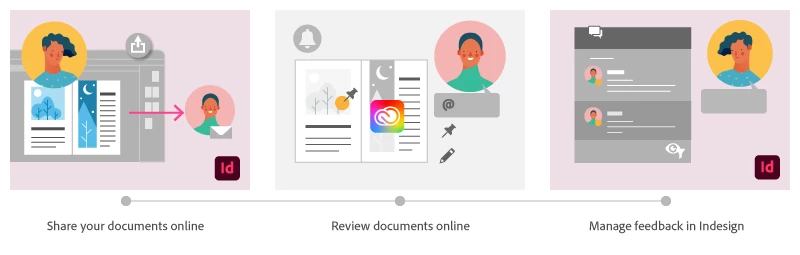
Using Share for Review in InDesign’s June 2020 release, you can share your designs for online review, and manage feedback right within the app. Stakeholders can open the shared document in a browser to provide feedback. Share for Review streamlines and simplifies the review process for both designers and their stakeholders 


The following FAQs provide clarity on common questions around Share for Review 

Share the document for review - FAQ

View reviewer comments - FAQ 

Review the document - FAQ

Best practices


How is Share for Review different from the ‘Integrated comment and review’ feature in InDesign CS5? How does it compare to the Import PDF Comments (IPC) feature?  

Adobe is investing in features and services that make creative collaboration easier and more enjoyable.  

With Share for Review, our aspiration is to make reviewing and editing InDesign creative more seamless, and address the following limitations in CS Review: 

  • Requirement for a flash plugin to use this feature 
  • Lack of support for key features such as email notifications 
  • User challenges with feature discoverability 

Compared to Import PDF Comments (IPC), Share for Review reduces time by eliminating the need to create and share PDFs and collate the resulting feedback. We will be working to enhance the reviewing features and capabilities in Share for Review, which will soon help this tool surpass the experience of IPC, from end to end.   


Does Share for Review include text commenting capabilities? 

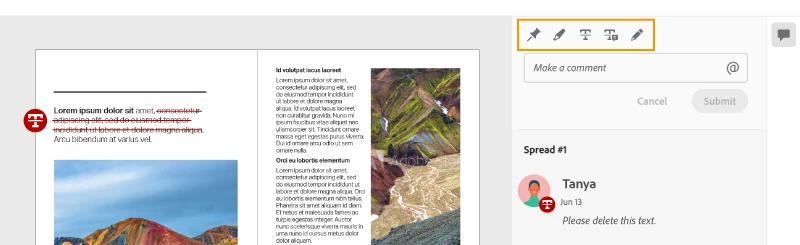
This first version of the feature allows you to provide feedback through the sticky note and pencil tools. We will continue to improve the experience, and we will soon incorporate more text commenting capabilities, including text highlight, text strikethrough, and the ability to accept text comments in a single click. 


Is this feature being introduced into InCopy?  

It is not. Instead, we’ll be making significant updates to InCopy by taking it to the Web to provide better collaboration capabilities. Stay tuned!    


What text capabilities do I have as a reviewer?  

As a reviewer, you will be able to highlight text, strikethrough text, and replace text corresponding to your comment. 


Let us know of any challenges, or questions you have for us around Share for Review and we’ll be happy to assist you. 

Correct answer Nathan Marroquin

This has worked for others:

  1. Save any work and close all open
  2. Sign out of InDesign (Help > Sign out). This will cause indesign to quit.
  3. Launch InDesign again, at which point you should be prompted to sign in again.

137 replies

cgpd
Participating Frequently
June 30, 2020

Great potential, however it's already breaking. The Share for Review windows in InDesign are appearing blank. I had submitted a couple documents for review, and initially the feature worked (for a day). Our entire team is now experiencing a blank (black in dark mode) Review and Share for Review panel. We are using the latest InDesign update on the latest MacOS. This blank screen is not document related, and seems to occur at all times.

Sheena Kaul
Community Manager
Community Manager
July 6, 2020

Hi there, 


I've seen customers complaining about the Share for Review panel being blank on MAC OS but signing out of the app and signing back in generally resolves the issue for them. 

You may also try uninstalling and reinstalling the app to see if that helps.


Regards,

Sheena

Participant
June 29, 2020

I think the Share feature is missing notifications. I really think this has a lot of potential, but I can't tell if a review is complete after I send it to someone. There is no submit or done button. I would have to email or check with the person I sent this to and that seems redundant since the share feature is supposed to save time. It would be nice after someone reviews the document, the sender gets an email notification AND a red dot over the share feature in InDesign so if you are working on something it will promte you to look at comments.

cgpd
Participating Frequently
June 30, 2020

I second this. I would also like to be able to update the document in the link as a new review round. Currently, if I update the link with a new version (with all changes now complete), I need to manually notify via email that I made the changes. It would be fairly logical to have a new update to the document be labelled with Version 2/Round 2 and so on (with a notfication sent out, of course).


Also, it would be great to simply have a tick-box to keep track of changes instead of completely deleting the comments with a "resolve" of the markup; It's very, very important to have the initial change requests visible by both parties involved,  and have everyone see that it has been ticked by the designer as done, ready for a second round of checking.


Edit: It would also be good to have the ability to finish making all comments before submitting them, simply because right now every single comment sends out an email notification, which is going to force a lot of team members to turn off notifications entirely.

Participant
July 2, 2020

I agree comepleteyl!

There needs to be a way for a reviewer to see the orginal and the updated version. 


Participant
June 29, 2020

Hello there,


I think this feature has potential. When I tried it this morning I could update the link inside of Indesign and it did work there, but the pages in the webbroweser NEVER updated. Tried it with 2 documents. A really nice feature, but if this doesn't work it is quite useless to us as a company.


Edit: Okay, I just checked... it finally updated. The problem is here... when I update and say to my client "it is updated" and they look and it isn't already updated - I only make people angry at me. How can I know that the webview is updated without constantly checking? How long can it take to update the page? I looked after 17 minutes. An E-Mail notification sent to my client would be really good and mke my life easier.

Sheena Kaul
Community Manager
Community Manager
July 6, 2020

Hi there,


Sorry to hear that. 

Generally, as soon as you click the update link option, it immediately updates the web page and also shows a timestamp next to the button which indicates the time when the changes were pushed. 


I'd suggest checking if the network connection is not blocking any of the webpage components.


Regards,

Sheena

Participant
June 29, 2020

It would be so great, if it would work.


  1. Invitations are not landing at my clients desk. I tested this with some other email addresses, but no one is getting an invitation, so I just had the chance to test it with public sharing.
  2. Making comments is working, but in Indesign they're just visible in the review pane. Means I cannot see any pin or drawing appearing in the document itself. So how should I imagine, what part of the document a comment is concerning? Always switching to the web surface to see the markings in the document, does not make sense.


Is this a known bug, or a feature 😉


Thx Harald

Participant
June 29, 2020

Btw. this is happening on Mac and also concerning imported comments from PDF documents.

Participant
June 27, 2020

As the designer, I would like a separate section (perhaps at the top of the comments list) where I can make general comments about the design, rather than have to put a pin on a particular page. 

Sheena Kaul
Community Manager
Community Manager
July 6, 2020

Hi there,


As of now, there is no option as such for a designer to add generic comments to the document shared for review. 


But I'd suggest you upvote for this feature on InDesign UserVoice so that the product team can look into this.


Regards,

Sheena


Participant
June 26, 2020

Both the "Share for Review" popup and the "Review" panel are black.

Resetting the Preferences didn't help. I'm on MacOS, running 15.1.1.103.

Thanks for your help


Sheena Kaul
Community Manager
Community Manager
June 26, 2020

Would you mind uninstalling and reinstalling the app once?

Participant
June 26, 2020

I managed to solve the problem by signing out and back in Creative Cloud.

Participant
June 26, 2020

This feature sure has potential!
I've tested it with a major client of us and all worked fine.

Except the fact that the once i've marked feedback as solved, it was no longer visible in the file.
Is there some way for my client to verify that the feedback was processed the right way.

Sheena Kaul
Community Manager
Community Manager
June 26, 2020

Hi there, 


Thanks for your feedback. 

The resolved comment moved to a hidden space but you can still filter those comments as mentioned here: https://community.adobe.com/t5/indesign/view-reviewer-comments-faq/td-p/11210823?page=1


Let me know if that helps.


Regards,

Sheena

Participant
June 25, 2020

Can you use Track Changes and Share for Review together? My reviewers want to know what the latest changes are when they're reviewing the document.


Sheena Kaul
Community Manager
Community Manager
June 26, 2020

Hi there, 


We don't have that functionality as of now but it'd be great if you can add it here: https://indesign.uservoice.com/


Regards,

Sheena

dmadrid689
Participating Frequently
June 25, 2020

My Share for review appears to be broken after updating to 15.1.1 this morning.

It was working perfectly last night. 


Sheena Kaul
Community Manager
Community Manager
June 25, 2020

I have seen this issue with another customer.

It seemed closing the app and to start it again fixed this issue.


dmadrid689
Participating Frequently
June 25, 2020

Unfortunately, that doesn't work. I've tried that and a complete system reboot. It's a bummer because I was in a middle of a revision with stakeholder and now I'm unable to upload any new changes. 

Participant
June 25, 2020

I have other problem.

While I want to Share to review I see only option "Invite Only" - no other options:


I tried few times and I can never share a document to "Public" with password.

Any ideas?

Sheena Kaul
Community Manager
Community Manager
June 25, 2020

Hi there,


This appears to be strange. 

Is it related to this specific document or with all the documents?

Also are you on the InDesign v15.1.1?


Regards,

Sheena

Participant
June 25, 2020

Hi Sheena,


It apears that it's on all documents.

I was checking on smaller (4 pages) and larger (100+ pages) - nothing changes.

Yes, I updated InDesign yesterday to 15.1.1 by CC.

Still can't figure it out so any help would be appreciated.


Best regards