Sheena Kaul
Community Manager
Community Manager
June 16, 2020
Answered

InDesign Share for Review - FAQ

  • June 16, 2020
  • 137 replies
  • 63438 views

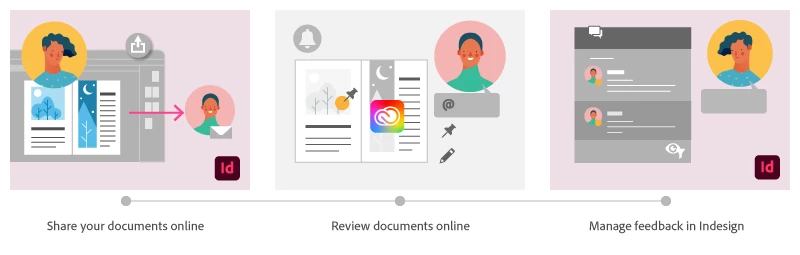
Using Share for Review in InDesign’s June 2020 release, you can share your designs for online review, and manage feedback right within the app. Stakeholders can open the shared document in a browser to provide feedback. Share for Review streamlines and simplifies the review process for both designers and their stakeholders 


The following FAQs provide clarity on common questions around Share for Review 

Share the document for review - FAQ

View reviewer comments - FAQ 

Review the document - FAQ

Best practices


How is Share for Review different from the ‘Integrated comment and review’ feature in InDesign CS5? How does it compare to the Import PDF Comments (IPC) feature?  

Adobe is investing in features and services that make creative collaboration easier and more enjoyable.  

With Share for Review, our aspiration is to make reviewing and editing InDesign creative more seamless, and address the following limitations in CS Review: 

  • Requirement for a flash plugin to use this feature 
  • Lack of support for key features such as email notifications 
  • User challenges with feature discoverability 

Compared to Import PDF Comments (IPC), Share for Review reduces time by eliminating the need to create and share PDFs and collate the resulting feedback. We will be working to enhance the reviewing features and capabilities in Share for Review, which will soon help this tool surpass the experience of IPC, from end to end.   


Does Share for Review include text commenting capabilities? 

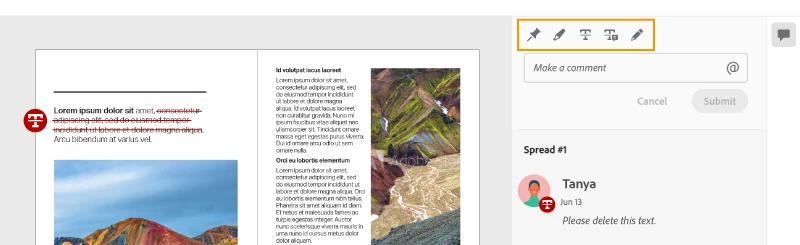
This first version of the feature allows you to provide feedback through the sticky note and pencil tools. We will continue to improve the experience, and we will soon incorporate more text commenting capabilities, including text highlight, text strikethrough, and the ability to accept text comments in a single click. 


Is this feature being introduced into InCopy?  

It is not. Instead, we’ll be making significant updates to InCopy by taking it to the Web to provide better collaboration capabilities. Stay tuned!    


What text capabilities do I have as a reviewer?  

As a reviewer, you will be able to highlight text, strikethrough text, and replace text corresponding to your comment. 


Let us know of any challenges, or questions you have for us around Share for Review and we’ll be happy to assist you. 

Correct answer Nathan Marroquin

This has worked for others:

  1. Save any work and close all open
  2. Sign out of InDesign (Help > Sign out). This will cause indesign to quit.
  3. Launch InDesign again, at which point you should be prompted to sign in again.

137 replies

Community Expert
July 8, 2020

Hi Lindsay,

consider "Share for Review" as a very simple tool with limited means that more or less points to a print production process.

With restrictions: Overprinting elements will not show as overprinting, highres images will not show as highres images and, as you already see: Animations are not showing up, multistate objects, buttons or hyperlinks will not work. And video does not work as well.


Regrads,

Uwe Laubender

( ACP )

RaviKiran
Adobe Employee
Adobe Employee
July 13, 2020

Hyperlinks and Bookmarks will work in the Review.

Participant
July 8, 2020

Hi, I have a presentation that I want to share for review through the new indd feature. However, it doesn't animate my MP4 or gif file. How can I make this work so my client can see the animation/video in the share for review system

Community Expert
July 8, 2020

Animations, animated gifs or MP4 video files cannot be annotated with Share for Review.

You could do a feature request:

https://indesign.uservoice.com/forums/601021-adobe-indesign-feature-requests


If you want to show your customers animations in action do this with the Publish Online feature or export a fixed layout EPUB. The issue with that is the right EPUB reader software that can run the animations.

The most important question: What's the presentation software you like to run that presentation?


Regards,
Uwe Laubender

( ACP )


Community Expert
July 8, 2020

"Can you make more than one person an "owner" of a document so multiple people can approve edits?"

No.


If you like do a feature request:

https://indesign.uservoice.com/forums/601021-adobe-indesign-feature-requests


When done best come back and post the link to that request so that others can vote for it.


Regards,
Uwe Laubender

( ACP )

Participant
July 8, 2020

Can you make more than one person an "owner" of a document so multiple people can approve edits? I love this new capacity right now, but I work in publishing and need to have my editors confirm changes in the copy so I can approve changes in design. 

Community Expert
July 8, 2020

Hi Saya1241,

I am doing only deliberate updates. Updates that I can control.

You find the controls for auto updates in the Preferences of your Creative Cloud Desktop application. Turn them off.

Before I am updating I backup my InDesign preferences, cache files and program data files. That allows me to go back in about 10 to 15 minutes if something goes wrong.


Your error message is a very unspecific one:

"Beim Erstellen des Artefakts ist ein Fehler aufgetreten."


Don't think that other users here in the forum could tell why and what happened.

Maybe a log was written that can tell an Adobe developer more?


What's your operating system?


Regards,
Uwe Laubender

( ACP )

Participating Frequently
July 13, 2020

Das es diese Möglichkeiten gibt ist mir klar und eingestellt habe ich das so auch schon. Dieses Mal hatte ich Interesse an der neuen Funktion. Das dieses Programm bei der Funktion "Update"! Ordner und Datein löscht, die nicht im Programmverzeichnis liegt, und davor nicht einmal warnt zeugt von Unfähigkeit oder Faulheit bei der Programmierung. Das ich diese Ordner in Zunkunft sichern werde ist ebenfalls eine logische Schlussfolgerung. 


Zu guter Letzt: Eine nichtssagende Fehlermeldung, für dessen Problemlösung ich einen Adobe Developer benötige, hat nichts in einem offiziellen Update rollout zu suchen. Ich bezahle doch nicht fast 1000€ im Jahr um Betatester zu sein.

Participating Frequently
July 8, 2020

It doesn't work


It means something: "artifact cannot be created properly". I would like to try to translate it properly, but I have no clue what it means even in german.


The update killed my scripts folder, my shortcuts, cost me about half a day and gave me a feature that doesn't work with meaningless error messages. In the future I will only update if a customer forces me to do so.

courtney546
Participant
July 7, 2020

Hi! I am having issues seeing anyone's pin or shape when they comment within the Review panel. I can see their comments and it shows that they pinned or outlined content (with an icon by their name) but the pin or outline itself does not appear...  Also, when they go in and pin something, they write in their comment and the second they hit "Submit" the pin or outline disappears... any ideas on how we can fix?

Participating Frequently
July 8, 2020

Same issue here with the pins problem.


I used this for a client two weeks ago and it worked fine.


Now whatever I try, I cannot pin the comments. The pin drops in white with red border, comment is added, but pin then vanishes while the comment is posted as 'Unmapped comment'.

Sheena Kaul
Community Manager
Community Manager
July 10, 2020

Hi there,


We've multiple customers reporting this issue and our engineers are working on this issue. 

I'll update this thread as soon as I have more info. 


Regards,

Sheena

JRBlack
Participant
July 7, 2020

I have been testing this out with coworkers. Last week went well, but this week is not. Anybody else getting unmapped comments (i.e., comments not getting associated with where one put the pin)?


KingPasta
Participant
July 7, 2020

Yes - I've been testing this today.

I believe its if you open an old InDesign document (2019 or older) in the new InDesign 2020 then try and use the new share and review feature.

I've tried moving my pages from the 2019 document over to a new 2020 document and have mixed results. I've just tried moving each page contents via copy and paste in place for each page (26 pages!!!) and can report it works!


Solution: Start a new Adobe 2020 document, or copy > paste in place from an old document to a new 2020 document

fabricel26565211
Participant
July 7, 2020

I think this shows the extent of the testing that has been conducted on the feature before it was publicly released...

Participant
July 6, 2020

Hello, i'm having trouble with pinning my comments, i've tried it all and it just doens't pin on my link for review, i can add coments but they stay in the general feed.

theadz02
Participating Frequently
July 7, 2020

Same problem here. Reviewers comments are not pinning to the document on the web view and show as unmapped comments. They appear to be mapped OK in InDesign in the review panel, but it is quite frustrating for the document reviewers on the web view. Is this able to be fixed ASAP please?

Participant
July 6, 2020

Hi. My Adobe Indesign always crashes when I try to update the link Share to Review. Can you solve this issue?

Sheena Kaul
Community Manager
Community Manager
July 7, 2020

Hi there,


Are you still facing this issue? Please confirm the version of InDesign on your machine?

Are you on a Win or MAC? Is the app crashing when sharing this specific document or does this happen while working with other documents as well?


Regards,

Sheena