Sheena Kaul
Community Manager
Community Manager
June 16, 2020
Answered

InDesign Share for Review - FAQ

  • June 16, 2020
  • 137 replies
  • 63441 views

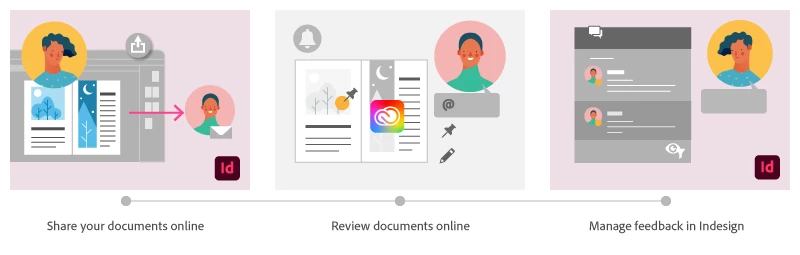
Using Share for Review in InDesign’s June 2020 release, you can share your designs for online review, and manage feedback right within the app. Stakeholders can open the shared document in a browser to provide feedback. Share for Review streamlines and simplifies the review process for both designers and their stakeholders 


The following FAQs provide clarity on common questions around Share for Review 

Share the document for review - FAQ

View reviewer comments - FAQ 

Review the document - FAQ

Best practices


How is Share for Review different from the ‘Integrated comment and review’ feature in InDesign CS5? How does it compare to the Import PDF Comments (IPC) feature?  

Adobe is investing in features and services that make creative collaboration easier and more enjoyable.  

With Share for Review, our aspiration is to make reviewing and editing InDesign creative more seamless, and address the following limitations in CS Review: 

  • Requirement for a flash plugin to use this feature 
  • Lack of support for key features such as email notifications 
  • User challenges with feature discoverability 

Compared to Import PDF Comments (IPC), Share for Review reduces time by eliminating the need to create and share PDFs and collate the resulting feedback. We will be working to enhance the reviewing features and capabilities in Share for Review, which will soon help this tool surpass the experience of IPC, from end to end.   


Does Share for Review include text commenting capabilities? 

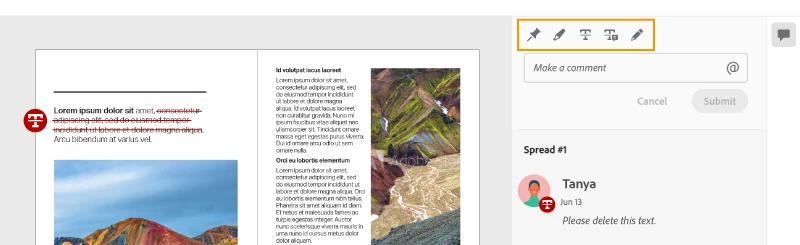
This first version of the feature allows you to provide feedback through the sticky note and pencil tools. We will continue to improve the experience, and we will soon incorporate more text commenting capabilities, including text highlight, text strikethrough, and the ability to accept text comments in a single click. 


Is this feature being introduced into InCopy?  

It is not. Instead, we’ll be making significant updates to InCopy by taking it to the Web to provide better collaboration capabilities. Stay tuned!    


What text capabilities do I have as a reviewer?  

As a reviewer, you will be able to highlight text, strikethrough text, and replace text corresponding to your comment. 


Let us know of any challenges, or questions you have for us around Share for Review and we’ll be happy to assist you. 

Correct answer Nathan Marroquin

This has worked for others:

  1. Save any work and close all open
  2. Sign out of InDesign (Help > Sign out). This will cause indesign to quit.
  3. Launch InDesign again, at which point you should be prompted to sign in again.

137 replies

dg3
Inspiring
June 25, 2020

Well having installed InDesign 15.1.1 at least the send for review panels seem to be working properly now, though actually connecting to the server to see the review copy was a different story, yesterday at least: took an absolute age, such that it looked like the server was down, though this may be a temporary glitch. More importantly I just can't understand why Adobe, who make Acrobat, couldn't just include all the features of the pdf Comments function into the Review process. Plus the necessity of setting up the page range for Review output in the pdf export prior to sending for review is just crackers and not even properly signposted. What we have is a bare-bones functionality that is just not going to persuade my clients to shift from using the Google integrated Kami to the Review tool. This is a shame as I find Kami harder to use than Acrobat (can't always spot the location of comments in the text) and of course you can't import the comments directly into InDesign so still have to look at two apps on screen to make amendments in the artwork. Hopefully lessons will be learnt about rushing out beta style functions without thinking it through,  in what looks like a promising addition to InDesign. But for now I'll be giving it a pass for longer content critical documents at least I'm afraid.

Participating Frequently
June 24, 2020

Hi, 
I really love this new function, but i have some issue with.

When i want to mention a stakeholder (or a stakeholder want to mention another one) sometimes it's impossible beacause their names doesn't appear after the @.
Do you know why ?

Sheena Kaul
Community Manager
Community Manager
June 24, 2020

That's very strange! 


Did you share the file with them using the invite-only option?

Participating Frequently
June 24, 2020

Yes i did

Participant
June 24, 2020

Hello, very nice feature. But is it also the intention that the assessment is visible in the Indesign canvas? I assume that this should be. I can see the comments (pin) in the online version, but I don't see the same pin in indesign.


thanx, Arjen

M Prewitt at IIW
Known Participant
June 24, 2020

Arjen, you have to turn on the Review panel in InDesign (Window > Comments > Review). 

Participant
June 24, 2020

Yes, thanks. That is on and it works. I meant the example below. the top is the Indesign canvas (and comments next to it), below is the online version (and there I see the pin / marks). In Indesign I cannot see where the markers or pins are to be changed. 

SchwarzerKater.at
Participant
June 24, 2020

Is it possible to insert a button or a tick in the comments as a sign that this is done.

Sheena Kaul
Community Manager
Community Manager
June 24, 2020

Hi there,


There is no tick option available but you can resolve a comment to indicate that it has been worked on. 

Check out View reviewer comments - FAQ  to see how that option works.


Regards,

Sheena

Wiljam jam
Participant
June 24, 2020

When I invite stakeholders (Invite Only) they are asked for a password or a Adobe login before being able to review my work? Is it a bug – and if not where do I generate the password?

---

Just found out that my question already have been asked and semi answered on a previus page. Sorry!

Sheena Kaul
Community Manager
Community Manager
June 24, 2020

Awesome! Glad that you found the answer.


You can always refer to the Review the document - FAQ for such queries.

Donna Bouma
Participant
June 24, 2020

Hi Sheena, I love the share for review feature and Im current using it for 2 diffrent clients, One of them its worked prefectly for (the other Im yet to hear back from). But this morning when I tried to access the review panel I got nothing but a black box, I tried updating and restarting my computer and nothing has worked. 
Im worried about the other client (that has not responded yet) that their comments will be lost in the internet somewhere?

TIA

Donna


dieDanica
Participant
June 24, 2020

I have the same problem here. Several comments are missing. Seems like this is more likely to happen to markings or strikethrough text.

Sheena Kaul
Community Manager
Community Manager
June 23, 2020

Hi All,


Please update to the InDesign v15.1.1 as we've made improvements to the Share for Review feature based on the feedback provided by you all on this post and UserVoice. 

Check out the fixed issues here.


Regards,

Sheena

klw1977
Participant
June 23, 2020

When I set up Share for Review, and a co-worker opens the document, his Review panel shows this:

Is there a way to make multiple users 'owners', or is the review process limited to the person who initially set's up the review?

Sheena Kaul
Community Manager
Community Manager
June 23, 2020

Hi there, 


I believe you're trying to give permissions to multiple users to be the owner of your document. 

As far as I know, there is no way to add another owner yet. But it'd be worth posting it in the UserVoice here: https://indesign.uservoice.com/


Regards,

Sheena


Participant
June 22, 2020

Love this feature! We've been using Acrobat to do this, so having it baked into is a game changer. Is there a way to review the document as single pages instead of spreads? It helps our writers and copy editors read easier with single pages. Thank you for your help!

Sheena Kaul
Community Manager
Community Manager
June 23, 2020

Thanks for the feedback. 


I don't think sharing single pages is possible from within the feature. 

But I'd suggest you post about it in the UserVoice: https://indesign.uservoice.com/

M Prewitt at IIW
Known Participant
June 22, 2020

For the most part, seems to work well. Great additional to the suite! However, I am having a problem with rotated spreads. We have a document where page 1 is landscape, page 2 is portrait. This is handled in InDesign with View > Rotate Spread. However, after export to Review, there does not appear to be a way to view both pages in the correct orientation. This forces cocking one's head sideways to review the page, which is not a good proofing posture. Is there a workaround for this?

Sheena Kaul
Community Manager
Community Manager
June 23, 2020

Hi there, 


That's an interesting question.


Have you tried to save the file after rotating the spread and then open it again in the InDesign app to make sure the change is saved and then try to share the document with the reviewer?


Let me know if that helps.


Regards,

Sheena 

M Prewitt at IIW
Known Participant
June 23, 2020

It's an ongoing setup, so the page is known to be saved in the rotated view. It has been that way for many months or even years. Simply put, the review export does not honor the page view rotation. It comes out the same as with a PDF export for press, which is un-rotated.


With the press export, it does not matter of course; the printed piece can simply be turned by the person holding it. But when viewing on screen, you can't simply rotate your whole computer display, which is why the rotate view feature exists.


With digital proofing it's the same issue. I expect people would like to be able to rotate the view, because there are often pages and components of pages that are rotated 90° or 180° relative to other content. 


We found one workaround which is to use the alternate layouts feature to create a page that is the correct orientation. That is, not rotated view, but actually permanently configured as landscape instead of portrait. It works OK, except that this results in some minor problems: (1) the review mode contains both orientations; there seems to be no way to skip including one or the other; (2) it requires the user to choose the correct set of layouts in the PDF export for press, an extra step to avoid accidentally sending the extra landscape orientation layout to press; and (3) it required us to recreate the page layout as a separare linked InDesign document, so that we could keep both alternate layout views in sync (there are too many elements to rely on the text linking feature of alternate layouts, and we don't want to have to deal with copy-paste-rotate every time).