Sheena Kaul
Community Manager
Community Manager
June 16, 2020
Answered

InDesign Share for Review - FAQ

  • June 16, 2020
  • 137 replies
  • 63441 views

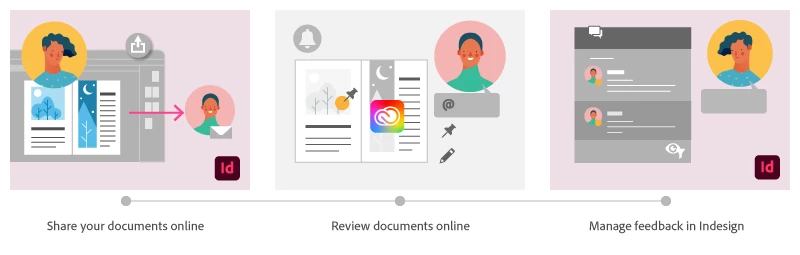
Using Share for Review in InDesign’s June 2020 release, you can share your designs for online review, and manage feedback right within the app. Stakeholders can open the shared document in a browser to provide feedback. Share for Review streamlines and simplifies the review process for both designers and their stakeholders 


The following FAQs provide clarity on common questions around Share for Review 

Share the document for review - FAQ

View reviewer comments - FAQ 

Review the document - FAQ

Best practices


How is Share for Review different from the ‘Integrated comment and review’ feature in InDesign CS5? How does it compare to the Import PDF Comments (IPC) feature?  

Adobe is investing in features and services that make creative collaboration easier and more enjoyable.  

With Share for Review, our aspiration is to make reviewing and editing InDesign creative more seamless, and address the following limitations in CS Review: 

  • Requirement for a flash plugin to use this feature 
  • Lack of support for key features such as email notifications 
  • User challenges with feature discoverability 

Compared to Import PDF Comments (IPC), Share for Review reduces time by eliminating the need to create and share PDFs and collate the resulting feedback. We will be working to enhance the reviewing features and capabilities in Share for Review, which will soon help this tool surpass the experience of IPC, from end to end.   


Does Share for Review include text commenting capabilities? 

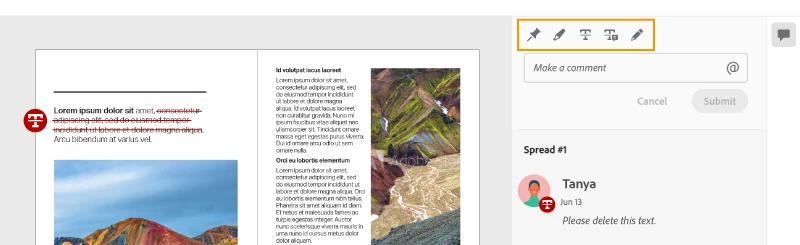
This first version of the feature allows you to provide feedback through the sticky note and pencil tools. We will continue to improve the experience, and we will soon incorporate more text commenting capabilities, including text highlight, text strikethrough, and the ability to accept text comments in a single click. 


Is this feature being introduced into InCopy?  

It is not. Instead, we’ll be making significant updates to InCopy by taking it to the Web to provide better collaboration capabilities. Stay tuned!    


What text capabilities do I have as a reviewer?  

As a reviewer, you will be able to highlight text, strikethrough text, and replace text corresponding to your comment. 


Let us know of any challenges, or questions you have for us around Share for Review and we’ll be happy to assist you. 

Correct answer Nathan Marroquin

This has worked for others:

  1. Save any work and close all open
  2. Sign out of InDesign (Help > Sign out). This will cause indesign to quit.
  3. Launch InDesign again, at which point you should be prompted to sign in again.

137 replies

Participant
June 22, 2020

After reviewers have made edits/comments I can see them in the Review panel just fine, but there is no indication that I can see of where they are referencing. no pins or pencil marks on the document at all. Do I have to jump back and forth from document to web to see where they occur?


Thanks!

Sheena Kaul
Community Manager
Community Manager
June 23, 2020

Hi there,


Every comment has the spread# written on top of it by default.

Also, if you click the annotation or the pin on the document it'll highlight the comment in the review panel.


You can also see View reviewer comments - FAQ  for more info.


Regards,

Sheena

Participant
June 22, 2020

Hi there, Have been using share for review function today for the first time and it seems to only send one page of my documnet? I have tried a number of documents (all multiple pages) and it will only sends one page from within the documents (never the first page) only for review. Are there settings for me to change to make sure the entire document is sent for review, not just one random page? Thanks!

Sheena Kaul
Community Manager
Community Manager
June 22, 2020

Hi there,


It looks like you had exported the document to PDF before sharing it for review and while exporting the pages had been selected. 

If that's the case, I'd suggest you update the settings for Export PDF and then share the document for review. 


Let me know if that helps!


Regards,

Sheena

Participant
June 23, 2020

Perfect! this has worked for me. Thanks for yor help

Participating Frequently
June 20, 2020

I am trying to share with my editor, who does not use Adobe products. It asks her for a password. How do I generate a password? How else can she access the document? 

Sheena Kaul
Community Manager
Community Manager
June 22, 2020

Hi there,


If you've shared a public link with them that has a password, then you'll have to provide that password to them.

Through invite-only option, the invitation that they receive will probably prompt them to login to their Adobe ID (with the corresponding password) to review the document. 

For the second option, please see the FAQ: Review the document - FAQ where this question is answered. 


Let me know if I've misunderstood you.


Regards,

Sheena


Participating Frequently
June 18, 2020

I like the function but I think there is an issue. When I shared for review with a client by sending PRIVATE link to their email, they were asked for a password. It never prompts you to set one. After reviewing the support pages I found how you can set the "REQUIRE PASSWORD" field for the PUBLIC invites... so I tried it and it worked for the client.  

1. It shouldn't ask for a password if sent via the Private setting UNLESS the user requests it.

2. If it IS required to set a password then the prompts/interface should do that easily and in an obvious manner.

3. This is similar BUT DIFFERENT than the share for review function that exists in Adobe XD... shouldn't they be the same? In XD it is also annoying that you have to resend a link if you need to change the password... don't take that function please.


Sheena Kaul
Community Manager
Community Manager
June 18, 2020

Hi there,


I believe when you chose the option to invite-only and entered the client's email address, they received a notification for the review after which they would've been prompted to login to view the document. Please see Review the document - FAQ where I've covered the steps for this scenario.


Let me know if that helps.


Regards,

Sheena

Participant
June 18, 2020

Hi, I tried the same thing and clients needed to enter a password - I had no idea what it was - not great. So do clients need to create their own adobe accounts to view shared files? I can't see many of my clients doing that so it's back to the old days. Not very helpful after all and I was really excited about it.

Community Expert
June 18, 2020

lauraactual said:

"This feature should really have its own export settings, yes? The whole idea seems to be to make the process easy, but having to remember and/or check what settings I used on a prior PDF export is not helpful.


I see myself 90% sharing only select pages for review."


Hi Laura,

then I have good news for you: I wrote a script that, if executed just before you start a review, would set the pdf preferences page range to All Pages. The code is just this:


/**
* @@@BUILDINFO@@@ Prepare-PAGE-RANGE-for-REVIEW-to-ALL-PAGES.jsx !Version! Thu Jun 18 2020 19:22:52 GMT+0200
*/

/*
	ExtendScript (JavaScript) by Uwe Laubender ( ACP ).
	Contact me through the Adobe InDesign Forum if you have any issues or suggenstions:
	https://community.adobe.com/t5/user/viewprofilepage/user-id/9180035
´*/

( function()
{
	var e ;

	try{
	app.pdfExportPreferences.pageRange = PageRange.ALL_PAGES ;
	}catch( e )
	{
	alertError( e );
	return ;
	};

	alert
	(
		"Page range was set to:" +"\r"+
		app.pdfExportPreferences.pageRange.toString()
	);


	function alertError(e)
	{
		var errorMessage =
				"ERROR: "+e.number+" Something went wrong." +"\r"+
				"InDesign Error Message:" +"\r"+
				"\""+ e.message + "\""		
		alert( errorMessage );
	}

}() )


How to save ExtendScript code to a script file and install that script file so that you can execute it from InDesign's Scripts Panel see Installing a “script” by Marc Autret here:

http://www.indiscripts.com/pages/help#hd0sb2


If installed and executed successfully it will give you the following alert:


If something goes wrong, you will get an error message.


Important Note: As long as REVIEW will use the page range from the PDF Export (Print) dialog the script will work for you. Now that I thought of it a bit more, I do not think that behavior is a bug. It's more like an unexpected feature.


Regards,
Uwe Laubender

( ACP )

Community Expert
June 18, 2020

Also note, that you could apply a keyboard shortcut for every script that shows up in InDesign's Scripts Panel.


Regards,
Uwe Laubender

( ACP )

lydiakitts
Participant
June 18, 2020

Please, please, please make this available for Illustrator. It will help with reviewing designs and working with students so much!

Sheena Kaul
Community Manager
Community Manager
June 18, 2020

Hi there,


I'm sure it'll be helpful with Illustrator as well but it would be great if you can upvote for this feature request on the UserVoice: https://illustrator.uservoice.com/ for the product teams to work on it.


Regards,

Sheena

Community Expert
June 18, 2020

B_P_1 said: "…An option to share only pages (not spreads) would be good, too."


Hi B_P_1,

I think, that would be essential!

If we communicate and discuss with the customer where a distinct change in a document should happen usually page numbers are communicated in the review workflow. We never refer to spreads.


Regards,
Uwe Laubender

( ACP )

Participant
June 18, 2020

Hi, Loooving this! Makes the proofing process so much easier, thanks adobe! 

Really missing one feature thouh, and you're probably already working on it...fingers crossed 😉 Our documents often have alternate layouts, and we'd like to have an option for reviewing just one layout at a time, same as the feature in the publish online-tool. 


Sheena Kaul
Community Manager
Community Manager
June 18, 2020

Hi there,


That's a cool suggestion.

I suggest you post it on the UserVoice here: https://indesign.uservoice.com/ so that the product team can update you about its availability.


Regards,

Sheena

Known Participant
June 17, 2020

How can I keep private and not use a password for clients I need to review -- had done a few tests and when in InDesign the comments panel says it is having trouble loading comments.


Also, if someone makes a comment, do I get notified via email or does the file have to be open. I send out around 10 -15 new proofs a say and would like to start using this feature

My machine specs are :Intel Core i7 - 9700F CPU @ 3.00 GHZ 8 core 64 GB of ram 64 bit operating system NVIDIA GeForce RTX 2060 with 164 MB memory Monitor is BenQ PD3200U 4K UHD - hooked up via HDMIandMac mini (M1, 2020) - 16GB Ram - 2TB SSD
Sheena Kaul
Community Manager
Community Manager
June 17, 2020

Hi there,


For your first query, I'd suggest referring the Share the document for review - FAQ which covers the answer for this question.


For the other query, please see View reviewer comments - FAQ 


Let me know if you still have questions or issues and we'd be happy to help you further.


Regards,

Sheena

DaleValet
Known Participant
June 17, 2020

Hi Sheena,


Thank you very much for your help and quite timely response!


I have followed these steps and it seems the notification email(s) to the clients only get sent out during the initial invite. After that, no more email notifications. Not even in spam/junk. When the invitee makes a comment, I will recieve an email notification, but when I update the file/link, unfortunately, a notification does not go out. Even upon checking after a few hours, nothing in in junk or spam.


When following the steps I though maybe it only works when I do a Private Invite. However, when setting up a Private Invite, it only seems to be geared toward other users that have an Adobe Account. If I send via Invite Only, the user is prompted to enter a password (where I have yet to be able to find where to create a password) or sign in with their Adobe ID. 99.9% of my clients will not have an Adobe Account or Adobe software. Because of this, I have to publish pubicly. There, however, I am able to assign a password.


I don't doubt that Adobe wanted notications sent each time the file/link is updated, it's just not doing that for me or my clients at the moment.


Thank you again for your help. It's much appreciated.

DaleValet
Known Participant
June 17, 2020

Has potential. Would like to have the ability to notify (email) members/people whenever a link has been updated. Currently, without notifictions sent, we can go hours before a client looks at revisions because they didn't realize the change was made.

Sheena Kaul
Community Manager
Community Manager
June 17, 2020

Hi there,


I understand the ability to have a notification that would update about the change. 

I'd suggest posting about this on our UserVoice here: https://indesign.uservoice.com/ so that the team can work on this request and update you.


Regards,

Sheena