Sheena Kaul
Community Manager
Community Manager
June 16, 2020
Answered

InDesign Share for Review - FAQ

  • June 16, 2020
  • 137 replies
  • 63443 views

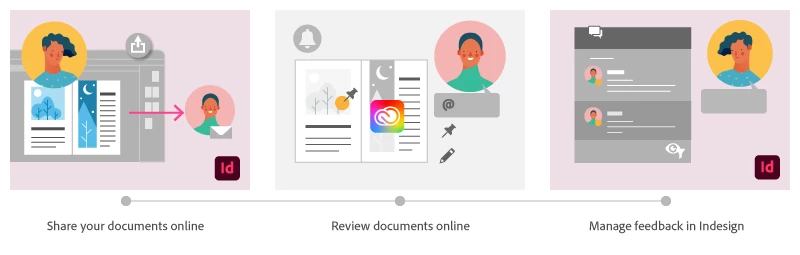
Using Share for Review in InDesign’s June 2020 release, you can share your designs for online review, and manage feedback right within the app. Stakeholders can open the shared document in a browser to provide feedback. Share for Review streamlines and simplifies the review process for both designers and their stakeholders 


The following FAQs provide clarity on common questions around Share for Review 

Share the document for review - FAQ

View reviewer comments - FAQ 

Review the document - FAQ

Best practices


How is Share for Review different from the ‘Integrated comment and review’ feature in InDesign CS5? How does it compare to the Import PDF Comments (IPC) feature?  

Adobe is investing in features and services that make creative collaboration easier and more enjoyable.  

With Share for Review, our aspiration is to make reviewing and editing InDesign creative more seamless, and address the following limitations in CS Review: 

  • Requirement for a flash plugin to use this feature 
  • Lack of support for key features such as email notifications 
  • User challenges with feature discoverability 

Compared to Import PDF Comments (IPC), Share for Review reduces time by eliminating the need to create and share PDFs and collate the resulting feedback. We will be working to enhance the reviewing features and capabilities in Share for Review, which will soon help this tool surpass the experience of IPC, from end to end.   


Does Share for Review include text commenting capabilities? 

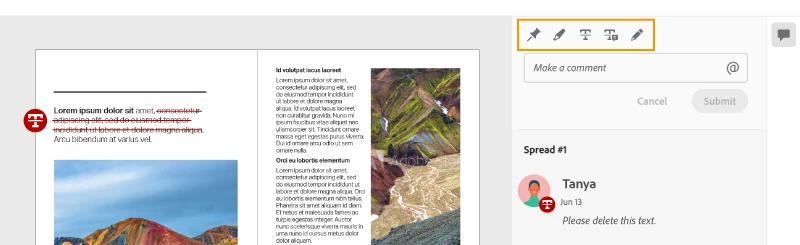
This first version of the feature allows you to provide feedback through the sticky note and pencil tools. We will continue to improve the experience, and we will soon incorporate more text commenting capabilities, including text highlight, text strikethrough, and the ability to accept text comments in a single click. 


Is this feature being introduced into InCopy?  

It is not. Instead, we’ll be making significant updates to InCopy by taking it to the Web to provide better collaboration capabilities. Stay tuned!    


What text capabilities do I have as a reviewer?  

As a reviewer, you will be able to highlight text, strikethrough text, and replace text corresponding to your comment. 


Let us know of any challenges, or questions you have for us around Share for Review and we’ll be happy to assist you. 

Correct answer Nathan Marroquin

This has worked for others:

  1. Save any work and close all open
  2. Sign out of InDesign (Help > Sign out). This will cause indesign to quit.
  3. Launch InDesign again, at which point you should be prompted to sign in again.

137 replies

flamidey2025
Participant
June 17, 2020


Really?

Sigh....


I'm not a beta tester, so back to 15.0.

Sheena Kaul
Community Manager
Community Manager
June 17, 2020

Hi there,


I apologize for the trouble here. A couple of questions before I can help you troubleshoot this issue:

1. Are you getting these errors when you're inviting someone specific or while adding any email address?

2. What steps are you following to add public access?

3. Is there a screen recording that you can send so we can see the entire workflow?


Regards,

Sheena

flamidey2025
Participant
June 17, 2020

Thanks for the inquiry & reply.


I can't invite someone as the field for invites does not even show up.

I just clicked on the public access option and it showed the error instantly.


Unfortunately, I am not going to spend any more time beta testing what should have been a tested version as we are entering final production for a big project.


Maybe in 3 or 4 versions i'll try again.


It's really sad to see how many of Adobe realeased features ar actually just beta tests these days.

Lauren Evans
Participant
June 16, 2020

This is a great feature, but full text mark-up options are really needed. Please make adding text markup options a priority. The tools in Acrobat are great - just let us be able to use those in this online markup version. Thank you!

Steve Werner
Community Expert
Community Expert
June 16, 2020

You should post your feature requests at the InDesign User Voice website which is regularly viewed by Adobe product managers and engineers:


https://indesign.uservoice.com


People who feel the same way can vote for your suggestion.


Lauren Evans
Participant
June 16, 2020

Thank you! I just went in and added it. 

Participant
June 16, 2020

Where are these files being stored on the web? Is it an Adobe server? Sometimes my company works on confidential materials and the client may want to know where these review files are being stored and how are they being protected.

Steve Werner
Community Expert
Community Expert
June 16, 2020

Yes, the files are stored on an Adobe server. 


Steve Werner
Community Expert
Community Expert
June 16, 2020

I couldn't find a security document for Creative Cloud servers but here's the one used by the Acrobat product group—the Document Cloud:


https://www.adobe.com/content/dam/acom/en/security/pdfs/Document-Cloud-Security-Overview.pdf


Inspiring
June 16, 2020

This has potential! 


You guys are probably working on in, but to be sure, I miss the following two features:

  1. Add Note to Replace Text. This feature is super powerfull in IPCS, you can replace entire paragraphs with the click of a button.
  2. Strikethrough. Another powerfull feature.
Sheena Kaul
Community Manager
Community Manager
June 17, 2020

Hi there,


We absolutely loved your suggestions and it'd be great if you can upvote for them on the UserVoice here: https://indesign.uservoice.com/


Regards,

Sheena

jaycribas
Participating Frequently
June 16, 2020

Love where this is going - tried testing this out on a multipage document, but only the first page is viewable.. I'm assuming this is a bug since I see page navigation on the review web page?

Participant
June 16, 2020

I'm having the same issue-- can you review multi-page documents? 

Participating Frequently
June 16, 2020

Can you add the ability to change the size of the pencil tool? It is too large for regular editing markups. 

Sheena Kaul
Community Manager
Community Manager
June 17, 2020

Hi there,


We totally understand that request and it'd be great if you can upvote for it on the UserVoice here: https://indesign.uservoice.com/


Regards,

Sheena

Community Expert
June 16, 2020

I got a white panel this morning on first launch of this feature.


I reset my preferences and the panel works now. 

However, the review panel is not named correctly.


And when I open the panel it's the correct panel for sure - but the name of the panel is not right.


How can I fix?


Community Expert
June 16, 2020

Sorry on Windows 10.