
Resuelto
Japanese plug in, how to turn off
I downloaded the Japanese version of InDesign CC 2018 in order to set some type, but I can't see where to turn it off. Mac 10.11.6.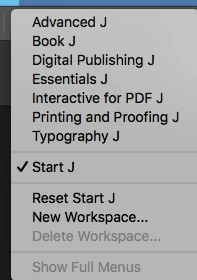

I downloaded the Japanese version of InDesign CC 2018 in order to set some type, but I can't see where to turn it off. Mac 10.11.6.
Your question states plug in, but then you state you downloaded the Japanese version of Indesign. I would think you'd have to uninstall and then install the version you wish to use.
Enter your E-mail address. We'll send you an e-mail with instructions to reset your password.
 AdChoices