
krantenbak
Participant
January 11, 2019
Question

Mongolian Baiti displaying the wrong glyphs

  • January 11, 2019
  • 5 replies
  • 3073 views

I’m trying to display mongolian script in Indesign correctly. The writing is displayed differently in Word and Indesign (see image below), while the same font is being used: “Mongolian Baiti”. Using a different font, such as “Mongolian BaiZheng Pua” results in the same differences between Word and Indesign. The same happens on other computers at my workplace, and my publisher’s computer.

The author has stated the the writing in Word is correct, while the one in Indesign is not.
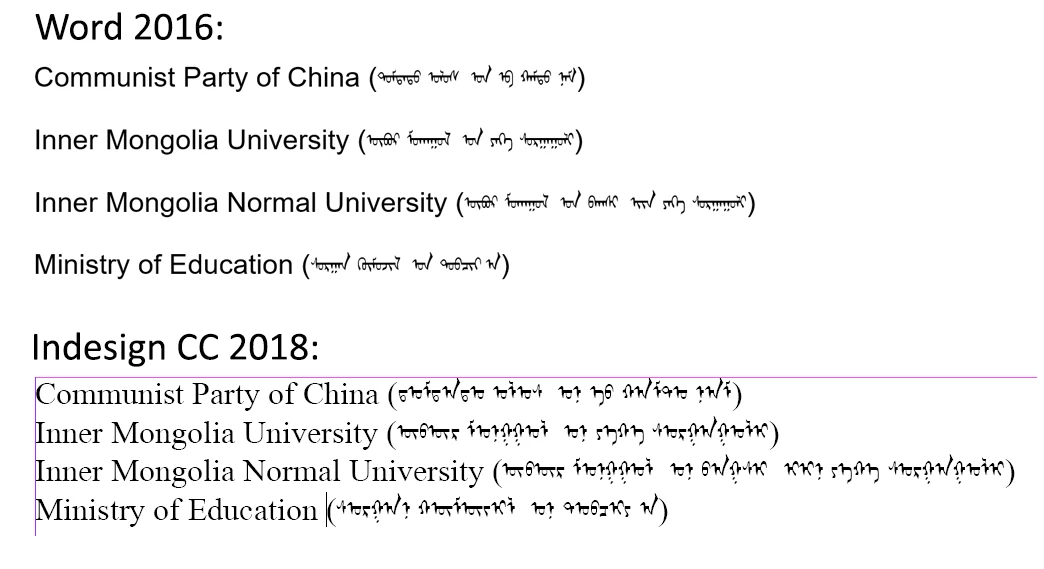
Can anyone tell me how to display the Mongolian script correctly in Indesign?

5 replies

krantenbak
Participant
January 14, 2019

I’ve also added the Mongolian dictionary, offered on the openoffice website, to Indesign. the dictionary works, because I can select it, but the shaping doesn’t improve unfortunately.

krantenbak
Participant
January 16, 2019

Doesn’t anyone have an idea?

Participant
July 6, 2019

In the Paragraph Style Options and in the Open Type Features menu you could try to change the Positional Form to Automatic Form. As you see in my screenshot the Mongolian text using Noto Sans Mongolian connect properly.

Legend
January 11, 2019

I thought it might. Now, here's a question. Is there any reason ever to turn this off? Is it historical that it's an option, or are there sound reasons to fly without it for western, or even for shaped, languages?

Peter Kahrel
Community Expert
Community Expert
January 12, 2019

InDesign had the paragraph composer from the outset, the world-ready composer was added later. The world-ready composer is more complex (and allegedly less stable), and if you don't need it I wouldn't use it.

P.

Legend
January 11, 2019

It looks as though the characters are correct but the shaping is missing. Shaping happens in some languages (not English) where the look of a character depends on the other characters nearby, and the app needs to know how to do this.

Peter Kahrel
Community Expert
Community Expert
January 11, 2019

> the look of a character depends on the other characters nearby, and the app needs to know how to do this.

That's what the world-ready composer does.

Steve Werner
Community Expert
Community Expert
January 11, 2019

Peter's suggestion is a good one. You'll find it in the Paragraph or Control panel flyout menu:

krantenbak
Participant
January 14, 2019

Hi,

thank you for your help and answers. I’ve turned on the world ready composer for the paragraph that contains the Mongolian Baiti, but there is unfortunately no effect.

I’m pretty sure I’ve done it correctly since, for instance, the writing of the font “Nirmala UI” does improve upon turning the world ready composer on.

Perhaps Indesign doesn’t know how to shape Mongolian characters?

I appreciate your help!

Peter Kahrel
Community Expert
Community Expert
January 11, 2019

Maybe you need the World-Ready Composer.