


Participating Frequently
June 8, 2021
Answered

Paragraph Style that will force a column break after the third Paragraph return

  • June 8, 2021
  • 1 reply
  • 1440 views

Hey everyone,

I'm trying to find a workaround for tables only being read row-by-row instead of column by column, so I've been experimenting with using a text frame with a paragraph style that splits into 3 columns:

A|D|G

B|E|H

C|F|I


Every frame will have 9 entries and it is important that there are 3 "rows" and 3 columns. Everything works well until the text gets to be longer than the width of the column and wraps to the next line, forcing the text below it into the next column:

A|C|F

a|D|G

B|E|H


I was thinking that if I made the frame tall enough and only had the text go to the next column with a Column Break, then I'd have better control over the formatting. Does anyone know, perhaps with a GREP style, that this could be accomplished without having to place the column breaks by hand? I'm pretty lazy and don't want to do that!


Why not use a table? Because I need the items to appear in the ToC in their column order A|B|C|D|E|F|G|H|I, and the table would show them in the ToC as A|D|G|B|E|H|C|F|I


Thanks,

Chris
This topic has been closed for replies.
Correct answer Laubender

Hi Chris,

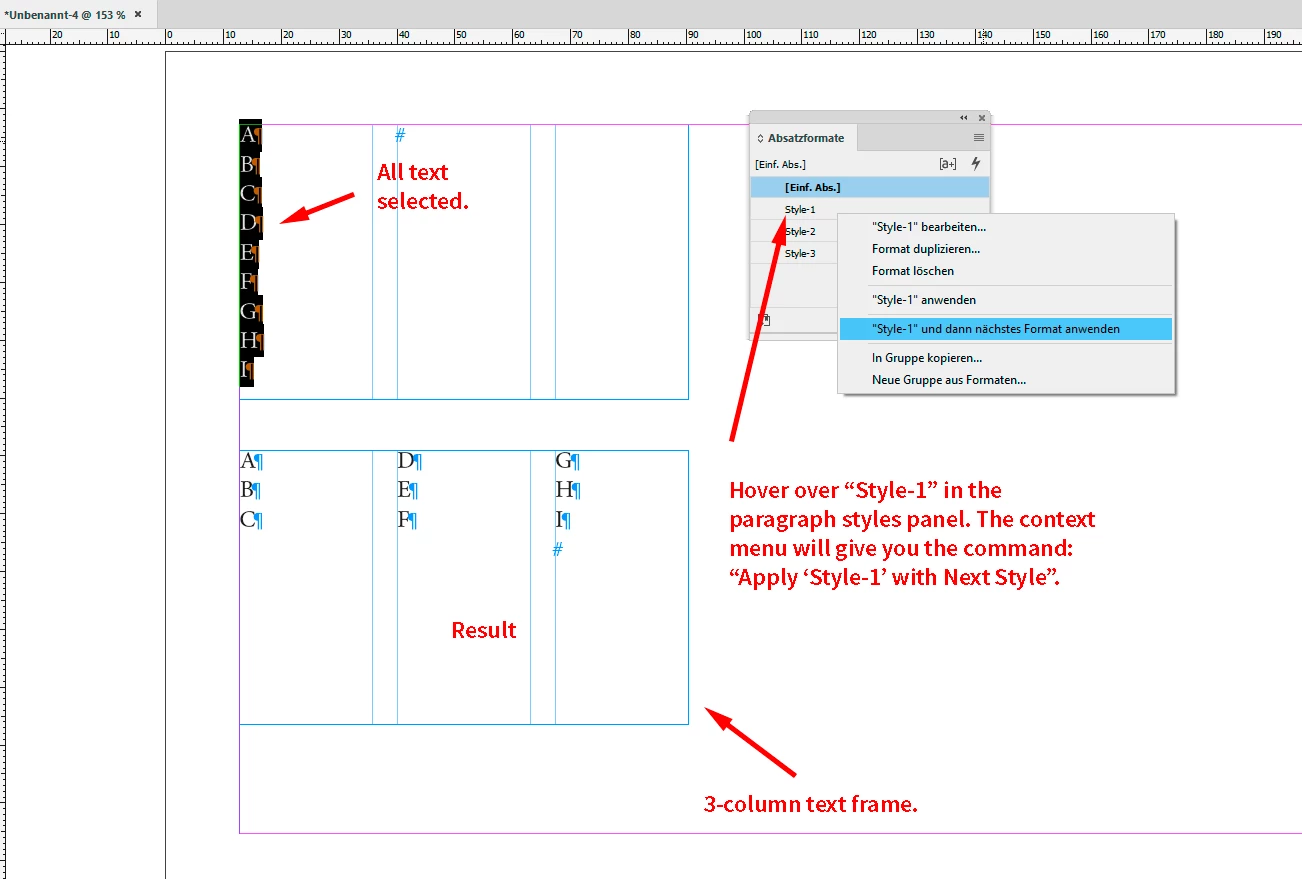
this should work with 3 paragraph styles where the Next Style feature is used.


Style 1 for ADG > Next Style: Style 2

Style 2 for BEH > Next Style: Style 3

Style 3 for CFI > Next Style: Style 1


With Style 1 comes the definition

Start Paragraph: Next Column


To format your text, select paragraphs A to I.

Open the Paragraph Styles panel.

Hover over Style 1 and use the context menu to get the menu command:
Apply Style 1 and Next Style


That's it. Here a screenshot from my German InDesign 2021 on Windows 10 where I show this:


Download my sample InDesign document from my Dropbox account:

https://www.dropbox.com/s/hbm2pgd5f8zcz6k/ApplyNextParagraphStyle-to-SelectedText-2021.indd?dl=1


Regards,
Uwe Laubender

( ACP )

1 reply

LaubenderCommunity ExpertCorrect answer
Community Expert
June 9, 2021

Hi Chris,

this should work with 3 paragraph styles where the Next Style feature is used.


Style 1 for ADG > Next Style: Style 2

Style 2 for BEH > Next Style: Style 3

Style 3 for CFI > Next Style: Style 1


With Style 1 comes the definition

Start Paragraph: Next Column


To format your text, select paragraphs A to I.

Open the Paragraph Styles panel.

Hover over Style 1 and use the context menu to get the menu command:
Apply Style 1 and Next Style


That's it. Here a screenshot from my German InDesign 2021 on Windows 10 where I show this:


Download my sample InDesign document from my Dropbox account:

https://www.dropbox.com/s/hbm2pgd5f8zcz6k/ApplyNextParagraphStyle-to-SelectedText-2021.indd?dl=1


Regards,
Uwe Laubender

( ACP )

Participating Frequently
June 9, 2021

Thanks, Uwe! That worked so well. I was afraid that it was not going to work with the Table of Contents, but it did!