

K.Daube
Community Expert
Community Expert
March 31, 2023
Answered

Place text absolutely on dialogue/panel

  • March 31, 2023
  • 4 replies
  • 1524 views

Although the problem surfaced with FrameMaker, it is not related to it. The script below just needs the ExtendScript ToolKit CC.

Problem: I can not find a method to place the additional text correctly (that is, close to the first paart of the button labels). For reference a pixel-ruler is overlayed in the screen shot:
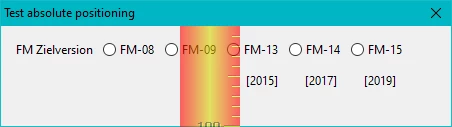
// E:\_DDDprojects\FM-JsxLib\FMjsxLib\Functions\Demos\PositionAbsolute.jsx ====== UTF-8 
// Test/Demo for aboslut position of text within dialogue/panel

PositionAbsolute = function (oObject, asProps, asMethods) { // ======================
  wPal = new Window('dialog', "Test absolute positioning", undefined);
  wPal.size = [450, 100];
  wPal.alignChildren = "left";
	wPal.g1 = wPal.add('group',undefined, "",{borderStyle:"black"});
	wPal.g1.margins = 0;
  	wPal.g1.st1 = wPal.g1.add('statictext',undefined,"FM Zielversion");
  	wPal.g1.rb = wPal.g1.add('group',undefined);
    	wPal.g1.rb.rb8  = wPal.g1.rb.add('radiobutton',undefined,"FM-08");
    	wPal.g1.rb.rb9  = wPal.g1.rb.add('radiobutton',undefined,"FM-09");
    	wPal.g1.rb.rb13 = wPal.g1.rb.add('radiobutton',undefined,"FM-13");
    	wPal.g1.rb.rb14 = wPal.g1.rb.add('radiobutton',undefined,"FM-14");
    	wPal.g1.rb.rb15 = wPal.g1.rb.add('radiobutton',undefined,"FM-15");
     wPal.rbtxt = wPal.add('statictext',undefined,"[2015]         [2017]         [2019]");
//   wPal.rbtxt.location = {x:230, y:30           // does nothing
//   wPal.rbtxt.location = [230, 30];             // does nothing
//   wPal.rbtxt.bounds = {x:230, y:30, width:140, height:15}; // only width is handled
     wPal.rbtxt.indent = 230;                     // ok, but not sufficient

  wPal.show();
} // --- end PositionAbsolute --------------------------------------------------

PositionAbsolute ();

Since "A RadioButton object has no creation properties", labels can not be multiline. Hence I try to place the "second line" close below - but no method works! See the commented lines towards the end of the script.

Prophylactically I have entered this as bug FRMAKER-12959  . But an expert such as Peter Kahrel know better or have a solution …

This topic has been closed for replies.
Correct answer K.Daube

So now it's clear to me: Multi-line labels for buttons, radiobuttons and checkboxes are possible only in InDesign CC - not in FrameMaker, older ID versions or ESTK CC (which is pretty old: 2013).

Thanks for all of Your help ► case closed.

4 replies

Peter Kahrel
Community Expert
Community Expert
April 5, 2023

It must be your version, @K.Daube. I can confirm that you can use \n to create multi-line button labels. This was done in ID 2021

w = new Window ('dialog')
  w.add ('radiobutton', undefined, 'abcd\nefgh').preferredSize.height=32;
w.show();


And indeed it doesn't work in CS6.


Peter

K.Daube
Community Expert
K.DaubeCommunity ExpertAuthorCorrect answer
Community Expert
April 5, 2023

So now it's clear to me: Multi-line labels for buttons, radiobuttons and checkboxes are possible only in InDesign CC - not in FrameMaker, older ID versions or ESTK CC (which is pretty old: 2013).

Thanks for all of Your help ► case closed.

Marc Autret
Legend
April 4, 2023

Not sure it's crossplatform but '\n' may work in a radiobutton (assuming you extend the preferredSize.height accordingly).


Tested in Win10 / InDesign CC:


PositionAbsolute = function(  win,u,t)
{
  with( win = new Window('dialog', "Simulate multiline label by tinkering with margins, spacing and indent") )
  {
    preferredSize = [450, 100];
    orientation = 'column';
    spacing = 0;
    margins = 0;
    alignChildren = ['left', 'top'];
  }

  with( win.g1=win.add('group') )
  {
    orientation = 'row';
    spacing = 5;
    margins = [12,12,0,0];
    alignChildren = ['left', 'top'];
    add('statictext',u,"FM Zielversion");
  }
  
  with( t=win.g1.rb=win.g1.add('group') )
  {
    orientation = 'row';
    spacing = 5;
    margins = [0,1,0,0];
    alignChildren = ['left', 'top'];
  }
  t.rb8 = t.add('radiobutton',u,"FM-08");
  t.rb9 = t.add('radiobutton',u,"FM-09");
  (t.rb13 = t.add('radiobutton',u,"FM-13\n[2015]")).preferredSize.height=32;
  (t.rb14 = t.add('radiobutton',u,"FM-14\n[2017]")).preferredSize.height=32;
  (t.rb15 = t.add('radiobutton',u,"FM-15\n[2019]")).preferredSize.height=32;

  win.st2 = win.add('statictext', u, "Continued presentation with some distance to the previous elements. We do not have any SPACING active, hence need to get vertical space by empty test lines. (Although this could be done by other means, like adding a top margin at a group level.)", { multiline:true });    
  win.st2.preferredSize.width = 450;

  win.show();
}


Best,

M

K.Daube
Community Expert
K.DaubeCommunity ExpertAuthor
Community Expert
April 4, 2023

Thank You Marc, for this code. It's in my head that \n does not work in the FrameMaker implementation of the ES machinery.

So i definitely need to check again.

Peter Kahrel
Community Expert
Community Expert
April 1, 2023

Things like this are always messy, Can't you lay out the radio buttons vertically? Or make the window wider?


P.

K.Daube
Community Expert
K.DaubeCommunity ExpertAuthor
Community Expert
April 1, 2023

Thanks, Peter and Loic for your responses.

In the original case the labels are long (e.g. "FM-15 [2029]") and there are 10 radio buttons - resulting in a window width > 600 pix. I wanted to have the window less wide and hence came to the request of two lines for the labels.

I will try these suggestion:

  • groups with alignment [Loic.Aigon] - will probably have the same problem as the current 'solution'
  • independent radiobuttons and add a statictext next to them [Pinpin Philippe] - will cause much more programming...

And let you know what I achieved.

Loic.Aigon
Legend
April 1, 2023

I am not sure, here is a sample code. Looks like "margin" is set by default:

PositionAbsolute = function (oObject, asProps, asMethods) { // ======================
	wPal = new Window('dialog', "Test absolute positioning", undefined);
	wPal.size = [450, 300];
	wPal.alignChildren = "left";
	  wPal.g1 = wPal.add('group',undefined, "",{borderStyle:"black"});
	  wPal.g1.margins = 0;
		wPal.g1.st1 = wPal.g1.add('statictext',undefined,"FM Zielversion");
		wPal.g1.rb = wPal.g1.add('group',undefined);
		  wPal.g1.rb.rb8  = wPal.g1.rb.add('radiobutton',undefined,"FM-08");
		  wPal.g1.rb.rb9  = wPal.g1.rb.add('radiobutton',undefined,"FM-09");
		  wPal.g1.rb.rb13 = wPal.g1.rb.add('radiobutton',undefined,"FM-13");
		  wPal.g1.rb.rb14 = wPal.g1.rb.add('radiobutton',undefined,"FM-14");
		  wPal.g1.rb.rb15 = wPal.g1.rb.add('radiobutton',undefined,"FM-15");
	   wPal.rbtxt = wPal.add('statictext',undefined,"[2015]         [2017]         [2019]");
  //   wPal.rbtxt.location = {x:230, y:30           // does nothing
  //   wPal.rbtxt.location = [230, 30];             // does nothing
  //   wPal.rbtxt.bounds = {x:230, y:30, width:140, height:15}; // only width is handled
	   wPal.rbtxt.indent = 230;                     // ok, but not sufficient
  

	var gp = wPal.add('group',undefined, "",{borderStyle:"black"});
	gp.orientation = "row";
	var i = 5;
	while(i--){
		makeGp(gp);
	}


	wPal.show();
  } // --- end PositionAbsolute --------------------------------------------------
  
  function makeGp(parent){
	var gp = parent.add('group',undefined, "",{borderStyle:"black"});
	gp.orientation = "column";
	gp.add('radiobutton',undefined,"FM-08");
	gp.add('statictext', undefined, 'test');
  }
  PositionAbsolute ();

The makeGp is just a commodity here. But you will get the idea.

Loic.Aigon
Legend
March 31, 2023

Ain't done ScriptUI in ages but my first reflex was that if I needed this to be achieved, I would "layout" the UI with groups and use alignement property to get everything in place rather than trying to "move" items through the UI.

But as I said, ScriptUI gurus may suggest a different approach.