


Printing Errors - - Not printing whole image
Hi, I am having this problem when printing my pdf created from indesign.
It's supposed to look like this: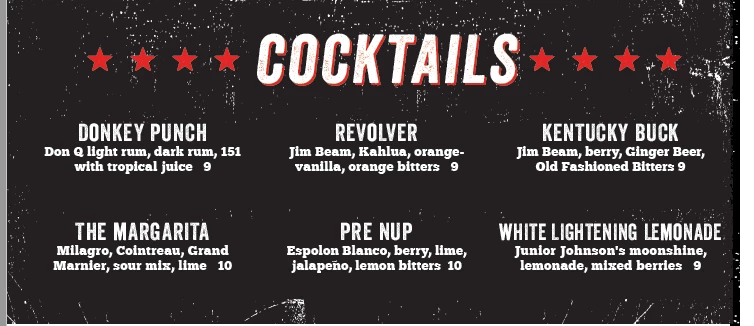
After printing (from adobe acrobat) it looks like this:
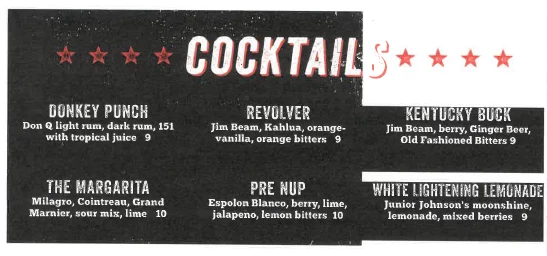
It does not look like this in adobe acrobat or indesign.
I have checked links. I'm trying to print from adobe acrobat 8. Unfortunately, my printer does not let me print from indesign (it will crash the program or fail on the printer) so I can't be 100 percent sure this is from Indesign or Acrobat. My go to fixes were, are there invisible boxes over that portion of the background grunge image. No. There are black rectangles behind each paragraph, so that's what is causing the black to be behind Kentucky and White Lightening.
I've tried printing to another printer that is a completely different type and it has a similar result. I've saved down to Acrobat 5 to test.
If I save this as a jpg the problem does not exist-- but my clients want a pdf so they can print front to back.. (Not worth trying to explain to them how to do this!)
Here's the real kicker, this just started recently. Probably within the last maybe, month and a half. This file has been used and worked on with no problems for like 2 years+... I am assuming this is happening from how I'm saving the pdf.. but I can't be sure on why it would be a problem now.
Thanks!
 AdChoices