Inspiring
December 12, 2018
Answered

Problem rendering PDF

  • December 12, 2018
  • 1 reply
  • 3367 views

Hi everyone and thanks for your help.

I created a booklet with Indesign and exported to PDF for printing.

Now I want to understand the problem, because the PDF already has printed.

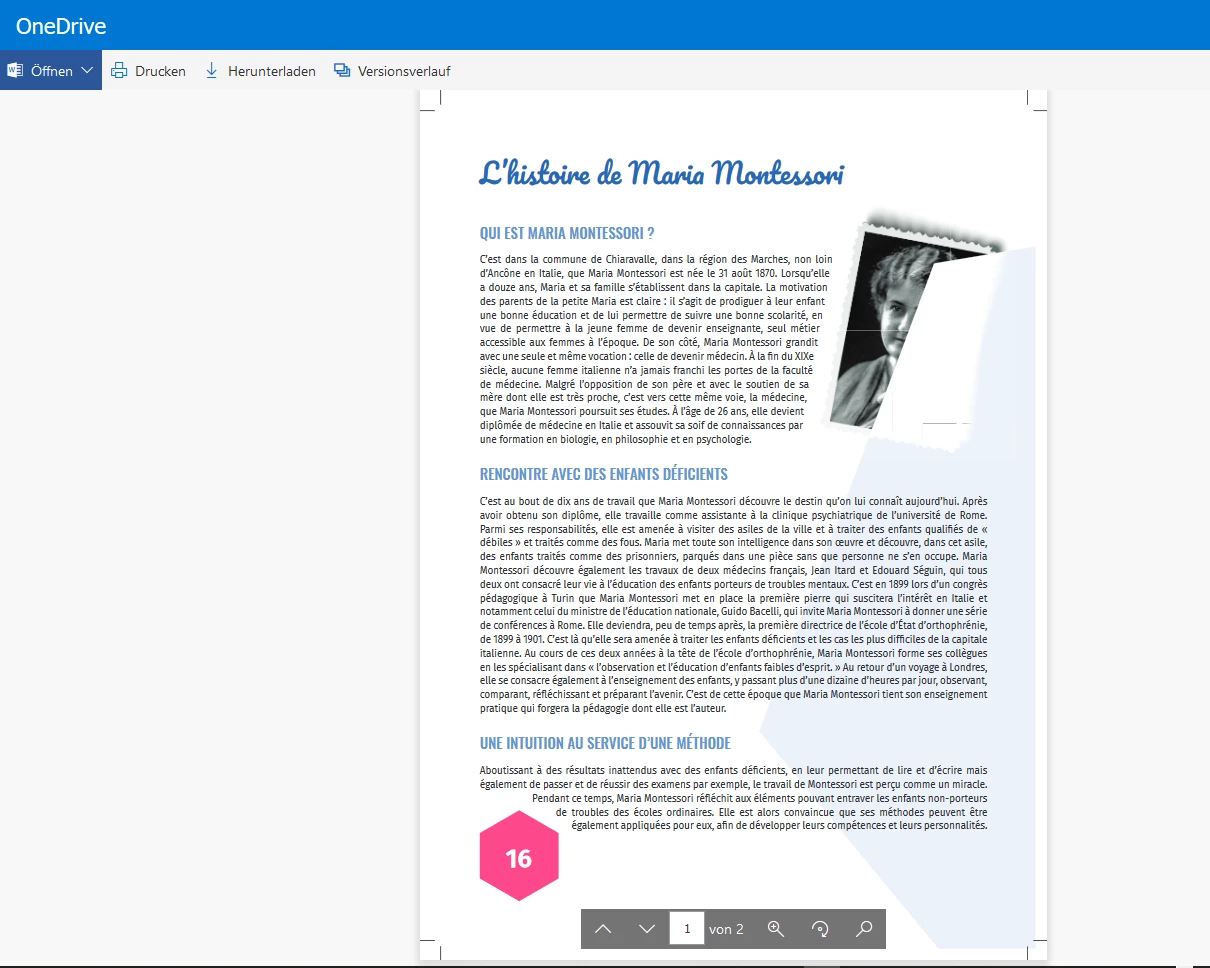
The problem appaers with two images, on which ones I applyed a warp text with a mask alpha.

When I open the PDF.

It render perfectly, sometimes no.

Render by
Result rendering
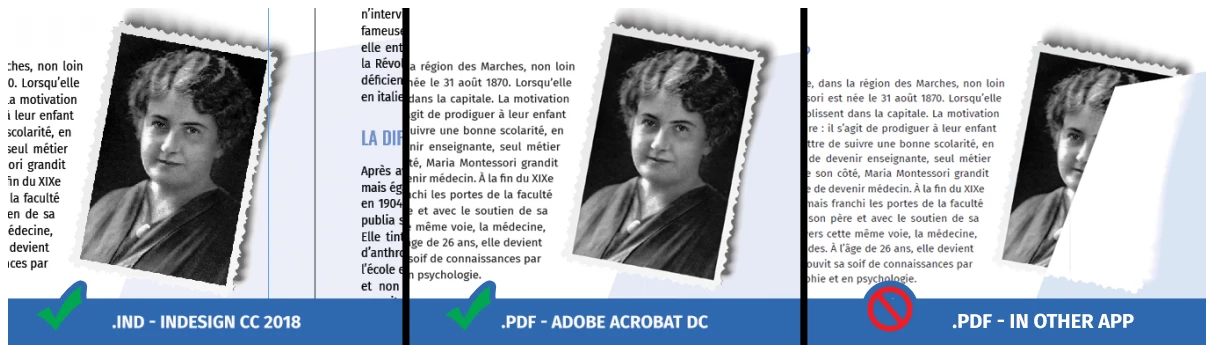
Browsers in my computer (Chrome, Opera, Edge)BAD
Adobe Acrobat DC in my computerGOOD
Browsers in other computer (Chrome, Opera, Edge)GOOD
Dropbox.comGOOD
Printing supplierBAD
Google Drive or OneDriveBAD

Can you explain that problem ?

I join the file concerned:

Microsoft OneDrive - My booklet.

Thank you,

    This topic has been closed for replies.
    Correct answer Laubender

    Hi Rifton008 ,

    you marked a "BAD" for the rendering result with "Printing supplier".

    That's rather unusual. Why is that? Did your print job turn out bad?

    What kind of printing supplier are we talking about?

    The most important question:
    Is this really a CMYK + 2 spot-color job?

    I inspected your supplied PDF/X-1a with Acrobat Pro DC.

    A surprise to me: It does not pass the PDF/X-1a compliance test:

    You can fix this with Acrobat's Preflight feature:
    PDF/X Compliance > Convert to PDF/X-1a (SWOP)

    Button: Analyze and fix

    Ok. Let's go on with all other "BAD" results of rendering.

    You can do something about that with a different kind of PDF that would not make it through the workflow of a printing supplier and should never be printed on an offset press. For that you would convert all colors to sRGB and simulate overprint.

    Compatibilty: Acrobat 4 (PDF 1.3)

    Color Conversion: Convert to Target

    Target Profile: sRGB IEC61966-2.1

    Include target profile

    Simulate Overprint

    Important: Do NOT convert all Spots to Process with the Ink Manager!

    Leave the spot colors as they are before exporting with the settings above.

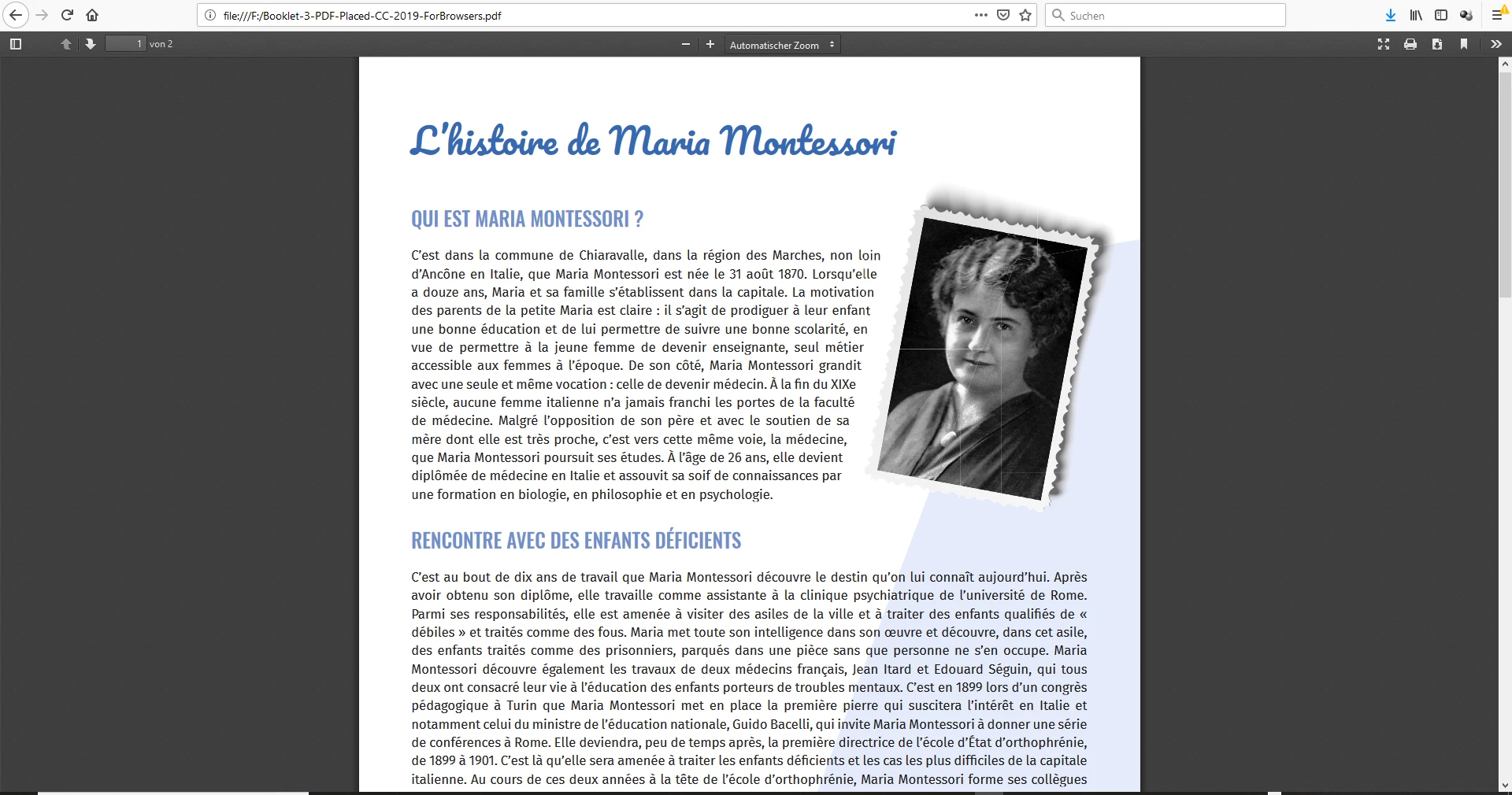
    Screenshot with the PDF viewer of your supplied PDF in Firefox on Windows 10:
    Screenshot with the PDF viewer of Firefox after placing the fixed PDF/X-1a to an InDesign document and exported with the settings mentioned above. Note: You cannot avoid stitching artefacts of areas where transparency is flattened!
    Regards,

    Uwe
    1 reply

    LaubenderCommunity ExpertCorrect answer
    Community Expert
    December 12, 2018

    Hi Rifton008 ,

    you marked a "BAD" for the rendering result with "Printing supplier".

    That's rather unusual. Why is that? Did your print job turn out bad?

    What kind of printing supplier are we talking about?

    The most important question:
    Is this really a CMYK + 2 spot-color job?

    I inspected your supplied PDF/X-1a with Acrobat Pro DC.

    A surprise to me: It does not pass the PDF/X-1a compliance test:

    You can fix this with Acrobat's Preflight feature:
    PDF/X Compliance > Convert to PDF/X-1a (SWOP)

    Button: Analyze and fix

    Ok. Let's go on with all other "BAD" results of rendering.

    You can do something about that with a different kind of PDF that would not make it through the workflow of a printing supplier and should never be printed on an offset press. For that you would convert all colors to sRGB and simulate overprint.

    Compatibilty: Acrobat 4 (PDF 1.3)

    Color Conversion: Convert to Target

    Target Profile: sRGB IEC61966-2.1

    Include target profile

    Simulate Overprint

    Important: Do NOT convert all Spots to Process with the Ink Manager!

    Leave the spot colors as they are before exporting with the settings above.

    Screenshot with the PDF viewer of your supplied PDF in Firefox on Windows 10:

    Screenshot with the PDF viewer of Firefox after placing the fixed PDF/X-1a to an InDesign document and exported with the settings mentioned above. Note: You cannot avoid stitching artefacts of areas where transparency is flattened!

    Regards,

    Uwe

    Community Expert
    December 12, 2018

    If the question about the two spot colors can be answered and if I can get access to the original InDesign document I think, I can recommend a way to do the same layout with a successful export to PDF/X-1a or PDF/X-4 (recommended) to satisfy your printing supplier whoever that is.

    FWIW: It's very strange that if you are using a PDF/X-1a export preset with InDesign that the result will not pass the PDF/X-1a conformance check with Acrobat Pro DC. You should change your workflow and always do the conformance check before providing a PDF to the printing supplier. We have to see into that issue more deeply. Maybe there is a bug with InDesign and the PDF export module.

    Regards,
    Uwe

    InnovaWEBAuthor
    Inspiring
    December 12, 2018

    Thanks for you answer Laubender​.

    I exported again my work to PDF and it rendering correctly, now.

    Maybe a bug like you say.

    If you want, there is my assembly work of Indesign.

    Microsoft OneDrive - Access files anywhere. Create docs with free Office Online.

    Best regards,