



Question
Problem with icons added to listbox (Script UI).
Dear forum,
I wrote a script whose dialog box has a listbox containing icons.
The problem is it works as expected on Windows 10 (InDesign 16.1), but on Mac (Big Sur 11.3.1, InDesign 16.1 & 16.2.1) the icons don’t show up on displaying the dialog box. I have to click on the listbox to make them appear.
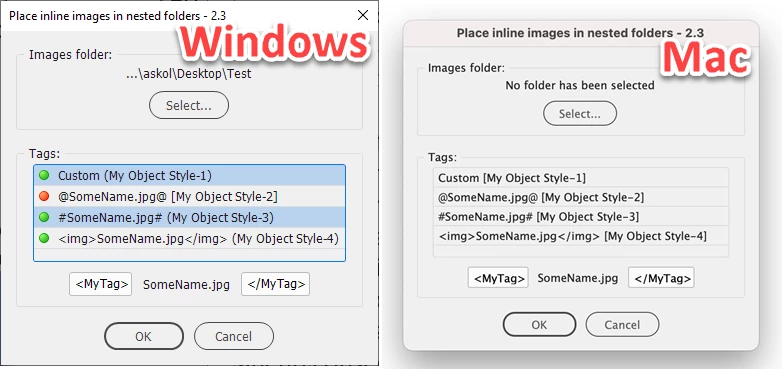
Below is a small snippet of code extracted from the script in case someone is willing to test it:
InitVariables();
CreateDialog();

function CreateDialog() {
	var iconGreen = IconMaker(iconBinGreen, "bullet_ball_green.png");
	var w = new Window("dialog", "Test");

	w.p2 = w.add("panel", undefined, "Tags:");
	w.p2.alignment = "fill";
	w.p2.lbox = w.p2.add("listbox", undefined, ["one", "two", "three"], {multiselect: true});
	w.p2.lbox.alignment = "fill";

	for (var k = 0; k < w.p2.lbox.items.length; k++) {
		w.p2.lbox.items[k].image = iconGreen;
	}

	w.show();
}

function IconMaker(iconBinGreen, name) {
	var iconFile = null;
	var tmpFolder = new Folder(Folder.temp.absoluteURI + "/Kasyan");
	tmpFolder.create();
	iconFile = new File(tmpFolder.absoluteURI + "/" + name + ".png");

	if (!iconFile.exists) {
		iconFile.encoding = "BINARY";
		iconFile.open( "w" );
		iconFile.write(iconBinGreen);
		iconFile.close();
	}

	return iconFile;
}

function InitVariables() {
	iconBinGreen = "\u0089PNG\r\n\x1A\n\x00\x00\x00\rIHDR\x00\x00\x00\x10\x00\x00\x00\x10\b\x06\x00\x00\x00\x1F\u00F3\u00FFa\x00\x00\x00+tEXtCreation Time\x00So 12 Okt 2003 23:43:18 +0100\u00B4\u00D5\u00BC\u00C0\x00\x00\x00\x07tIME\x07\u00D3\n\f\x15+&\u00E6\u0088z7\x00\x00\x00\tpHYs\x00\x00\n\u00F0\x00\x00\n\u00F0\x01B\u00AC4\u0098\x00\x00\x00\x04gAMA\x00\x00\u00B1\u008F\x0B\u00FCa\x05\x00\x00\x01sIDATx\u00DA\u00D5RMKBA\x14=\u00F34\u008D\f\x12\f7E\u00BB\u00A8\\+\u00D2\"7\u00B9h\u00DB\u00B6\u00A0\u009F\u00E0\u00C2\u00A0~D\u0084\u00DB~A-\u00DBD\u00CB\u00B0\u00A0\u0085P\u00AB>\x16A\u0081\u00A0D`j=\u009Dy3\u00EF\u00BD\u0099\u00EE\x13\x02\rKZz\u00E1p\u0099a\u00CE\u00B9\u00E7\u00DE\u00B9\u00C0\u00D8\x07\x1Bv\u00B9x\x1E_\u00E3\u00EF\u00AAhB\u00A1\u00AC\u00F0<\u00B4\u00B8\u00A8`\n%\u00EC\u00E0j\u00A4@\u00FA:Y\u009C\u00F1\u00E2\x07\u0099\u00A5\x15+\x12\u0089\u00C0\u00E6\x1C\u00D5F\x03\u00E5\u00C7\x07\u00DDDg\x0F[8\u00EC\x7F\x1F\u00FAY9\x19N\x1Co\u00E7\u00D6-+l\u0081K\t\u00E1\u00BA\u00801\u0098O\u00CC\u00B2z\u00AD\u0095\u0097\x1Bn\x19g\u00A8~s\u00AC~\x01\u009Bl\u00AF.\u00A7\u00AC\u00B6\u00E4\u0090D\u00D4D\u00F4\x03h\r\u0097ZI-\u00CCY\u00B0\u00B1\u00DB\u00CF\t\u00F7\x1F\fc\u00D9\u00C0v\u00DB\u00B6\u00E1\x11\u00D1Q\u00AAGt}\x1F\x1Ea2:\x01\x16f\x19\x033\\@j\x1F\u00B6\x10P\u00F4X\x13\u009C\x00$\u00A2\u00C8\u008DCB\u008A`\u00F4\u00E0\u00CC\x06Zhw\u009DJ0\u00B0`p\x1F$\u00D4u\x1Ct\u0083\u00EC*H%\u00C9\x19\x07\u0094\u00B9\u00F9U\x001\u0094.\u00EE\u00EFt\u0097\u00AA\u00DAD\u00B6\x05G\u0087\u00B2\u0090$\u00E0\u00F9x\u00A9\u00BEiD\u00FE\u00F8\x05\u009C\u00A2*6\x15\u00AF\u00D5\u009B\u00F9X4\u00CA\u0082N\x1D\u009F\u00F6\u00E0\u00B3\u0083\u00A7\u00E7W-Bj\x1F\x05\u009C\u008C\\$\x1C!\x17L\u009BY,\u00DD\u00EB\u00D95\u00B7\u0098\u00A6\u00CA\x05\\\u00FEgK\u00C7$\u00BE\x00\u0093\u00E9\u00CFJ\u00B3\u00D1\u00D3w\x00\x00\x00\x00IEND\u00AEB`\u0082";
}
Any ideas why this happens? Is there a workaround for this issue?
— Kas
 AdChoices