


Reduce PDF file size after exporting or when exporting from InDesign
Hi Everyone,
It is my first time posting here.
I have searched the community for an answer to this and found a couple of posts, but I'm unable to downsize the file.
The report is about 120 pages and it has lots of linked ai files containing bar graphs and pie charts. All this files are about 1Mb to 1.5Mb. Is there a way to make these smaller? I'm guessing these are what make the "Content Streams" big. The report has a few photos, but not many and none are bigger than 1.5Mb.
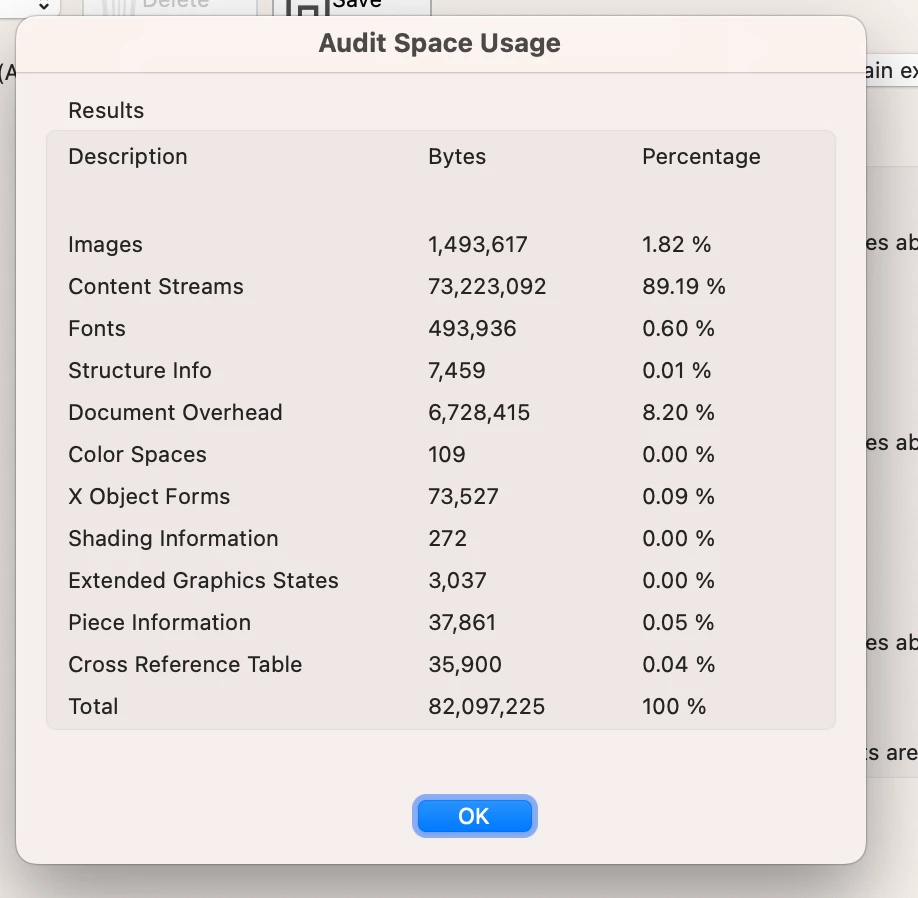
The report Exports to about 82Mb when using "Smalles File Size" export features. If I open it in Acrobat Pro and save it as Reduced File Size, it doesn't reduce more dan a Mb here and there.
What can I do?
Also somethig curious... the fist time I saved a draft (before I added the photos to the cover and section covers) the report saved as a 25Mb PDF file. So I thought it was the photos, but I deleted all the photos to test it and it didn't make a difference.
Another thing I did was create stories so the proof-reader could work on the text in InCopy. I thought maybe this was what blew up my file, but I unliked all the stories, etc. and the PDF still exports big.
 AdChoices