
Participant
June 5, 2020
Answered

Remove Copy/Paste Ability from PDF Exports

  • June 5, 2020
  • 2 replies
  • 56266 views

Hi all, I am a chemistry lab manager and I am in the process of rewriting and reformating our lab materials using InDesign. I'd like to be able to disable students' ability to copy and paste from the PDF made by exporting my .indd; is this possible? Any suggestions?
Correct answer Barb Binder

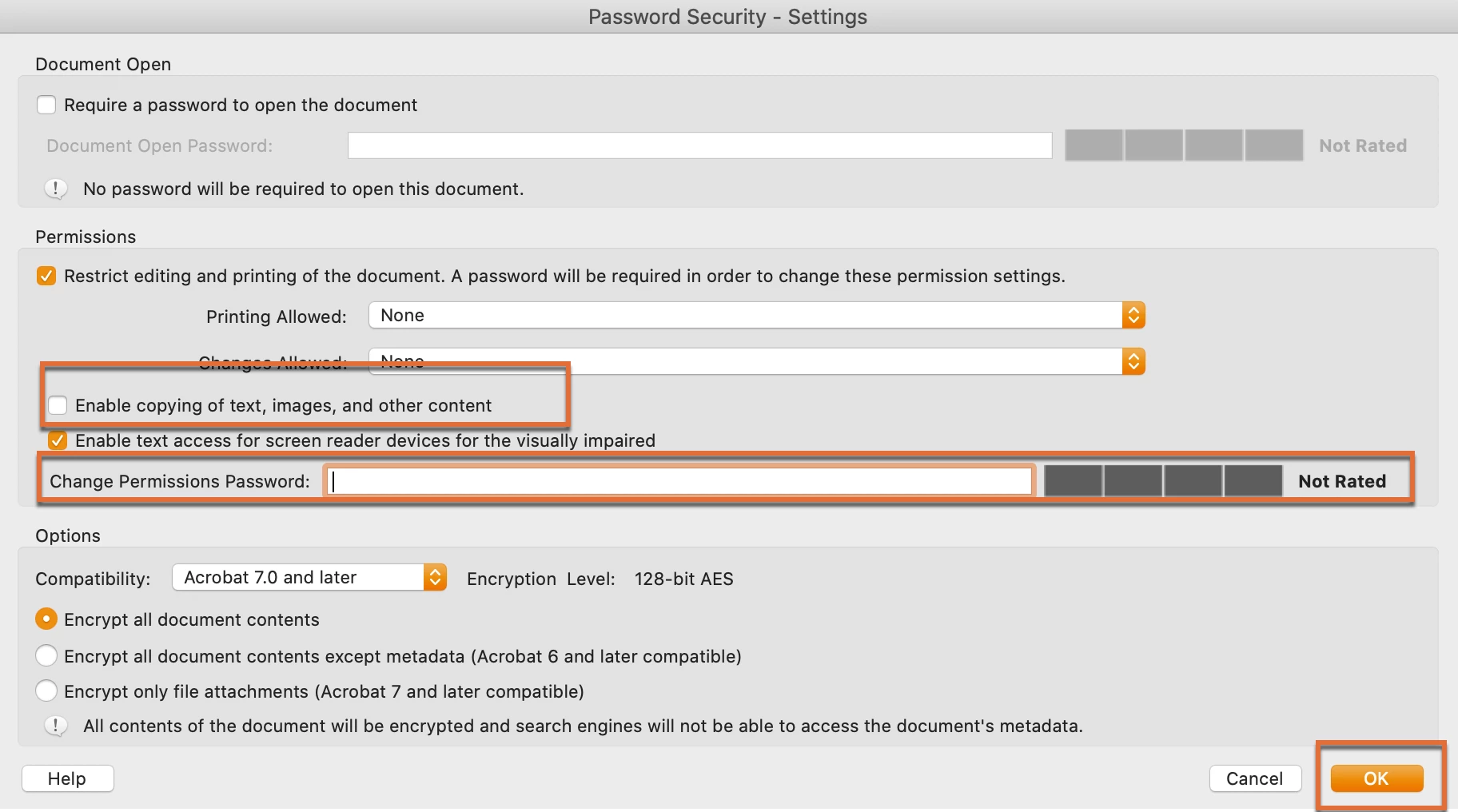
This is done in Acrobat, not in InDesign:

  • Open the PDF in Acrobat
  • File > Properties > Security > Security Method > Password Security
  • Disable "Enable copying of text, images and other content"
  • Add a permissions password, OK, Confirm, OK


This is a deterrent but be aware that if a student uses a program other than Adobe Acrobat or Adobe Reader to access the file and they may get around the permissions password. You can purchase more robust encryption, but this is what comes with the software.


~Barb

2 replies

Participant
May 19, 2023

But my screen is showing like this....


Barb Binder
Community Expert
Community Expert
May 19, 2023

You need to uncheck "Enable copying of text, images and other content" on export. It appears you had it checked. 


~Barb

~Barb at Rocky Mountain Training
Participant
May 30, 2023

This is really unriliable way as there are plenty of tools to crack PDF passwords, I end-up making sceenshots & convert them in PDFs just to make sure, please add this as an option when you save files to save it as an image.

Barb Binder
Community Expert
Barb BinderCommunity ExpertCorrect answer
Community Expert
June 5, 2020

This is done in Acrobat, not in InDesign:

  • Open the PDF in Acrobat
  • File > Properties > Security > Security Method > Password Security
  • Disable "Enable copying of text, images and other content"
  • Add a permissions password, OK, Confirm, OK


This is a deterrent but be aware that if a student uses a program other than Adobe Acrobat or Adobe Reader to access the file and they may get around the permissions password. You can purchase more robust encryption, but this is what comes with the software.


~Barb

~Barb at Rocky Mountain Training
Participant
June 5, 2020

Thanks! I think I found a suitable workaround. I exported the .indd as a PDF, then opened the PDF in Acrobat. By printing-to-file and selecting the Print As Image option, I get a second PDF that treats the text as a static image. Most importantly, when I post this second PDF to our learning management system, it is not possible to copy and paste.


Of course, a student could probably find a workaround to that, but I am trying to prevent casual laziness. If they want to invest the work to figure out how to copy and paste, good for them 🙂

Bill Silbert
Community Expert
Community Expert
June 5, 2020

Actually, a pdf that is a static image can still have text that is in the image copied and pasted using the Edit PDF feature in the current full version of Acrobat Pro DC. This feature converts any text in the static image into editable and copyable text. It's an easily used feature. Barb's method should be far more of a deterrant.