


Scrivener to InDesign: Apostrophes Break Preceding Characters
I'm using the most up-to-date versions of both programs.
Just a month ago I used InDesign to format my novel for print. I was able to copy/paste directly from Scrivener into my InDesign template without any issues. I'm working on a new novel and wanted to check how InDesign would render some of the stranger characters I planned on using in this draft when I found a larger issue.
Here's the original text in Scrivener:

Here's how it pastes into InDesign:
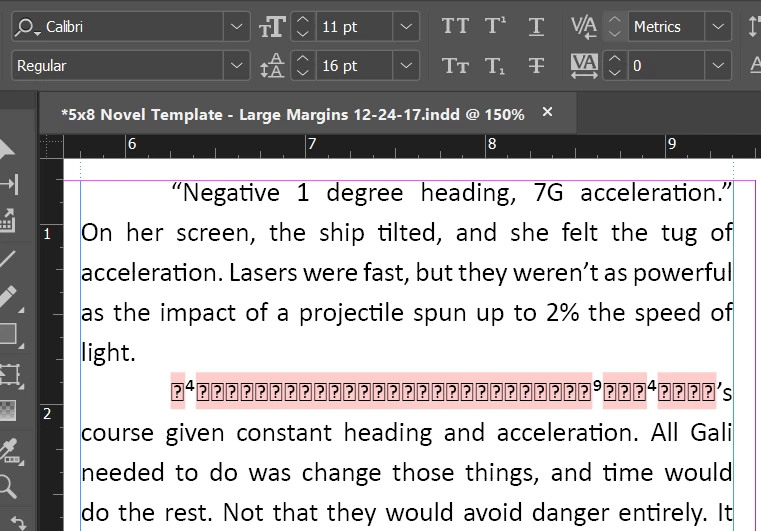
The font is the same in both, and I pasted without formatting. This isn't the only place where this occurs, and the error is always preceding the apostrophe. I'm using the same template that I used to produce the other novel.
I tried pasting the first novel's text into my template (the text that actually worked the first time around) and ended up with the same problem.
I used a new, untampered InDesign document with the same result from both novels.
Pasting from Scrivener to a Google doc, then copy/pasting from the Google doc to InDesign fixes the issue. But that's just stupid, and it adds an extra step to an already lengthy process.
Thanks in advance.
 AdChoices