


Participating Frequently
October 3, 2025
Answered

Share for Review Tools not working

  • October 3, 2025
  • 8 replies
  • 2164 views

TL;DR: Clients can no longer highlight text in Share for Review (browser view). Only pin/shape options remain, making text amends invisible. Bug or feature removal?


Hi all, I’ve just come back from holiday and run into a nightmare with Share for Review in InDesign.


I shared a chapter of a book with a client using the built-in Share function. They did what they always do in the browser: highlight passages of text, add amends, pin comments, etc.


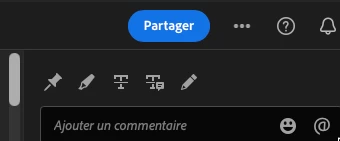
But this time the highlight tool is gone. The only options available are Place a Pin or Draw a Shape. As a result, all of my client’s highlighted amends are invisible to them... although the Review panel inside InDesign still recognises the highlights.


This makes it impossible for them to follow my replies or know which text I’m addressing.


Has the highlight feature been removed? I’ve noticed a UI change, so perhaps this is intentional? If so, why would such a critical function for book and text-heavy projects be taken away?


Thanks in advance for any clarity.


<Title renamed by MOD>
Correct answer Fabienne28893105v8yr

Bonjour,

Les outils sont bien revenus à leur place, ça marche pour nous. Merci.

8 replies

Abhishek Rao
Community Manager
Community Manager
October 8, 2025

Hi everyone,


Thanks so much for your patience while the team worked on this. The product team has rolled out a fix, and the Share for Review tools should now be working as expected. Please test it once and let us know if everything looks good on your end or if you still notice any issues.


Really appreciate your cooperation throughout this!
Abhishek

Participant
October 8, 2025

Users who do not have any licenses with Adobe are getting 404 errors, spinning circle. 

Participating Frequently
October 7, 2025

Consider yourselves lucky. While we did momentarily have this issue, most of our users have lost connection to share for review documents completely across our entire enterprise. A ticket was submitted on 9/17/2025 that was quickly escalated to higher levels, but now we're just waiting. This is causing major headaches for us and missed deadlines across multiple departments and divisions. All of our users are now getting 404 asset not found errors when they try to access share for review links. It is a mess. Every share for review file has completely disappeared from my Creative Cloud Desktop and web apps. I don't think I've ever seen this level of chaos last for so long. We're nearly at a month now. 

Participant
October 7, 2025

This was also reported by me in my post. Same thing; my coworkers and outside contractors cannot get to the links to work anymore. There is a small workaround (sometimes); try changing browsers or use incognito mode. They will not be able to comment, but they may be able to see the project. For me, that helps nothing. Without both the links working and being able to comment with highlighted text, we are also dead in the water. Over 600 page book just stalled. It will have to go to the printer with mistakes now. 

Abhishek Rao
Community Manager
Community Manager
October 6, 2025

Hi everyone,

Thanks for reaching out and for sharing the details. The team is aware of this behavior where the highlight option is missing from Share for Review, and a bug has already been logged for the same. The product team is actively investigating the issue to restore the functionality as soon as possible.

We'll update this thread once we have more information or a fix rolled out.


Really appreciate your patience and understanding in the meantime.

Abhishek

Inspiring
October 6, 2025

Thank you, @Abhishek Rao .

Just to be clear,  there is a whole lot more missing than just the highlight tool.

Here's what we're seeing now:


Here's what it should look like:

The Strikethrough and the Replace tools are missing, and the Share button is gone along with the other Informational tools.

In addition, the page navigation bar is now a black bar that covers part of the page at the bottom - it needs to go back to the right sidebar where it was.

Thank you.

Participant
October 6, 2025

@Abhishek Rao  I am still having issues with all previous comments on the review files being unmapped. The comments are there but "unmapped". Can the original markups for the comments be restored? Thanks for your help on this. 

Participating Frequently
October 6, 2025

Trabajo con un equipo online que hace las correcciones de los textos. Para eso los comparto desde indesign con un link desde el panel REVISAR. Recientemente desaparecieron de la interfaz online (assents.adobe) las herramientas de texto T y T Que permitían seleccionar la frase y qué lugar exactamente se está corrigiendo. Ahora solo aparece el comentario y no se puede ver a qué parte del texto de la hoja pertenece. 


Participating Frequently
October 7, 2025

J'ai aussi le même problème, ce n'est pas encore résolu ?

ffiigg
Inspiring
October 7, 2025

Not yet. It's a painful but that really holding up my workflow. 

Participant
October 3, 2025

I work at a publishing company, we make manuals. Share for Review highlighting comments are critical to our process, and now it's gone! I'm stunned, in shock. I'm wondering why this was a good idea, how is this change adding to the experience?The pin or pencil tools have always been there and nobody uses them because they are the worst options. I have a 26 chapter book (664 pages) in the final stage of proofing that is now in limbo.


At the same time there is an issue with my shared links being unviewable to the people who've been using the Share for Review process for the past two years. We've wasted 2 days trying to figure out a 401 Unauthorized error; we couldn't figure out if this is Google Chrome problem or Adobe problem. Needless to say, my PC-using coworkers (Microsoft devotees) now have nothing good to say about Adobe.


You know what? Maybe they're right. The industry flips to new products when the old one just keeps giving us problems. Maybe Adobe InDesign needs to go the way of Quark XPress.

Participant
October 3, 2025

And now when I go to make changes to the comments that were made... I get: "We weren't able to save your changes, please try again." It makes no difference how many times I click resolved, it doesn't go away. Then when I try to Update Content, I get: "There was an error uploading the artifact." So I guess there is a disconnect to my own CC files. 

Inspiring
October 3, 2025
Participating Frequently
October 3, 2025

Thank you! Glad to hear it's part of a fix that's only a couple of days old — so it might be an oversight and it'll come back 🤞

So sorry to read you have so much riding on this feature. Hopefully they'll sort it.

Inspiring
October 3, 2025

@Crabster_Cake , I sincerely hope and pray that they sort it out! We're 3/4 of the way through a year-long project and our reviewers are all set to review for final editing and approvals. Kinda hard to do a thorough review if you can't see everything that's been done... What's so frustrating is that Share for Review has gradually improved over the years and it was finally up to being about 95% reliable. Why fix what was finally not broken? 

ffiigg
Inspiring
October 3, 2025

Me too. I'm working with Editors, who typically use all the mark up / annotation tools and those are now all missing. Only the comment and pin tool are available. Essentially Share for Review is no longer usable for anything with text. 

Participating Frequently
October 3, 2025

Yep — that's exactly what I'm seeing too.

I don't know what to do — my clients loved this feature, as did I.

Participating Frequently
October 3, 2025

Not sure if it matters, but running the latest Chrome and Safari browsers on M4 Mac Mini (Sequoia 15.6) with InDesign 20.5