Lordrhavin
Inspiring
April 2, 2024
Answered

Skripting: how do I export to several pdfs?

  • April 2, 2024
  • 2 replies
  • 1217 views

Can someone please point me to the explanation/documentation on how to export to PDF by skript? I'm especially interested in:

- How do I set the filenames/pathes.
- How do I manipulate the PDF-settings from skript.

I'm pretty sure this is documented somewhere, but I couldn't find it.

Thanks a lot.

This topic has been closed for replies.
Correct answer rob day

Hi @Lordrhavin , Rather than use new PDFExportPreset(), try app.pdfExportPresets.add()—if you use new PDFExportPreset(), then the exportFile() parameter should be myPDFExportPreset.name.


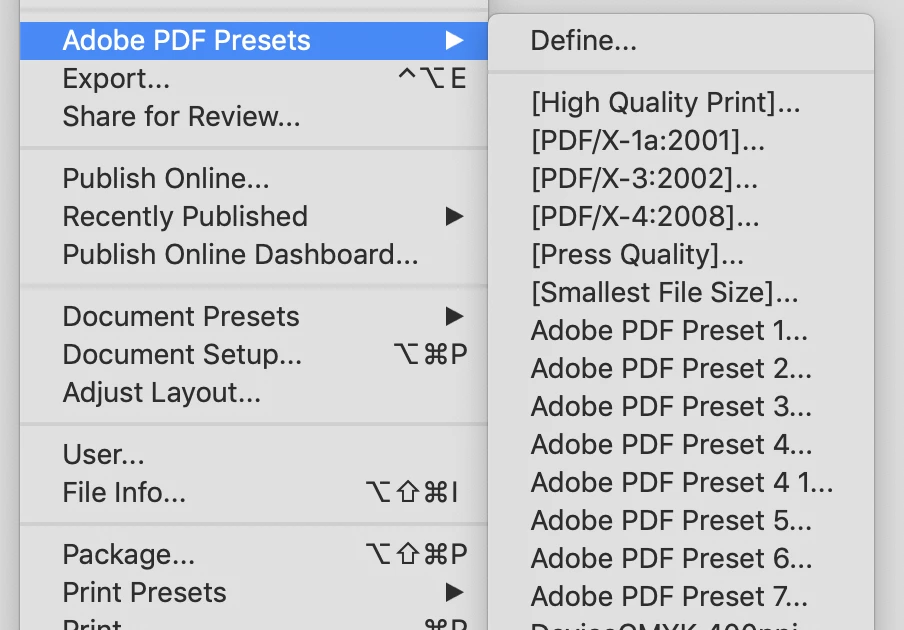
But you want to watch out for adding a new, unnamed preset everytime you run the script, or you’ll get this:


I use something like this to create new or temporary presets:


var doc = app.activeDocument;

if (doc.saved) {
   
    var fp = doc.filePath + "/" +  doc.name.replace(/\.[^\.]+$/, '') + ".pdf"
    //make a temporary preset from the default PDF/X-4 preset
    var preset = makePDFPreset("TempPDF", app.pdfExportPresets.itemByName("[PDF/X-4:2008]"));
    //adjusted properties
    preset.properties = {exportLayers:true, exportNonprintingObjects:true, exportWhichLayers:ExportLayerOptions.EXPORT_VISIBLE_LAYERS, generateThumbnails:true, pdfDisplayTitle:PdfDisplayTitleOptions.DISPLAY_DOCUMENT_TITLE}
    //export
    doc.exportFile(ExportFormat.pdfType, File(fp), false, preset);
    //remove the created preset after export?
    preset.remove()

} else {
    alert("Document Not Saved")
}


/**
* Gets an existing PDF preset, or makes a new named PDF Preset based on an existing preset 
* @ param the preset name 
* @ param bo, an existing preset 
* @ return the pdf preset  
*/
function makePDFPreset(n, bo){
    var ps  = app.pdfExportPresets.itemByName(n);
    if (ps.isValid) {
        return ps;
    } else {
        ps = app.pdfExportPresets.add({name:n});
        ps.properties = bo.properties;
        return ps;
    }
}

2 replies

Lordrhavin
Inspiring
April 2, 2024

@Robert at ID-Tasker @Anantha Prabu G 

The following code spaws the following error at the exportFile()-command (translation from German, might not be exact:
"invalid value for parameter using, PDFExportPreset expected but nothig gotten."

I'm not sure how this can happen, as the using-parameter (the 4th one) *is* a PDFExportPreset-object in my code. anyone can chime in an explain this error?


function main() {
	var name = app.activeDocument.name;
	name = name.replace (/\.(indd|indt|idml)$/, ".pdf")
	
	var path = null;
	try {
		path = app.activeDocument.filePath;
	} catch (error) {} // we ignore if file is unsaved.

	path = Folder(path).selectDlg ('Select folder for the exported PDFs:');
	if (path === null) // user clicked cancel
		return false;

	var myPDFExportPreset = new PDFExportPreset();
	myPDFExportPreset.acrobatCompatibility = AcrobatCompatibility.ACROBAT_6;
	myPDFExportPreset.exportLayers = true;
	myPDFExportPreset.exportNonprintingObjects = true;
	myPDFExportPreset.exportWhichLayers = ExportLayerOptions.EXPORT_VISIBLE_LAYERS;
	myPDFExportPreset.generateThumbnails = true;
	myPDFExportPreset.pdfDisplayTitle = PdfDisplayTitleOptions.DISPLAY_DOCUMENT_TITLE;
	
	app.activeDocument.exportFile(ExportFormat.pdfType, File(path + "/" + name), false, myPDFExportPreset);
	return true;
}

app.doScript(main,ScriptLanguage.JAVASCRIPT,[],UndoModes.ENTIRE_SCRIPT,'Export-Test');


rob day
rob dayCorrect answer
Community Expert
April 2, 2024

Hi @Lordrhavin , Rather than use new PDFExportPreset(), try app.pdfExportPresets.add()—if you use new PDFExportPreset(), then the exportFile() parameter should be myPDFExportPreset.name.


But you want to watch out for adding a new, unnamed preset everytime you run the script, or you’ll get this:


I use something like this to create new or temporary presets:


var doc = app.activeDocument;

if (doc.saved) {
   
    var fp = doc.filePath + "/" +  doc.name.replace(/\.[^\.]+$/, '') + ".pdf"
    //make a temporary preset from the default PDF/X-4 preset
    var preset = makePDFPreset("TempPDF", app.pdfExportPresets.itemByName("[PDF/X-4:2008]"));
    //adjusted properties
    preset.properties = {exportLayers:true, exportNonprintingObjects:true, exportWhichLayers:ExportLayerOptions.EXPORT_VISIBLE_LAYERS, generateThumbnails:true, pdfDisplayTitle:PdfDisplayTitleOptions.DISPLAY_DOCUMENT_TITLE}
    //export
    doc.exportFile(ExportFormat.pdfType, File(fp), false, preset);
    //remove the created preset after export?
    preset.remove()

} else {
    alert("Document Not Saved")
}


/**
* Gets an existing PDF preset, or makes a new named PDF Preset based on an existing preset 
* @ param the preset name 
* @ param bo, an existing preset 
* @ return the pdf preset  
*/
function makePDFPreset(n, bo){
    var ps  = app.pdfExportPresets.itemByName(n);
    if (ps.isValid) {
        return ps;
    } else {
        ps = app.pdfExportPresets.add({name:n});
        ps.properties = bo.properties;
        return ps;
    }
}
leo.r
Community Expert
April 2, 2024

@rob day :


Interestingly, as I have just discovered, these unnamed new presets will appear in the menu but NOT in the Define Adobe PDF Presets window (at least when created by AppleScript). And if you open the Define... window, then click Done to exit, these unnamed presets will be deleted.


Just an observation...


Anantha Prabu G
Brainiac
April 2, 2024

.

Thanks,PrabuDesign smarter, faster, and bolder with InDesign scripting.
Lordrhavin
Inspiring
April 2, 2024

That is a nice start, but not a documentation.

app.pdfExportPreset: how do I create a new one, it has no contructor. I dont want a preset-selection-dialog, i want to construct a new app.pdfExportPreset and set the appropriate settings. is the source-code of this java-class somewhere to be found? I found this one:

https://developer.adobe.com/indesign/dom/api/p/PDFExportPreset/

But is is not really helpful, as it doesnt state a c-tor or any factory method.