


ThomasBadger
Known Participant
August 6, 2019
Question

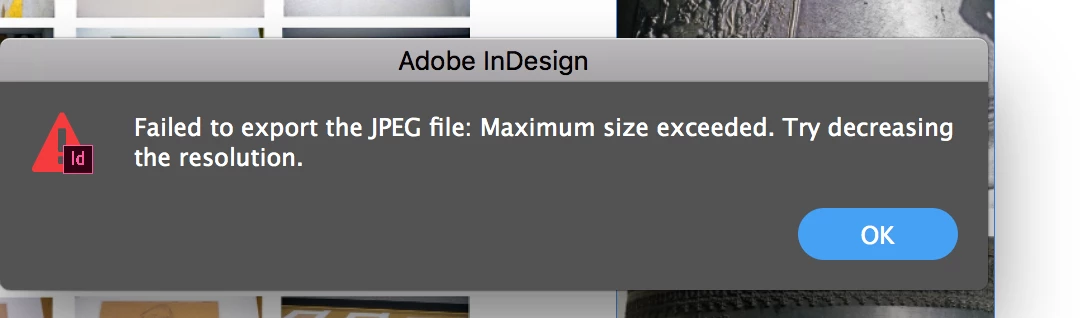
Unable to export JPEG from InDesign 2019! Error: Failed to export the JPEG file: Maximum size exceeded. Try decreasing the resolution.

  • August 6, 2019
  • 4 replies
  • 5102 views

Help, please. I've run out of Xanax and I'm starting in on the dog's 4th of July tranquilizers.

What is the secret to exporting large jpegs from InDesign without spending hours trying to outthink the program? I'm trying to export a 150-inch wide InDesign 2019 document to jpeg but I'm about to blow my brains out because I keep getting the "Failed to export the JPEG file. Maximum size exceeded. Try decreasing the resolution."

I need to make the jpg as large as possible but I don't have the patience to sit and try every combination of resolution and quality.
{Renamed by MOD}

This topic has been closed for replies.

4 replies

Peter Villevoye
Community Expert
Community Expert
August 7, 2019

If it's a mock-up, then why should you use a high resolution ?

At 150" x 6" at 300 DPI InDesign indeed halts; at 150 DPI it works.

But I'd suggest to keep the mock-up at a reasonable 72 dpi or even lower...

ThomasBadger
Known Participant
August 7, 2019

The $64,000 question my friend. He's sending it both as something to be printed out and something to be viewed on screen. For whatever reason some of the photos are coming out normal and high rez and others are pixellated.

If it's a mock-up, then why should you use a high resolution ?

At 150" x 6" at 300 DPI InDesign indeed halts; at 150 DPI it works.

But I'd suggest to keep the mock-up at a reasonable 72 dpi or even lower...

rob day
Community Expert
Community Expert
August 7, 2019

He's sending it both as something to be printed out and something to be viewed on screen.

Then provide 2 files, a PDF for the print version, and a JPEG at a pixel dimension that's appropriate for screen viewing. If you export a 150ppi JPEG for print it would be 22,500 pixels wide, so even if you don't export a PDF for the print version, you would still need two different versions for print and screen.

For whatever reason some of the photos are coming out normal and high rez and others are pixellated.

Check the Effective Resolution of the problem images. The Effective Resolution is the output resolution.

ThomasBadger
Known Participant
August 7, 2019

But I guess the real question is should I be putting this together in InDesign at all? Would it be smarter to just do it in Photoshop to begin with?

Willi Adelberger
Community Expert
Community Expert
August 7, 2019

No, do it in InDesign, but don't use JPG intermediate state. Print from a PDF, best from a PDF/X4. Why should you use the JPG step anyway?

Dov Isaacs
Legend
August 6, 2019

Although the export-as-PDF-and-reopen-in-Photoshop hack mentioned above may resolve any issues or limitations that InDesign may impose, you should be aware there are some limitations in the JPEG file format itself.

What resolution are you trying to export at?

Be aware that JPEG is limited to a maximum of 65,535 by 65,535 pixels in an image. Thus for a 150 inch image, based upon the JPEG specification itself, you cannot exceed approximately 435 pixels/inch resolution for such an image.

BTW, you specify 150 inches wide but how tall is the image you expect to export?

          - Dov

- Dov Isaacs, former Adobe Principal Scientist (April 30, 1990 - May 30, 2021)
ThomasBadger
Known Participant
August 7, 2019

Thank you all for your help. Because of your kindness, I may make it through this project.

It is for a friend who is doing a mockup of a gallery installation along a single, unbroken wall with 43 images all at least 24 inches wide. As a result the size of the finished image is 150 inches long by 6 inches high.

Here it is with the photos removed

Legend
August 7, 2019

I assume that you will be printing this 150"x6" piece out to put on the wall, yes? Will you be printing it as one single sheet, or will it be tiled and put together with tape? I suppose you could go to a place that has a large-format printer that prints on a spool (we have one where I work), but the width of the spool is usually much wider than you would need for a 6" high piece, so it will be expensive, and you will waste a lot of paper.

Either way you do it, I would skip the jpeg stage and just print from a PDF exported from InDesign.

Legend
August 6, 2019

Do you have Photoshop? If so, export a PDF from InDesign, open it in Photoshop at the desired resolution and save it as jpeg.