Inspiring
December 26, 2017
Answered

Unmovable layers from Adobe Resumes?

  • December 26, 2017
  • 5 replies
  • 962 views

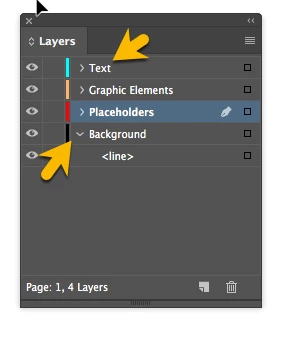
Why can't I love some lawyers such as Background or Text when I download Adobe's free resume?
    This topic has been closed for replies.
    Correct answer Test Screen Name

    Make sure you know about master pages, without which you will be stuck.

    5 replies

    Barb Binder
    Community Expert
    Community Expert
    December 27, 2017

    Hi AnotherMe:

    So many options for lawyer jokes and no one stepped up!

    I think your original question is answered, as well as the question on spreads, body and master pages? If not, let us know.

    I'm going to point out that most of the resumes have both Letter and A4 paper sizes defined as Alternate Layouts, so be sure work on the master pages/body pages of the correct paper size. I find it easier to work with the Pages Panel set to display by Alternate Layout, and of course, you can also delete the pages you don't need. Just drag them to the trash can in the bottom right corner of the Pages panel.

    Before (note the 2 page 1s and 2 page 2s):

    After turning on View Pages > By Alternate Layout:

    If you are still having difficulty updating the layout, let us know the name of the specific Adobe Resume template and exactly what you still need to do. The conundrum is that templates are great for new users to get a head start on a layout, but the use of master pages, body pages and alternate layouts is very confusing the the same new users.

    ~Barb

    ~Barb at Rocky Mountain Training
    jane-e
    Community Expert
    Community Expert
    December 27, 2017

    AnotherMe  wrote

    Why can't I love some lawyers

    Since the <line> element is showing up in the Layers (Lawyers) panel, it is on the spread, not the Master, right?

    The gold arrow is covering the space where the lock icon would be (if it exists). If there is a lock icon, unlock the line.

    Otherwise, please provide the name / number of the template and we can look at it.

    And yes, "why can't I love some lawyers" brightened my day. Thank you for that!!

    AnotherMeAuthor
    Inspiring
    December 27, 2017

    jane-e  wrote

    AnotherMe   wrote

    Why can't I love some lawyers

    Since the <line> element is showing up in the Layers (Lawyers) panel, it is on the spread, not the Master, right?

    The gold arrow is covering the space where the lock icon would be (if it exists). If there is a lock icon, unlock the line.

    Otherwise, please provide the name / number of the template and we can look at it.

    And yes, "why can't I love some lawyers" brightened my day. Thank you for that!!

    Man, I didn't see these typos until now. So funny.

    What's the difference between a spread and a master?

    None of the layers were locked. I was able to select the layer in the master page and make the change.

    AnotherMeAuthor
    Inspiring
    December 27, 2017

    I found the answer.

    Barb Binder
    Community Expert
    Community Expert
    December 26, 2017

    Why can't I love some lawyers such as Background or Text when I download Adobe's free resume?

    These typos made me laugh, but seriously...

    Which template are you using? And what exactly do you need to move? We can help if you can be more specific.

    And in the meantime, here's a trick: let's say you want to move that line on the Background layer. If it is visible in Layers panel, you can just click on the little square on the far right of the word <Line>. That will select it on the page and you can move it with the arrow keys on the keyboard, or by dragging it with the Selection tool (the black arrow at the very top of the Tools panel).

    ~Barb

    ~Barb at Rocky Mountain Training
    Community Expert
    December 27, 2017

    BarbBinder  wrote

    Why can't I love some lawyers such as Background or Text when I download Adobe's free resume?

    These typos made me laugh, but seriously...

    Typos? Don't think so.

    Autocorrection perhaps :-)

    Regards,
    Uwe

    Legend
    December 26, 2017

    No, it has elements that appear on every page. You can't change them from any one page, only by editing the master page. There's a big learning curve to InDesign...

    Test Screen NameCorrect answer
    Legend
    December 26, 2017

    Make sure you know about master pages, without which you will be stuck.

    AnotherMeAuthor
    Inspiring
    December 26, 2017

    https://forums.adobe.com/people/Test+Screen+Name  wrote

    Make sure you know about master pages, without which you will be stuck.

    So a master page has elements that can't be moved?