

Klаus
Inspiring
August 8, 2023
Question

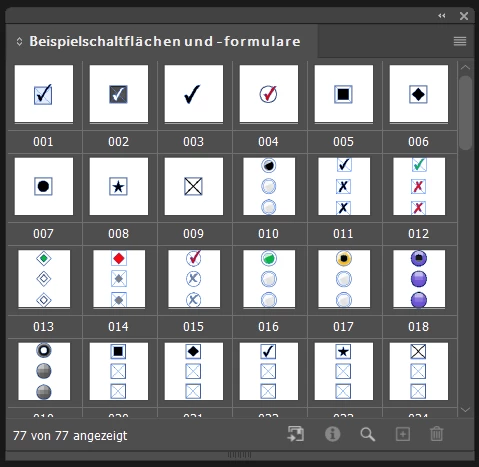
Unwanted »Sample Buttons And Forms« panel on start-up [Windows 10]
  • August 8, 2023
  • 2 replies
  • 819 views

This »feature« is with me since the latest update of InDesign I guess. How to get rid of it?

Thanks

This topic has been closed for replies.

2 replies

Community Expert
August 8, 2023

Hi @Klаus ,

that's unusual. You could trace the library file. It should be in the InDesign application folder:

Presets > Button Library > ButtonLibrary.indl

Don't know if you can or should remove it from there.


If you like trace the path to the file with this ExtendScript (JavaScript) when this InDesign library file is showing up:

( function()
{
if(app.libraries.length == 0 )
{ 
	alert("Message:" +"\r"+ "No open INDD-Libraries found!" );
	return 
};

var libs = app.libraries.everyItem().getElements();
var resultPaths = [];

for( var n=0; n<libs.length; n++ )
{
	resultPaths[n] = app.libraries[n].fullName;
}

alert( "Open Libraries:" +"\r"+ resultPaths.join("\r") );
}() )


What's your version of InDesign? 18.5.0 now?

I cannot see this behavior with my updated InDesign 18.5.0 on Windows 10.

But I can remember, that in an earlier version of InDesign some years ago, it happened to me as well.

Removing cache and preferences could help as well…


Regards,
Uwe Laubender
( Adobe Community Expert )

Community Expert
August 8, 2023

Here is where you find preferences and cache on your machine:

https://helpx.adobe.com/indesign/using/setting-preferences.html


Regards,
Uwe Laubender
( Adobe Community Expert )

Eric Dumas
Community Expert
August 8, 2023

Do you use workspaces to control the panels activated and their layout on your screen(s)?

Workspace basics in InDesign (adobe.com) (scroll past the half-way down to reach 

Save and switch workspaces