
Participant
April 27, 2015
Answered

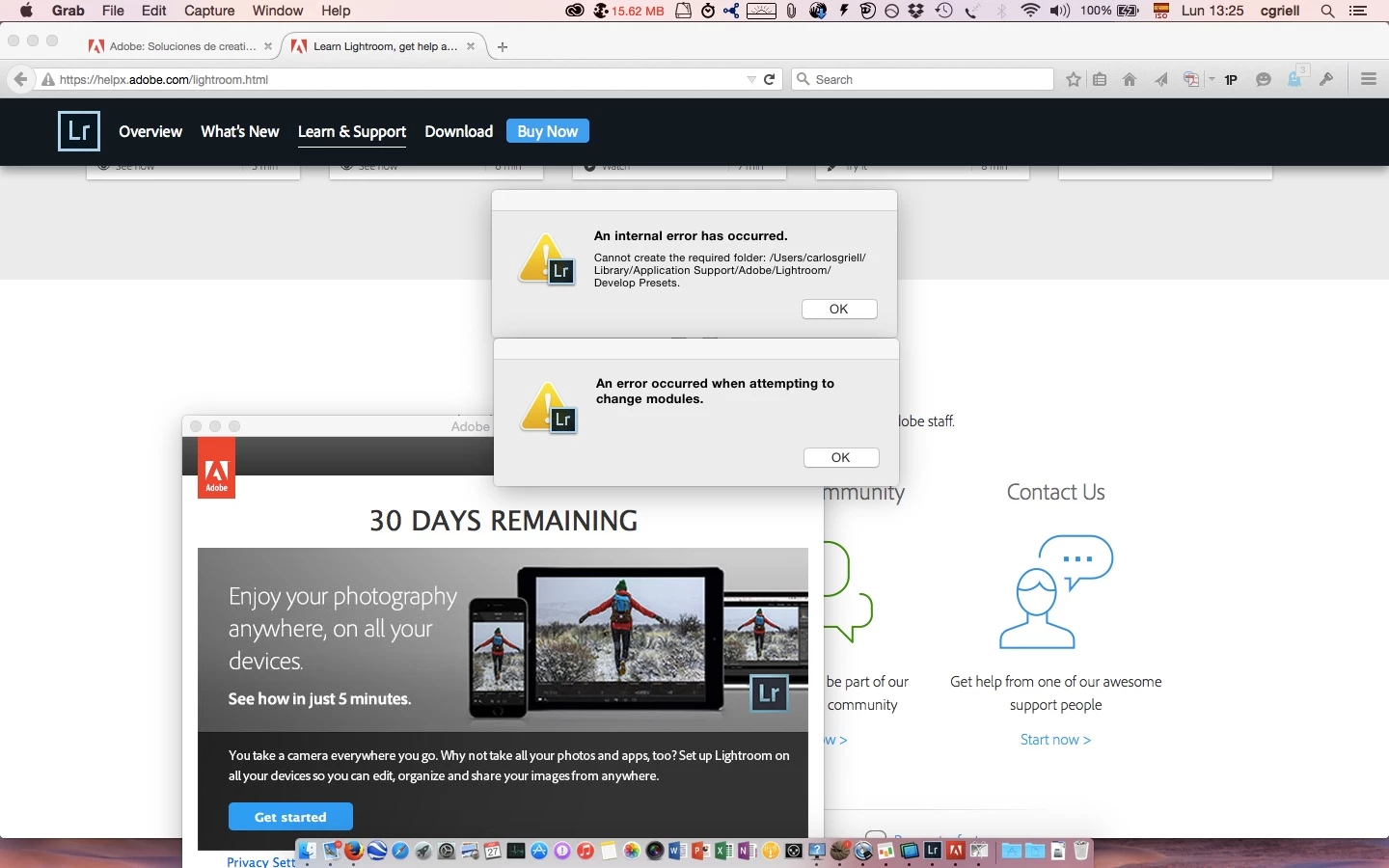
Cannot create the required folder

  • April 27, 2015
  • 23 replies
  • 31019 views

I am on a Mac with Yosemite, and I plan to migrate from Aperture (BTW, thanks, Apple!) to something else, and one of the options is LR. So, I downloaded the trial version but when launching it presents a window with a fatal error "Cannot create required folder). I am the sole user on my system, I have administrator privileges, I have tried to create a folder in the exact place where LR can't, and I created it with no error messages.. so, what's wrong? I add a copy of my error screen
    This topic has been closed for replies.
    Correct answer Govardhan.V

    Please follow below steps :

    1) Right click on Finder icon and  select "Go-To" Folder option.
    2) You will get a text box, type-in below command and then hit 'Return' key.( Do not miss ~ symbol)

    ~/library

    3)Then navigate to Application Support>Adobe.

    Right click on Adobe folder and select GetInfo option.

    Expand the Sharing & Permissions section.

    Click the lock icon in the lower-right corner. Enter your administrator user name and password when prompted, and then click OK.

    Please click on '+' symbol , it will open list of user accounts.

    Add all user accounts and then provide "Read & Write" permission to all user accounts. ( If not okay , just add currently logged in user name and Administrator)

    Click the Gear icon, and select Apply to Enclosed Item. Close the Get Info dialog box.

    Then launch Lightroom application and check.

    Let me know if you still face any issue .

    23 replies

    Ed_Vert
    Participant
    October 28, 2015

    Ok what worked for me, and I think I read it on a previous page or another thread was just to manually create all the folders.  A thanks to whoever posted it. When it says "cannot create..." you just copy the folder name from the message, go to the directory, click the gear icon and choose "new folder" - create it then re-name the untitled folder the appropriate name.

    Yeah it's a little bit of a pain but it goes fast. Here it is in screenshots...and yes you have to type in your PW every time but it goes pretty quick. Once you get into light room and start working it will still do it if it finds a folder that you are missing but just be patient and all will work fine.

    Like I said Adobe really needs to fix this though.

    maggiet50358303
    Participant
    October 28, 2015

    I tried everything you instructed but it still doesnt work for me.. when i launch my lightroom application it presents the window with ''cannot create required folder''

    Govardhan.V
    Participating Frequently
    October 28, 2015

    Did you tried launching from Root user account?

    Govardhan.V
    Participating Frequently
    January 24, 2016

    You are most welcome 

    Ed_Vert
    Participant
    October 12, 2015

    I did this and it did NOT work. Adobe really needs to fix this issue!

    What else can I do??

    Govardhan.V
    Participating Frequently
    October 12, 2015

    You can try repairing Disk permissions via Disk Utility.

    Or just for checking , Enable Root account once and then login to same and then check .

    Panavarela
    Participant
    September 14, 2015

    big thaaaaaaanks!!!

    Participant
    September 5, 2015

    Thank you so much!!!!

    Participant
    August 12, 2015

    It does not work for me :/

    Govardhan.V
    Participating Frequently
    August 13, 2015

    Mac computers has 2 libraries.

    ~/library =User Library

    /library = System Library,.

    Please confirm whether you had provided full permissions to currently logged in user account and Administrator fort Adobe folder under User Library ?

    jessek81802166
    Participant
    June 16, 2015

    YES it worked!! thank you Brucgovn

    nataliew82858401
    Participant
    June 9, 2015

    Perfect!!! I would have never figured that out haha, thank you!

    MustbeMarj
    Participant
    June 7, 2015

    WOW!!! Thanks Worked like a charm.

    Participant
    May 30, 2015

    Legend!!!! that worked a treat!!