Participant
July 28, 2022
Answered

Circle of noise created when merge to HDR

  • July 28, 2022
  • 4 replies
  • 2664 views

I get this circle of noise on about 15% of images I process. These are from brackets of 7 images and don't seem to matter if it's a dark area or not. Always in a circle, and only when HDR processed in Lightroom. Version 111.4.1, but iv'e been dealing with this for a year.

Correct answer GoldingD

OK, a more useful observation/inquiry.


When you merged, what did you have the Deghost Amount set to? Deghosting is not perfect, and can lead to issues. When it does, try less deghosting. 


In my test, I went all bonkers and set deghost to high, and a circle of noise occurred much like your issue, same location, circular. (might also be a bit on the left)
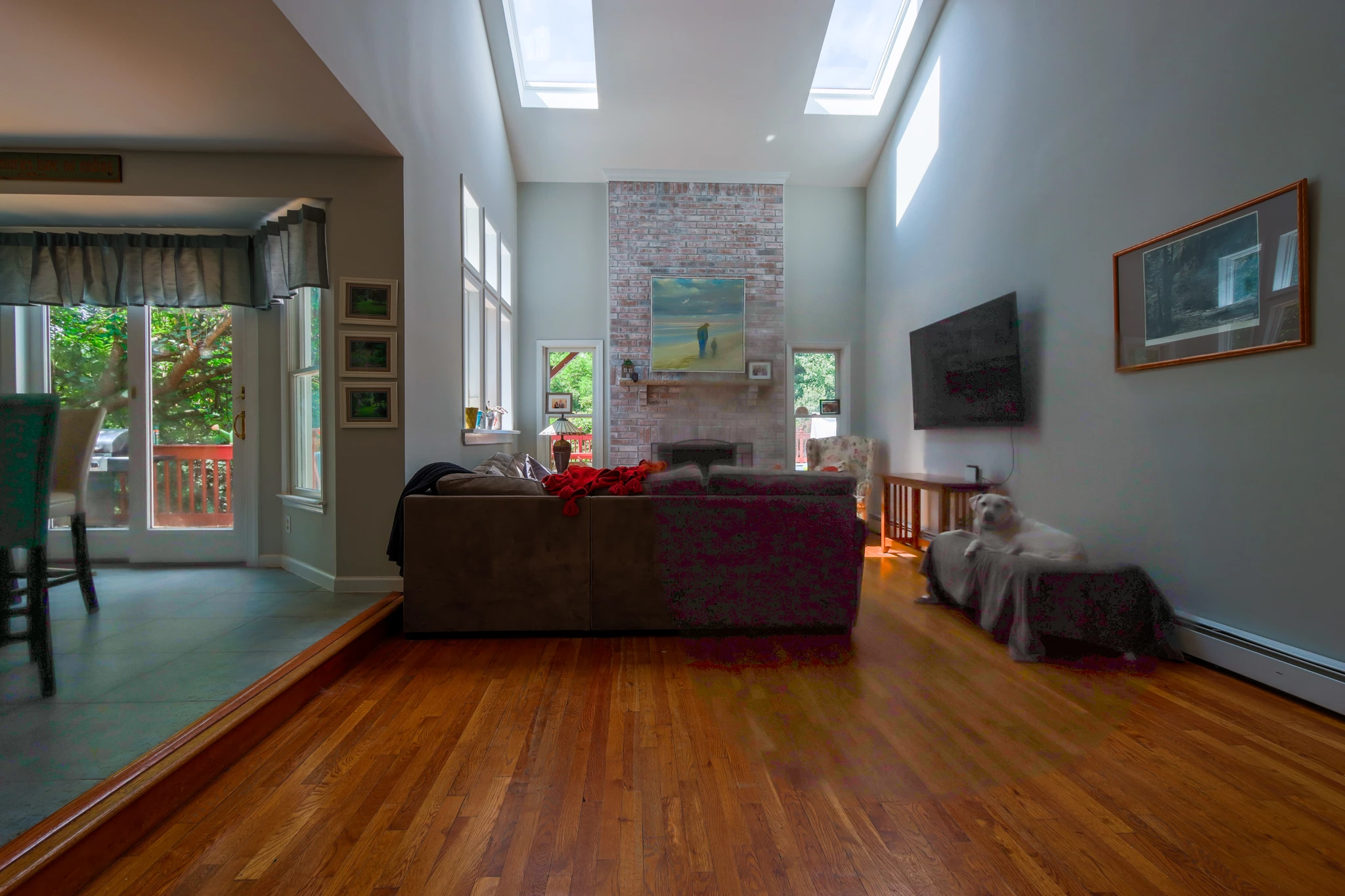


Mind you, your friend appears to have moved a bit, so no deghosting will not work. Try low:
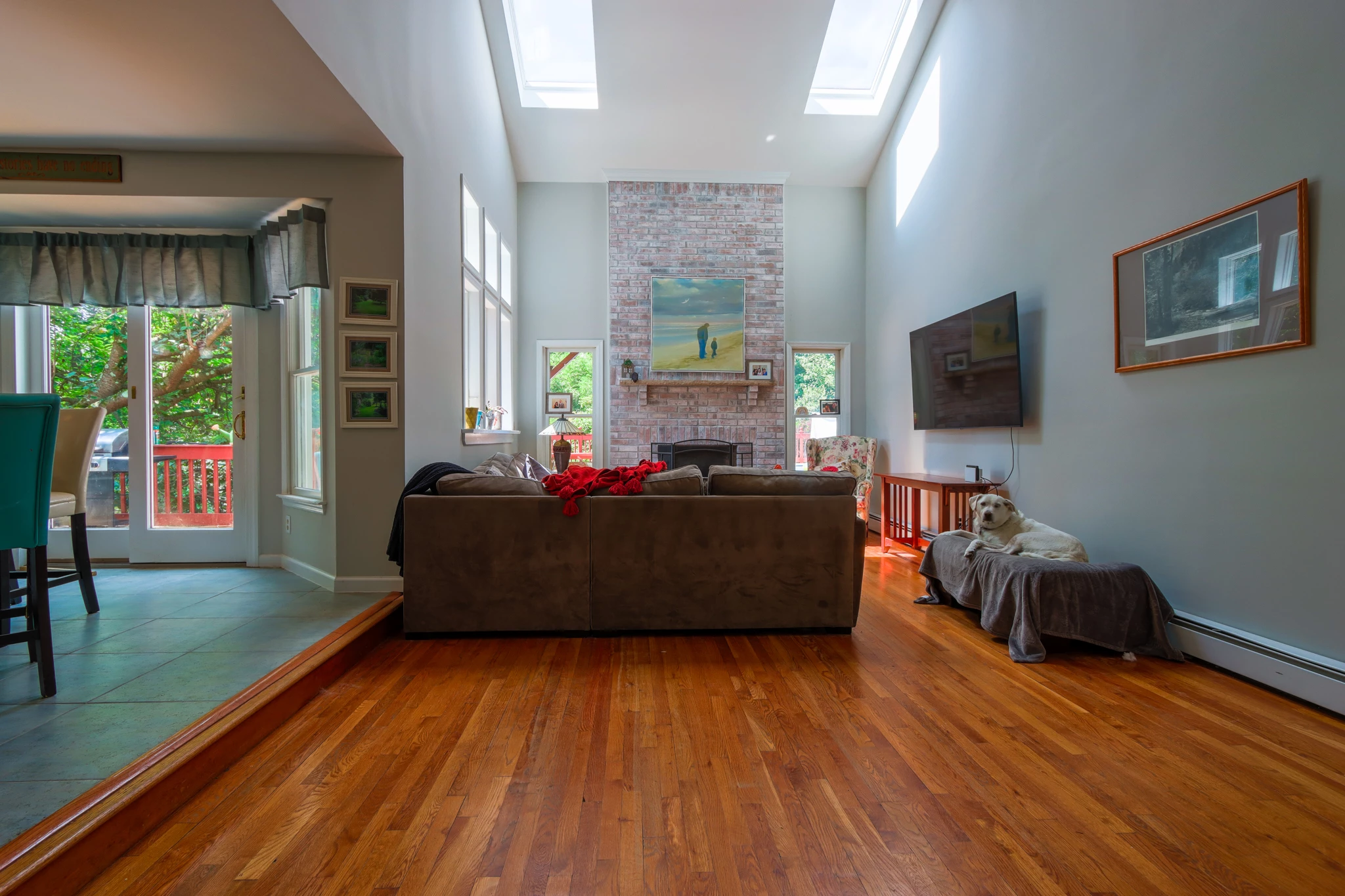
 

Mind you, just some quick tonal adjustments, so take the results with a grain of sand.

4 replies

GoldingD
GoldingDCorrect answer
Legend
July 29, 2022

OK, a more useful observation/inquiry.


When you merged, what did you have the Deghost Amount set to? Deghosting is not perfect, and can lead to issues. When it does, try less deghosting. 


In my test, I went all bonkers and set deghost to high, and a circle of noise occurred much like your issue, same location, circular. (might also be a bit on the left)


Mind you, your friend appears to have moved a bit, so no deghosting will not work. Try low:


Mind you, just some quick tonal adjustments, so take the results with a grain of sand.

Participant
July 29, 2022

Thank you very much, GoldingD! My deghosting setting sat at High and I never bothered with it, had no idea I was living my life all bonkers. 🙂 Lowering the ghosting solved my long term issue. This saves me time and improves my work. Thank you. 

Participant
August 11, 2025

Version 14.4 still remains this problem. I need people on picture to be sharp, but only set to "High" can help. 

GoldingD
Legend
July 29, 2022

So, looking at your samples. Your shooting at what bracket, something like 1-1/2 stop? To tight, your camera has better dynamic range than that, try something more like 2 stops, perhaps 2-1/2 stops, and you will not need seven frames, more like 3. Too many frames can cause artifacts in challenging pics in LrC Photo Merge.


Also, in terms of artifacts, shooting RAW would be better. (separate observation/inquiry to follow)

Participant
August 21, 2024

This was exactly what I needed!!! I had too many stops and it gave me a patch of noise.  THANK YOU!

Rob_Cullen
Community Expert
Community Expert
July 29, 2022

Hi @schmirector . I took the liberty of downloading your images and tested HDR merge.

I cannot reproduce the 'noise' effect you are seeing.

I might suggest that you really do not need seven images for a HDR. Even 2 or 3 should suffice to give a suitable result.

So i do not have an answer for you, other than it could be lens flare that is being exaggerated in the HDR, but then I would expect to see it in my merges!

Try with 3.


My Seven merge-


And a merge from 3 photos  (136, 138, 140)

Regards. My System: Windows-11, Lightroom-Classic 15.0, Photoshop 27.0, ACR 18.0, Lightroom 9.0, Lr-iOS 10.4.0, Bridge 16.0 .
GoldingD
Legend
July 28, 2022

Recommend that you share a bracket of shots so that members can test on their rigs. Perhaps at Dropbox.


Inquiry:

Are you accomplishing any develop edits prior to the merge?

Do you apply any presets at import?


and:

Please post your System Information as Lightroom Classic (LrC) reports it. In LrC click on Help, then System Info, then Copy. Paste that information into a reply. Please present all information from first line down to and including Plug-in Info. Info after Plug-in info can be cut as that is just so much dead space to us non-Techs.

 
Participant
July 28, 2022

https://www.dropbox.com/sh/19awds2gpz8lkk2/AAB3WEA_mEkPmhEil7JzdPOca?dl=0
Here are the 7 brackets and my noisy HDR-dng. Thanks for the suggestion, GoldingD

GoldingD
Legend
July 29, 2022

Are you shooting in JPEG, not RAW?

Wondering if these are the in camera originals.

