WobertC wrote The "Rabbit Hole" gets deeper Can I demonstrate my thoughts on workflow to you with screen-clips? Try following this procedure as a test. 1) I have an image from the camera that I have imported into Lightroom. It is called {Original Camera File.DNG} This file is located in a folder called {IMAGE ORIGINALS} 
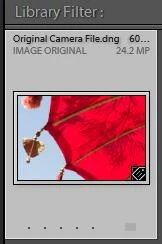
2) I do some Develop edits in the Lightroom Develop module. I invert the Tone Curve (easy to see) 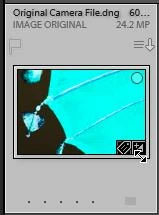
Note that now this thumbnail shows the 'Developed' BADGE. It is still the same {Original Camera File.dng} It just 'looks' visibly different in the Library, Loupe and Develop views of Lightroom. Here we differ, but it's "only" a matter of semantics. To me, it's developed, it looks different, it is different, it's not the original. What's the same is the original, and that's kept outside of LR. We're changing it in LR, that's what we're about. Original=unchanged. So, we're not in Kansas any more. I'll leave it, just remembering that semantics issues can cause understanding issues. 3) I EXPORT this image to a sub-folder called "LR" (as you are trying to do) with these settings- I have NOT created a {LR} folder prior to opening the Export dialog- I will let Lightroom create it for me. I might be missing something. About letting LR create the folder, there's already an original folder, you're exporting to it. All LR is creating is the "LR" subfolder, and you're telling it to, and naming it. That's my routine. The [Add to This Catalog] option must be checked if you want the folder and exported image to appear in the catalog! 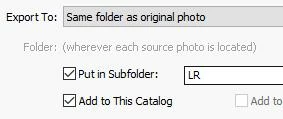
4) The result is this- The sub-folder {LR} has been created automatically and it contains the EXPORTED JPG image. 
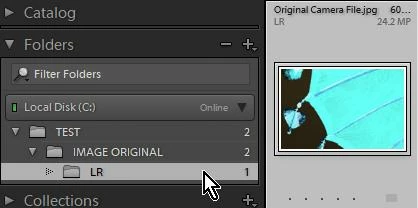
Note: This thumbnail does NOT SHOW the Developed BADGE! It is a brand-spanking-new JPG image file! 5) Now- If i have the Preference set 'ON' to "Show photos in sub-folders" -I see this when I select the parent [IMAGE ORIGINAL] folder- 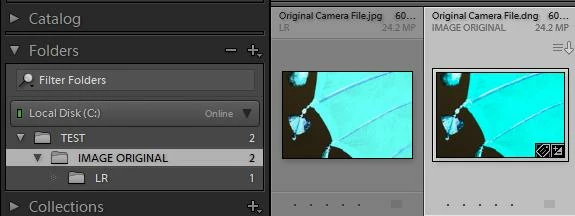
The .DNG with the 'edited' badge is the "Original". The .JPG without an 'edited' badge is the Exported file. That's a great explanation, and I know it didn't come easy. Off topic alert: I went to LR to try and replicate what I recall, and it is in "Navigator," where I was doing a search per instructions from djpaige. It won't open my D drive, where all the folders are. I'll close and reopen, but . . .. OK now. With "add" checked, that's what I get, too. I've never paid any attention to it since it's about "catalog" which I prefer not to deal with. Looks like a real rabbit hole to me. My catalog is the file tree. I'm a no catalog guy and one catalog = no catalog, fine with me. I don't add descriptions, etc., to my photos. A catalog must be a sub-library. I have zillion folders and subfolders instead. I've imported, I've processed, and I'm exporting processed files. The export with "add" checked, and the misnamed (to me) "show subfolders" checked (LR confuses files and folders there. I want to see subfolders. I don't want to see the files in the subfolders displayed in the parent folder!), produces two folders and three of everything. Can't see the use of that! At least now I know why I kept getting two of everything in the original folder. As i spend my time using the files outside of LR there are no badges, just confusing multiplicity of pics. Evidently I checked that "add" box long ago, probably per Kelby or something I was reading. It got unchecked recently, somehow. When I export with "add to cat." unchecked I get what I showed elsewhere, with my "test." One folder with edited content and badges. Here it is again. That crescent moon was mostly sky before the edit.That's the edited version in the export. With badges. If we're calling that the original, I'll have to "go ask Alice." 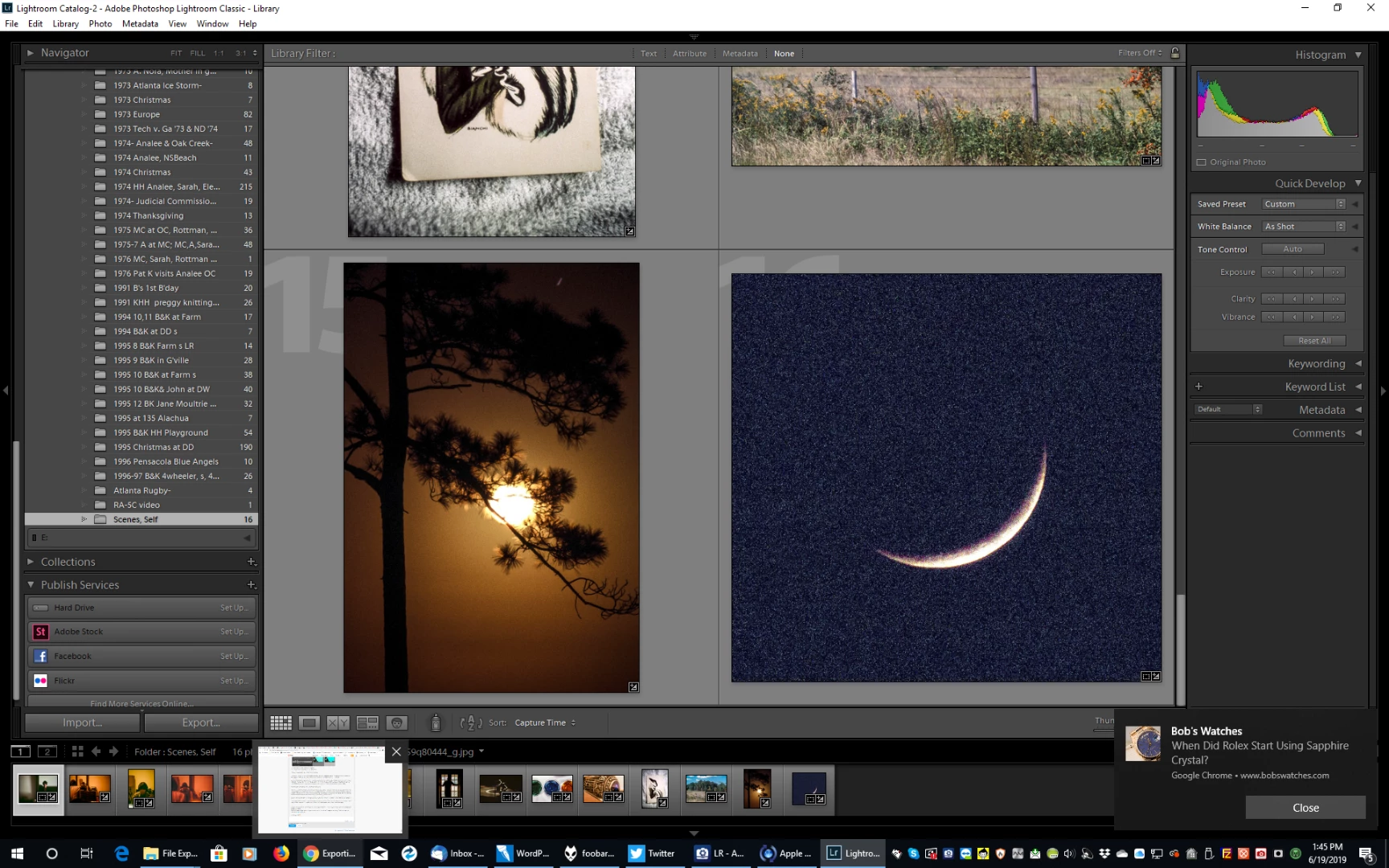
I cannot seem to explain any better the process, but I can see the problems you are having and the possible errors causing these problems, including- Multiple catalogs, All your problem identifications are correct, but: About the multiple catalogs - Not my doing! Not consciously. I leave that catalog stuff alone! (The dang things are mostly empty now, anyway!) Multiple versions of Lightroom Adobe sold 'em. I recall no warnings about anything. I probably thought I "owned" 2015 and might not want to rent Classic forever. Certainly since everything is CC, all about the cloud now, two LR programs would share the same data. Now I'm told the two catalogs are so different they won't speak to one another. I really don't know about that, because I'm sure the newer program didn't start with an empty catalog, it took the existing catalog somehow. Not adding or importing ALL images to one catalog, I've never created a single catalog, much less a second one. Wanted no truck with that. It all happened automatically in LR.. 'Copying' at Import (as discussed by dj_paige , etc. Possible occasionally. Doesn't explain the recently missing files. I did dj's search and the files are on the computer but not in LR. LR can't find'em. Time for a coffee | 



 AdChoices