


Inspiring
June 29, 2017
Question

Forcing Lightroom to delete plugins

  • June 29, 2017
  • 2 replies
  • 1823 views

Lightroom CC 2015.10.1, Normal PC, Windows 10, 64-bit.

I have a plugin in here for Helicon Focus.  I've had plugins in Lightroom about since I started using Helicon Focus.  They've never worked well so I generally ignore them.  BUT, it WOULD (possibly) make life simpler if I could actually USE HF from Lightroom....

In the Plugin Manager (in theory, I've attached a picture) I HAVE a plugin called "HeliconFocus".  It's red, and says "Installed but not working".  The Status: is "plug-in is malfunctioning and can not be used" and the Last message says "Info.lua: bad header in precompiled chunk"
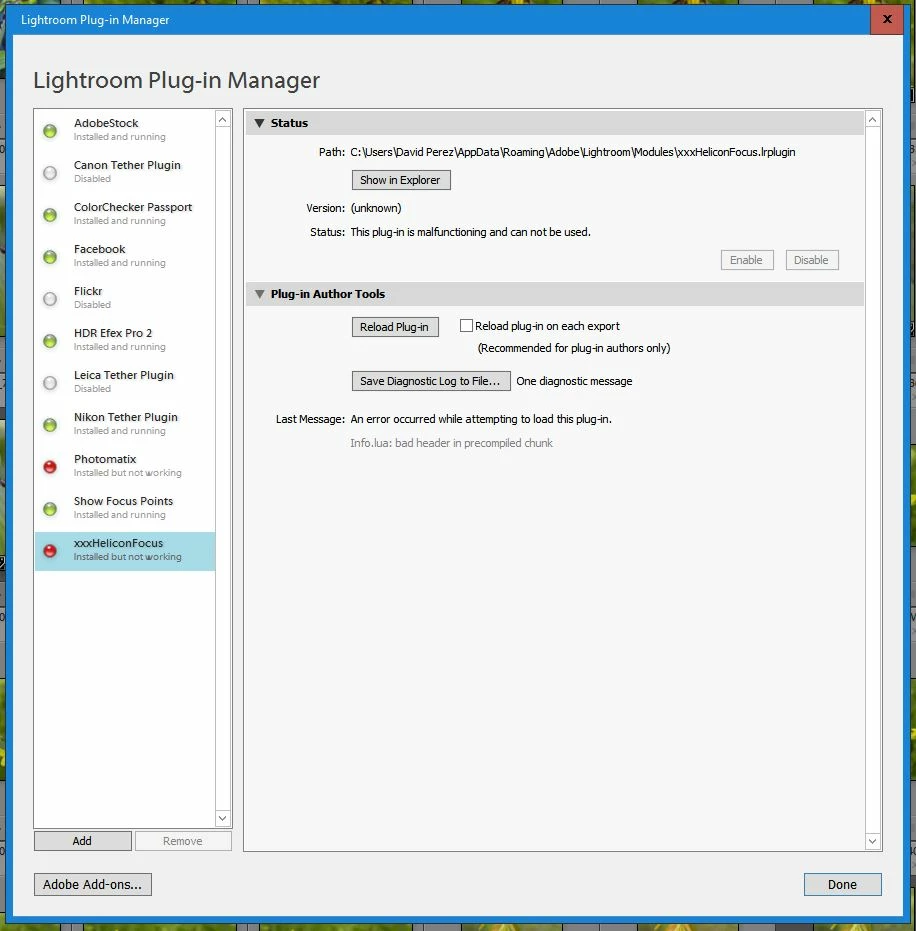
I can go over the Helicon and complain that there's a problem with their plugin, but I'm 100% positive they're just gonna tell me it's not them, its Lightroom.  SO, HOW do I get Lightroom to remove this thing and make like it's NEVER been there so I can try to reinstall it and see if it continues to pule all over it's feet?

    This topic has been closed for replies.

    2 replies

    johnrellis
    Genius
    June 30, 2017

    it WOULD (possibly) make life simpler if I could actually USE HF from Lightroom....the Last message says "Info.lua: bad header in precompiled chunk"

    That error message likely indicates you've got a corrupted download.  You might re-download and reinstall the software.

    Inspiring
    June 30, 2017

    OK, I got the plugin to go away.  Unfortunately, re-installing it from Helicon Focus (which is the only way I know of to get it installed) results in exactly the same errors...  I even uninstalled and re-installed Helicon (which always seems like that old definition of insanity - doing the same thing over and over and expecting different results), with exactly the same result...

    I've posted in the Helicon forum.  Hopefully, I'll get  a quick resolution 'cause it's a major pain in the *** to have to wade through thousands of images in HF trying to find the right stack to load...

    johnrellis
    Genius
    June 30, 2017

    "I've posted in the Helicon forum."

    That's likely your best route at this point.  That error message indicates a plugin file is in invalid format, and given you downloaded it twice, it's very unlikely that it got corrupted in the download/install process.  So it's more likely that the server copy is invalid, something only Helicon can fix.

    Just Shoot Me
    Legend
    June 30, 2017

    Click the button that says Show in Explorer. Once that opens showing you the file close LR and Delete it. Maybe restart your computer and LR and see if it is still there.