


leonardhein
Participant
July 24, 2020
Answered

How to create smart collection with only people

  • July 24, 2020
  • 4 replies
  • 1696 views

Is it possible to create a smart collection with only photos of people in it?


I have successfully created a smart collection with a keyword for my company. But then it also adds all the odd technical photos. My aim is to create a smart collection based on conditions a) keyword = "company name" and condition b) only have people in it (based on face recognition, or keyword marked as "Person")

Thank you. 
This topic has been closed for replies.
Correct answer JohanElzenga

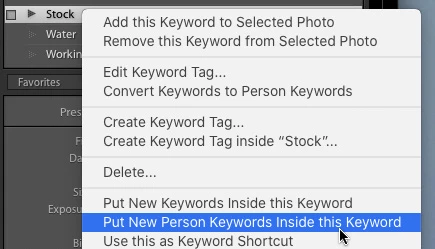
It's not in the 'Edit Keyword Tag' menu, but in the menu you'll get when you right-click on the keyword.


4 replies

johnrellis
Legend
July 29, 2020

"It's not in the 'Edit Keyword Tag' menu, but in the menu you'll get when you right-click on the keyword."


Right, thanks for the correction.


[Use the blue reply button under the first post to ensure replies sort properly.]


johnrellis
Legend
July 29, 2020

Also, in the Keyword List panel, right-click the People keyword and do Edit Keyword Tag. Check the option Put New Person Keywords Inside This Keyword. 


[Use the blue reply button under the first post to ensure replies sort properly.]

leonardhein
Participant
July 29, 2020

Hi John,


Thank you for your feedback. However, I do not find the option "Put New Person Keywords Inside This Keyword" ?

JohanElzenga
Community Expert
JohanElzengaCommunity ExpertCorrect answer
Community Expert
July 29, 2020

It's not in the 'Edit Keyword Tag' menu, but in the menu you'll get when you right-click on the keyword.


-- Johan W. Elzenga
leonardhein
Participant
July 28, 2020

Thank you Johan.

JohanElzenga
Community Expert
Community Expert
July 24, 2020

Create a parent keyword 'People' and drag all your people keywords underneath that parent. Then you can search for 'People' as keyword and/or use 'People' in a smart collection.

-- Johan W. Elzenga