


Participating Frequently
November 17, 2020
Answered

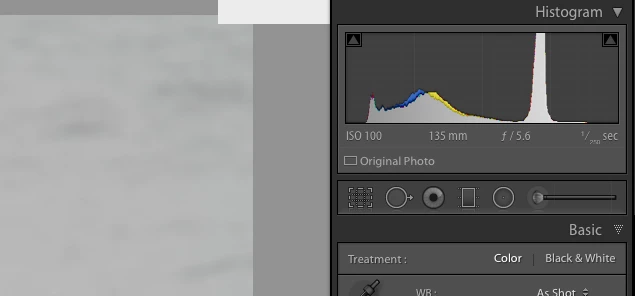
In Mac LR CC Develop screen small white rectangular box upper right hand corner..... what is it for?

  • November 17, 2020
  • 6 replies
  • 1582 views

There is a small rectangular white box in the upper right corner of the image frame of the Develop screen. What does it signify?                     VVVVVVVVV      
This topic has been closed for replies.
Correct answer STRProd

Seems to coincide with installation of MacOS BigSur (11.0.1).

Lr Classic V6.0 (yes, it is old)

A few other bugs noticed in using. meh.

6 replies

johnrellis
Genius
March 21, 2021

"Does not solve the problem. Any other ideas? Is this a bug that Adobe is addressing or intends to address?"


Do the menu command Help > System Info. If that shows you are on LR 6, then no, Adobe won't address it. They stopped supporting LR 6 when they released LR 7 3.5 years ago.  See this reply for a workaround that has helped others:

https://community.adobe.com/t5/lightroom-classic/in-mac-lr-cc-develop-screen-small-white-rectangular-box-upper-right-hand-corner-what-is-it-for/m-p/11645625#M214634


If you're on LR 10.2 (the most recent version), then post a screenshot of what you see.


[Use the blue reply button under the first post to ensure replies sort properly.]

Participating Frequently
December 7, 2020

I updated to LrC-release 10 and it appears to have gone away.  Thanks for the advice. - Mark

johnrellis
Genius
December 3, 2020

Others have reported glitchy white boxes at the top of Develop in LR 6 on Mac OS 10.11.  A workaround that has helped others: Do View > Loupe Info > Show Info Overlay to turn off the info overlay. You don't get to see the info overlay, but you won't see the white box either.


[Use the blue reply button under the first post to ensure replies sort properly.]


Participant
December 3, 2020

I have the exact same issue.  Same size, same spot. Doesn't seem to respond to the suggested fix.


STRProdCorrect answer
Participant
December 3, 2020

Seems to coincide with installation of MacOS BigSur (11.0.1).

Lr Classic V6.0 (yes, it is old)

A few other bugs noticed in using. meh.

Just Shoot Me
Legend
November 17, 2020

That you have a Graphics subsystem Problem. Video card and or driver problem.


As above in the nested reply by Axel Matt turn off the GPU optioon and Test.

Legend
November 17, 2020

I'm guessing this is a malfunction of the graphics card/graphics driver.

AxelMatt
Community Expert
Community Expert
November 17, 2020

Please try to switch off the GPU support from the Lightroom preferences and check if that helps to fix the issue. 

Go to Lightroom > Preferences > Performance tab > Uncheck "Use Graphics Processor" > Restart Lightroom. 

https://helpx.adobe.com/lightroom-classic/kb/lightroom-gpu-faq.html#troubleshooting 

https://helpx.adobe.com/lightroom-classic/kb/troubleshoot-gpu.html 

My System: Intel i7-8700K - 64GB RAM - NVidia Geforce RTX 3060 - Windows 11 Pro 25H2 -- LR-Classic 15 - Photoshop 27 - Nik Collection 8 - PureRAW 5 - Topaz Photo
Participant
March 20, 2021

Does not solve the problem. Any other ideas? Is this a bug that Adobe is addressing or intends to address?