


pantelisc24963498
Participant
October 28, 2017
Answered

Keywords list order

  • October 28, 2017
  • 2 replies
  • 3686 views

Hi there,

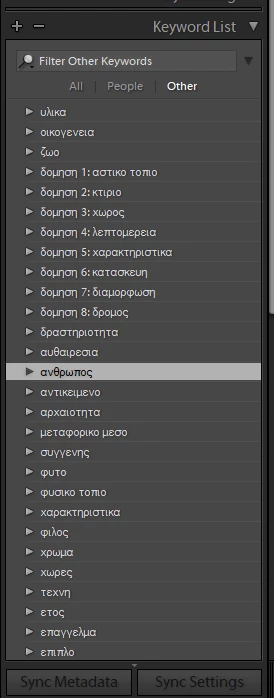
since the last upgrade, lightroom re-ordered my hierarchical keywords and these are no longer in alphabetical order. Do you know if there is a way to re-adjust that or change it? Do you think the it's a problem that I write my keywords in Greek?

thanks

Pantelis
This topic has been closed for replies.
Correct answer abhishek_india

Try adding following config to config.lua:

LibrarySort.useOldSort = true

To locate the config.lua, Open Lightroom > Preferences > Presets

Click on "Show Lightroom Presets Folder..."

It should take you to folder ending with ... /Application Support/Adobe/Lightroom/

If config.lua is already present in Lightroom folder, just add,

LibrarySort.useOldSort = true
in the config.lua file. If the file is not present create a file named config.lua and add the same configuration there.

2 replies

abhishek_india
abhishek_indiaCorrect answer
Participating Frequently
November 8, 2017

Try adding following config to config.lua:

LibrarySort.useOldSort = true

To locate the config.lua, Open Lightroom > Preferences > Presets

Click on "Show Lightroom Presets Folder..."

It should take you to folder ending with ... /Application Support/Adobe/Lightroom/

If config.lua is already present in Lightroom folder, just add,

LibrarySort.useOldSort = true
in the config.lua file. If the file is not present create a file named config.lua and add the same configuration there.

pantelisc24963498
Participant
November 11, 2017

Thanks a lot for your response. Adding that setting in my config.lua solved

the sorting problem.

2017-11-08 7:56 GMT+02:00 abhishek_india <forums_noreply@adobe.com>:

Keywords list order created by abhishek_india

<https://forums.adobe.com/people/abhishek_india> in Lightroom Classic CC

- View the full discussion

<https://forums.adobe.com/message/9953427#9953427>

johnrellis
Genius
October 28, 2017

Please do Help > System Info and report the exact version of LR you're running and the version of Mac or Windows.  There are some existing bugs that may or may not affect you.

pantelisc24963498
Participant
October 28, 2017

Hello

I have Windows 10 Home and Adobe Photoshop Lightroom Classic CC 7.0.1 Camera Raw 10.0

In the previous version of lightroom the ordering of the keywords was correct.

thanks

johnrellis
Genius
October 28, 2017

There have been recent bugs in the sort order of presets on Mac, but nothing reported for keywords or for Windows.

Try these initial troubleshooting steps:

1. Reboot.

2. Reset LR's preferences: https://www.lightroomqueen.com/articles-page/how-do-i-reset-lightrooms-preferences/

Sprinkling that magic fairy dust often fixes things when LR's user interface goes wonky.