
Participant
June 18, 2014
Question

Lightroom 5.5 crashes

  • June 18, 2014
  • 33 replies
  • 19008 views

I just installed the update to 5.5, and in the last hour it has crashed 4 times. I get the error below. never had a problem until I upgraded. Ironically, I updated it because I wanted the bug fixes, but all I got were bugs. Is there actually anything I can do to try to fix it? Running Win 8.1. And like I said, worked fine until I updated.
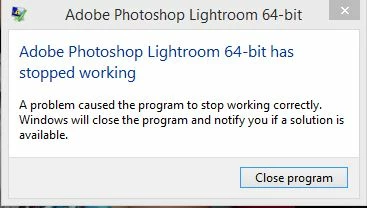
    This topic has been closed for replies.

    33 replies

    Inspiring
    June 25, 2014

    I just had my first crash with LR 5.5 on Win 7/64. The crash happens during Synchronize Folder command, after it had found changes and synchronizing... Get the same error message as the first post. However, checking the Event Viewer, the following is recorded:

    Faulting application name: lightroom.exe, version: 5.5.0.10, time stamp: 0x5391f1ae

    Faulting module name: wpdmanager.mox, version: 0.0.0.0, time stamp: 0x48a324a9

    Exception code: 0xc0000005

    Fault offset: 0x000000000001f885

    Faulting process id: 0xab0

    Faulting application start time: 0x01cf907095a9a2d8

    Faulting application path: C:\Program Files\Adobe\Adobe Photoshop Lightroom 5.5\lightroom.exe

    Faulting module path: C:\Program Files\Adobe\Adobe Photoshop Lightroom 5.5\moxplugins\wpdmanager.mox

    Report Id: 0ff89b13-fc64-11e3-9d3c-1c6f65382535

    My installation was through a direct download

    Have tried several times, with the same result. Will play around, if a particular folder is causing the problem

    Participating Frequently
    June 25, 2014

    I am tearing my hair out!! Double trouble. I use bothy MAC and PC and am unable to load Lightroom 5.5 in either.

    I had Teck Support on line yesterday for about 90 minutes, fiddled with permissions on my PC but with no success. Now they tell me to call Microsoft as it is a permissions issue.

    BUT there were no problems with ANY version of Lightroom from the beta. I have over 20, 000 pictures stuck in Lightroom and no way to access them.

    I will follow some of the advice her and re install 5.4 on the PC.

    Teck support have not got around to my MAC yet but I am not sure that I even want them to. I will try some of the fixes listed here.

    But this is just not good enough. Adobe need to take a long hard look at what they have done and release a fix that will work on both MAC and PC.

    KeesJansen
    Participant
    June 24, 2014

    Moved back to 5.4. No issues.

    Only Adobe release versions that have same bugs on multiple platforms.....

    dbilgerAuthor
    Participant
    June 24, 2014

    I haven't tried any of the troubleshooting to try to get this to work since I am in the middle of several projects. But I did revert back to 5.4 and no issues ever since. So when I have the time to deal with it, maybe I'll give it another shot.

    andy.d.bell
    Known Participant
    June 24, 2014

    Same problem here.

    Windows 7, no crashes until the 5.5 update.

    If it helps, I just noticed the last time it crashed, I got a quick pop-up from bezel.exe which I understand is a program used by either my AMD graphics card or processor.

    It's happening every hour or so and I have some tough deadlines to meet. Please fix this quickly!

    Another new bug I've noticed is that in the library module, if I flag a photo as rejected then decide to keep it and undo the flag, instead of displaying the photo I just un-flagged (like it had in previous versions) there is no photo available and I have to scroll through my grid of 1,000 or so images to get back to where I was. What used to take a fraction of a second is now a major problem.

    KeesJansen
    Participant
    June 24, 2014

    Only a company like Adobe can screw up this big.

    It's unbelievable. And then people are actually paying for a subscription.

    Lightroom 5.5 is like an Alpha version. Does Adobe test their own software?

    Known Participant
    June 23, 2014

    I am also having the occasional crash on Windows 8.1. If I go to "Help->Lightroom Online" it will crash every time.

    Known Participant
    June 23, 2014

    Mine is crashing every 30-60 minutes since the 5.5 update.  (Windows 7, never had this problem with earlier releases.)  Horrible, Adobe!!

    Participant
    June 19, 2014

    Finally had to de-install LR5.5, download from site and re-install.  Now working!

    xaci_68
    Inspiring
    June 19, 2014

    I have a different problem (MAC and Mavericks updated to the last 10.9.3):

    Any idea? In the mean time I'll try download it from the direct link

    xaci_68
    Inspiring
    June 19, 2014

    Solved this issue...