


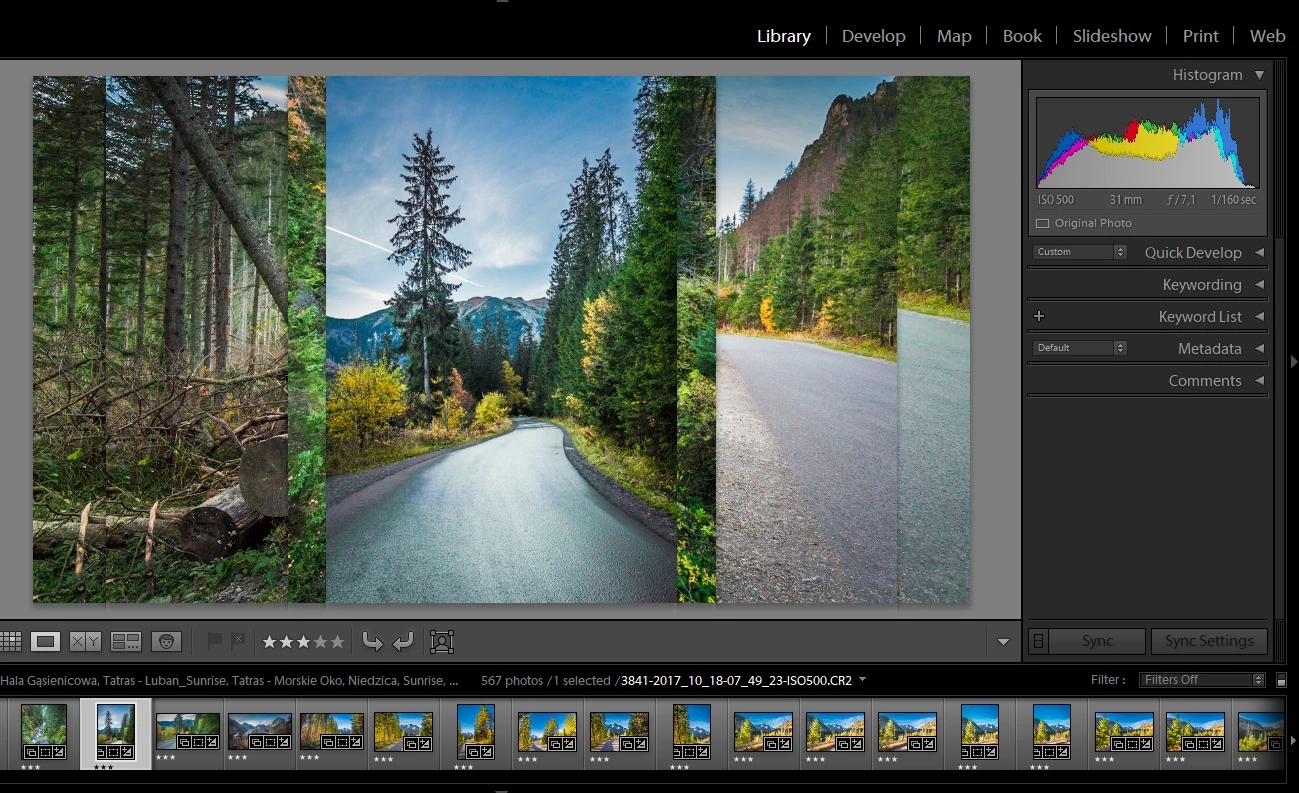
Lightroom Classic CC render issue in library view (mixed photos)
I have problem displaying in the Library module.
The background behind the image does not refresh, so after seeing a few images all are mixed (See a preview below.).
The previous version of Lightroom correctly displayed everything.
All drivers are up to date.
In my opinion this is a bug in Lightroom, not in operating system or drivers.
None of the knowing solutions do not help. In this thread
- Copy config.lua file with "AgView.disableDirect2D = true"
- Check/uncheck "use GPU"
My system info.
Laptop Dell Inspiron N7110.
Lightroom Classic version: 7.0.1 [ 1142117 ]
License: Creative Cloud
Operating system: Windows 10
Version: 10.0
Application architecture: x64
System architecture: x64
Logical processor count: 8
Processor speed: 2,1 GHz
Built-in memory: 8086,1 MB
Real memory available to Lightroom: 8086,1 MB
Real memory used by Lightroom: 1963,3 MB (24,2%)
Virtual memory used by Lightroom: 1809,0 MB
GDI objects count: 584
USER objects count: 2169
Process handles count: 1366
Memory cache size: 489,6MB
Maximum thread count used by Camera Raw: 5
Camera Raw SIMD optimization: SSE2,AVX
Camera Raw virtual memory: 806MB / 4043MB (19%)
Camera Raw real memory: 807MB / 8086MB (9%)
System DPI setting: 96 DPI
Desktop composition enabled: Yes
Displays: 1) 1600x900
Input types: Multitouch: No, Integrated touch: No, Integrated pen: No, External touch: No, External pen: No, Keyboard: No
Graphics Processor Info:
OpenGL: GeForce GT 525M/PCIe/SSE2
Check OpenGL support: Passed
Vendor: NVIDIA Corporation
Version: 3.3.0 NVIDIA 388.13
Renderer: GeForce GT 525M/PCIe/SSE2
LanguageVersion: 3.30 NVIDIA via Cg compiler
Total Video Memory: 2048 MB
 AdChoices