



hyund39164868
Participant
April 1, 2024
Answered

P: (GPU) Develop/Edit view & Export artifacts after 14.4.1 Update (AMD-only) (affects Cr, LrC & LrD)

  • April 1, 2024
  • 139 replies
  • 100163 views

Hi,


Since just now, I've been experiencing a weird bug / crash in Lightroom Classic (on a Mac), where ALL my photos suddenly are fully covered in artefacts in the Develop module.
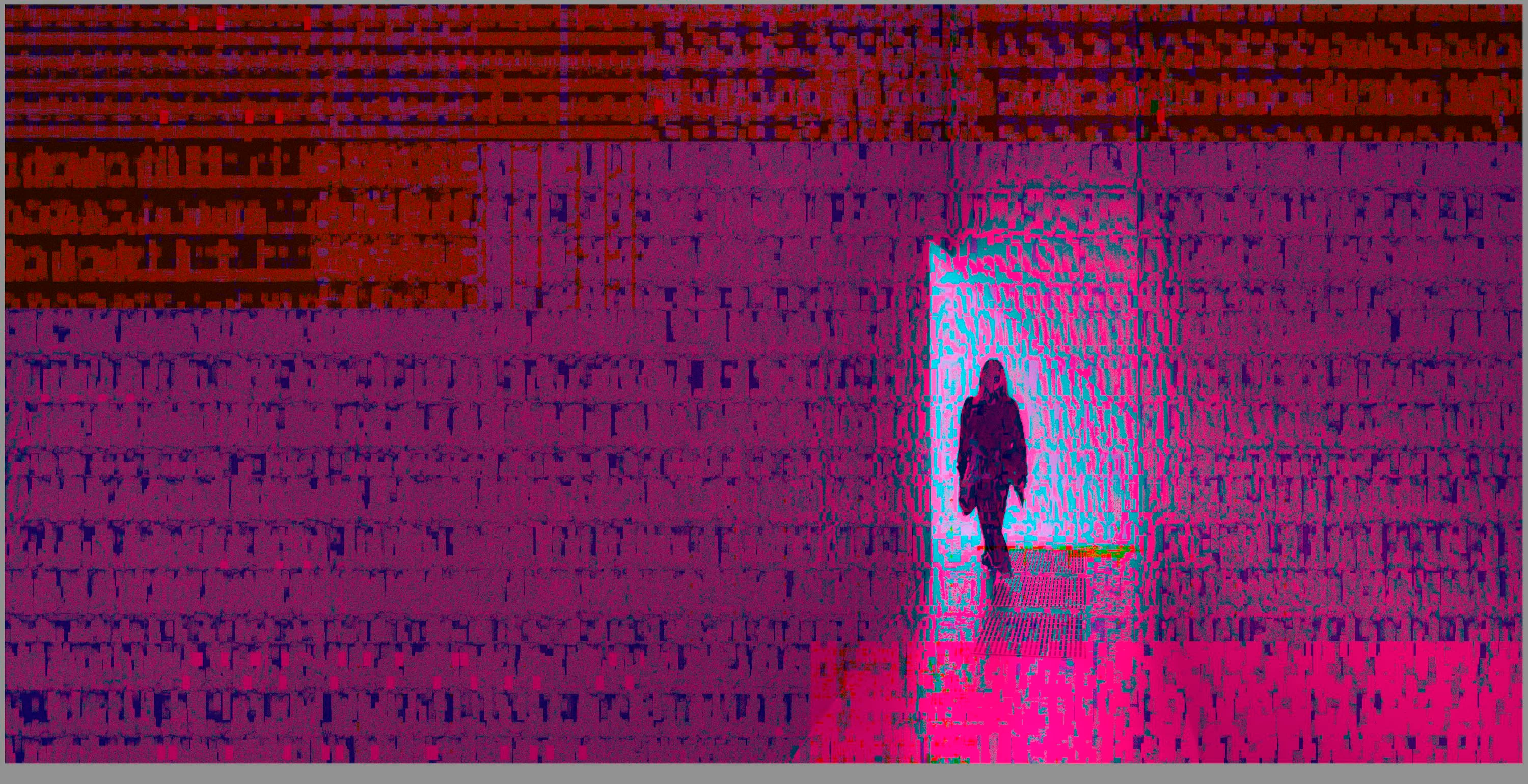
 

(Screengrab from the Develop module in Lightroom Classic)


When I check the linked RAW + JPEG source files in Finder, they all seem ok (they don't look corrupted, nor show any artefacts here), meaning the issue is within Lightroom.
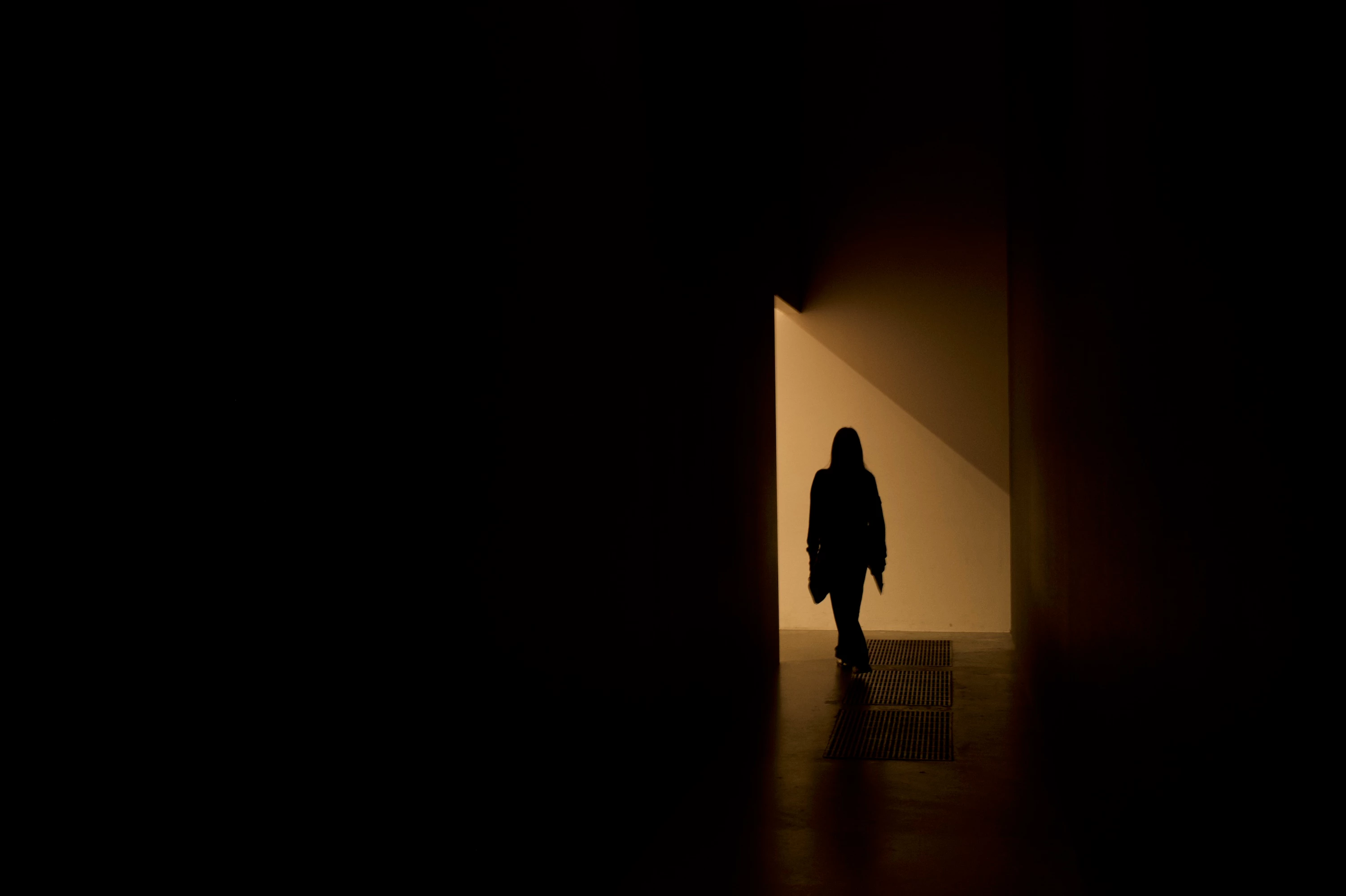
 

(Screengrab from the RAW source file in Finder)


When I export images out of Lightroom (with any setting, edited or even not edited), the artefacts are also present on the export files.
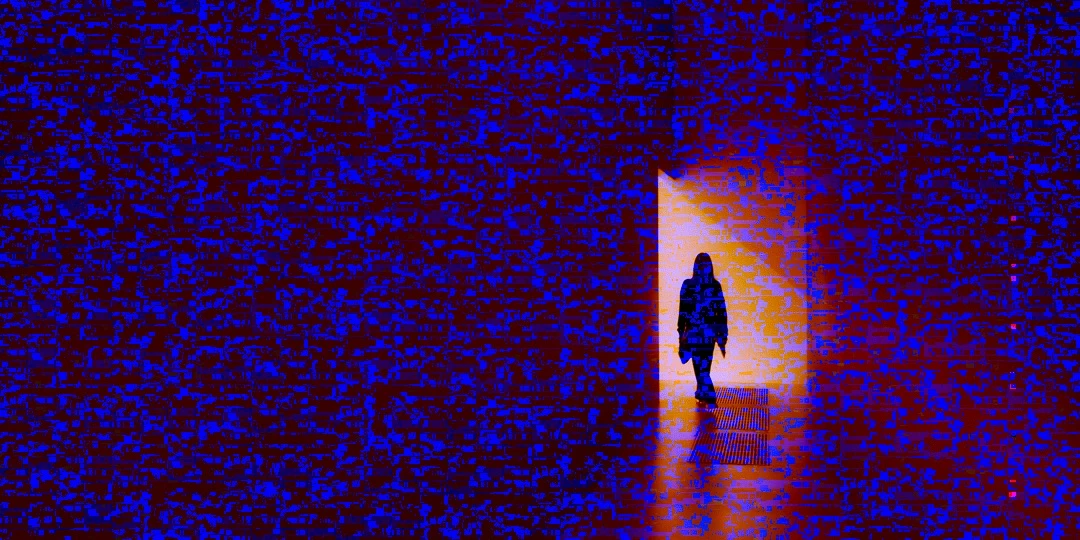
 

(Screengrab from the exported JPG image)


This problem started occuring soon after I applied the new AI noise reduction feature on just ONE (1) photo. 


I already tried:


  • Closing and re-opening Lightroom
  • Shutting down (fully), and restarting the computer after 1 minute
  • Switching the GPU accelrator setting in Lightroom on/off


MY SPECS

  • Lightroom Classic 13.0.1 - Build (202310121438-d2af310c)
  • Macbook Pro 16" - 2019
  • 2,3Ghz 8-core Intel Core i9
  • AMD Radeon Pro 5500M 8GB 
  • 32GB 2667MHz DDR4 memory
  • OS Sonoma 14.4.1


Any help would be greatly appreciated, because this makes the whole software unusable....

Thank you!

139 replies

Participant
August 30, 2024

Thank you so much for that information! I will try that and see if it helps.

johnrellis
Legend
August 29, 2024

@theresa_2326


Your screenshots show you have a 2019 Macbook Pro with an AMD Radeon 5000-series GPU.


Apple released a buggy graphics driver for it in Mac OS 14.4.1. Most people report images covered with static-like noise but a few have reported problems with LR's AI commands.


Users experiencing noise and artifacts can often work around the problem by restarting their computer and/or setting Preferences > Performance > Use Graphics Processor to Off.  But for problems with AI masking caused by the buggy driver, you're out of luck: For some inexplicable reason, Adobe refuses to allow users to disable use of the GPU by LR's AI commands.


Adobe says they notified Apple months ago, but who knows if/when Apple and AMD will release a fixed driver.

Participant
August 29, 2024

Hello all,


Since I've updated lightroom the color on my images are distored. I do not know all of the technical terms to really describe exactly what is happening. So I've included screenshots of what I think would be useful information. Please let me know if I need to include more. I've dealt with dehaze turning my images black. I just try not to use dehaze, but now I do not know what is causing the images to change colors. Its like blue and yellow. On one image you can see lines throughout the image. 

Participating Frequently
August 22, 2024

I've been having this same issue for a while now and cannot figure out what is going on. While editing in Lightroom, my raw files will randomly become corrupt looking- with magenta and green stripes cutting through the images. The files on my actual hard drive appear fine, and when I restart my computer and begin editing again, the files come back and I'll have no issues. I've enventually exported many of these images and delivered to clients with no problem, so it really seems like the file is fine. But sometimes it happens very frequently, making editing a huge pain. Plus I'm nervous there must be something wrong with the file if it keeps happening.


some additional info- I am shooting on a Sony a7iii. I have 2 camera bodies and it seems the images from both cameras have this issue. This problem started happening sometime after I started using a new kind of external drive- portable Samsung t7 shield. I have two of them and the images do the same thing on both drives. I also use various memory cards so it's not just one card. And I edit on a MacBook Pro. 


Please help me figure out this problem!! 

dj_paige
Legend
August 22, 2024

Additional information needed:


  • Are you using Lightroom (Lr icon) or Lightroom Classic (LrC icon)? What version NUMBER? (we need the version NUMBER and not words like "latest" or "up-to-date")
  • What operating system and version NUMBER. (we need the version NUMBER and not words like "latest" or "up-to-date")
  • What GPU (make and model) is installed in your computer?
  • Please show us a screen capture of this problem when it happens. Please use the "Insert Photos" icon to include your screen capture in your reply. Do NOT attach files. 
Participating Frequently
August 23, 2024

1. I am using Lightroom Classic. version 13.5

2. My Opereting System is Sonoma 14.5

3. GPU- AMD Radeon Pro 5300M 


Participant
August 20, 2024

Occasionally while editing, I'll run into an issue like this and have to completely restart my computer for it to go away. I have tried shutting down my lightroom classic and when I open it back up, it'll be the same. I have the latest lightroom classic update. I have tried googling this but have no clue what to even put to find the answers I need! I'll attach images of what it looks like below! My files are perfectly fine, but for some reason it'll show up all pixelated! It will do it to every file I click on in the develop mode. 


I recently upgraded to a Nikon Z8 and the files are bigger, although I don't think that would make a huge difference. Nothing has changed other than a new camera. Is my computer to old to handle bigger and newer files like this?? How do I fix this issue? 

Rikk Flohr_Photography
Community Manager
August 20, 2024

Year of Mac: 
OS Version: 
Graphics Card Model: 

Rikk Flohr: Adobe Photography Org
Participant
August 29, 2024

Year: 2019

OS Version: 14.6.1

Graphics card: AMD Radeon Pro 5500M 4 GB, Intel UHD Graphics 630 1536 MB

Participant
August 13, 2024

After reading this thread, I changed my setting to Use GPU for display, purged the cache, and closed our lightroom and it it working fine now. Also just to mention I am on Sonoma 14.6.1 on my 2019 MacBook Pro, and here is my system info in case anyone else has more in depth advice for my situation :


Lightroom Classic version: 13.4 [ 202406181129-60d181b7 ]
License: Creative Cloud
Language setting: en-US
Operating system: Mac OS 14
Version: 14.6.1 [23G93]
Application architecture: x64
Logical processor count: 12
Processor speed: 2.6GHz
SqLite Version: 3.36.0
Power Source: Plugged In, 100%
Built-in memory: 16,384.0 MB
Dedicated GPU memory used by Lightroom: 1,005.4MB / 4,080.0MB (24%)
Real memory available to Lightroom: 16,384.0 MB
Real memory used by Lightroom: 2,546.8 MB (15.5%)
Virtual memory used by Lightroom: 38,462.4 MB
Memory cache size: 104.1MB
Internal Camera Raw version: 16.4 [ 1897 ]
Maximum thread count used by Camera Raw: 5
Camera Raw SIMD optimization: SSE2,AVX,AVX2
Camera Raw virtual memory: 1933MB / 8191MB (23%)
Camera Raw real memory: 2022MB / 16384MB (12%)

Cache1:
Preview1- RAM:28.0MB, VRAM:0.0MB, 5A9A7582.CR2
Final2- RAM:248.0MB, VRAM:0.0MB, 5A9A7581.CR2
Preview3- RAM:22.0MB, VRAM:0.0MB, 5A9A7576.CR2
Final4- RAM:1,194.0MB, VRAM:0.0MB, 5A9A7580.CR2
Preview5- RAM:28.0MB, VRAM:0.0MB, 5A9A7585.CR2
Preview6- RAM:28.0MB, VRAM:0.0MB, 5A9A7577.CR2
Preview7- RAM:28.0MB, VRAM:0.0MB, 5A9A7578.CR2
Preview8- RAM:28.0MB, VRAM:0.0MB, 5A9A7579.CR2
Preview9- RAM:28.0MB, VRAM:0.0MB, 5A9A7583.CR2
Preview10- RAM:28.0MB, VRAM:0.0MB, 5A9A7584.CR2
Final11- RAM:248.0MB, VRAM:0.0MB, 5A9A7575.CR2
NT- RAM:1,908.0MB, VRAM:0.0MB, Combined:1,908.0MB

Cache2:
m:104.1MB, n:1,286.4MB

U-main: 69.0MB

Standard Preview Size: 3584 pixels
Displays: 1) 3584x2240, 2) 1920x1080, 3) 1920x1080

Graphics Processor Info:
Metal: AMD Radeon Pro 5300M
Init State: GPU for Image Processing supported by default
User Preference: GPU for Display Enabled

Application folder: /Applications/Adobe Lightroom Classic
Library Path: /Volumes/Hannah/2024/SOCIAL/WEEK 33/WEEK33_2024_HC_SOCIAL/WEEK33_2024_HC_SOCIAL.lrcat
Settings Folder: /Users/hceliz/Library/Application Support/Adobe/Lightroom

Installed Plugins:
1) AdobeStock
2) Aperture/iPhoto Importer Plug-in
3) Flickr
4) Nikon Tether Plugin

Config.lua flags:


Participating Frequently
August 13, 2024

As requested, the is the System Info from LR:
(please, forgive my bad English, my language is Portuguese from Brazil)


System Info:


Lightroom Classic version: 13.4 [ 202406181129-60d181b7 ]
License: Creative Cloud
Language setting: en-BR
Operating system: Mac OS 14
Version: 14.5.0 [23F79]
Application architecture: x64
Logical processor count: 16
Processor speed: 2,3GHz
SqLite Version: 3.36.0
Power Source: Plugged In, 100%
Built-in memory: 16.384,0 MB
Dedicated GPU memory used by Lightroom: 4.682,1MB / 4.080,0MB (114%)
Real memory available to Lightroom: 16.384,0 MB
Real memory used by Lightroom: 3.070,5 MB (18,7%)
Virtual memory used by Lightroom: 55.868,7 MB
Memory cache size: 166,2MB
Internal Camera Raw version: 16.4 [ 1897 ]
Maximum thread count used by Camera Raw: 5
Camera Raw SIMD optimization: SSE2,AVX,AVX2
Camera Raw virtual memory: 905MB / 8191MB (11%)
Camera Raw real memory: 931MB / 16384MB (5%)

Cache1:
Preview1- RAM:22,0MB, VRAM:0,0MB, 20240810_121724_DSF0730.raf
Final2- RAM:189,0MB, VRAM:0,0MB, 20240809_191318_DSF0653.raf
Final3- RAM:216,0MB, VRAM:36,0MB, 20240809_191318_DSF0653-Enhanced-NR.dng
Final4- RAM:189,0MB, VRAM:0,0MB, 20240809_191350_DSF0663-Enhanced-NR-Edit.tif
Preview5- RAM:5,0MB, VRAM:0,0MB, 20240810_121716_DSF0728.raf
Preview6- RAM:5,0MB, VRAM:0,0MB, 20240810_121839_DSF0736.raf
Preview7- RAM:5,0MB, VRAM:0,0MB, 20240809_191350_DSF0663.raf
Preview8- RAM:22,0MB, VRAM:0,0MB, 20240809_191350_DSF0663-Enhanced-NR.dng
Final9- RAM:189,0MB, VRAM:0,0MB, 20240809_191349_DSF0660-Enhanced-NR.dng
NT- RAM:842,0MB, VRAM:36,0MB, Combined:878,0MB

Cache2:
m:166,2MB, n:816,2MB

U-main: 86,0MB

Standard Preview Size: 1024 pixels
Displays: 1) 4096x2560

Graphics Processor Info:
Metal: AMD Radeon Pro 5500M
Init State: GPU for Image Processing supported by default
User Preference: GPU for Image Processing Enabled

Application folder: /Applications/Adobe Lightroom Classic
Library Path: /Users/andre/Pictures/Lightroom/Lightroom Catalog-RIO-v13-3.lrcat
Settings Folder: /Users/andre/Library/Application Support/Adobe/Lightroom

Installed Plugins:
1) AdobeStock
2) Aperture/iPhoto Importer Plug-in
3) Flickr
4) HDR Efex Pro 2
5) JPEGmini
6) Nik 6 HDR Efex
7) Nikon Tether Plugin
😎 ON1 NoNoise AI 2022
9) ON1 Photo RAW 2021
10) ON1 Photo RAW 2024
11) ON1 Resize 2021
12) Plugin Parameters

Config.lua flags:


Participant
August 13, 2024

I am on Lightroom Classic 13.4 on a Macbook Pro and there have been a few times where I am editing photos in Lightroom and my photo will all of a sudden glitch and all these pixels are filled with colors. I go to Library and the picture looks normal again but still messed up in Develop mode. The only fix I have seem to have found is restarting my computer, then all is good again. Is there a fix to this and also an explanation? 

dj_paige
Legend
August 13, 2024

If you are using an AMD GPU, this is happening to a lot of people. Please search the forums for an explanation and an answer.

Participating Frequently
August 13, 2024

Does anyone also have the problem shown in the image below?

Is there any definitive solution?


If I disable Use Graphic Processor in Preferences, the problem disappears...


I'm using a 2019 MacBook Pro with 16GB and an I9 processor.

Until last month I was using a 2014 MacBook Pro with 16GB and an I7 processor and this problem did not happen. It's regrettable...


GoldingD
Legend
August 13, 2024

Looks like this bug:


  • I deleted this link post merge


you have:


  • 2019 MacBook Pro
  • 16GB RAM
  • I9 processor.
  • GPU ??? is it an AMD?
  • MACOS ??? is it v14.4.1 ?
  • LrC v 13.0.1 or newer (up to v13.4)?


No one is sure yet if this is an Apple bug, or an Adobe bug, or both. No one at Adobe has shared an estimate on when this may or may not be fixed.


P.S. Do not be surprised if your posting gets merged into the above link.

Legend
August 12, 2024

Do you have an Intel Mac with a Radeon GPU?