
Participating Frequently
June 20, 2026
Answered

P: Lightroom Denoise suddenly stopped working

  • June 20, 2026
  • 117 replies
  • 1564 views

Hi everyone,

I'm having an issue with the latest version of Lightroom CC on a MacBook M5 Pro running macOS Tahoe 26.5.1. (I was experiencing the same problem on 26.5 and decided to update hoping it would fix it, but unfortunately it didn't.)

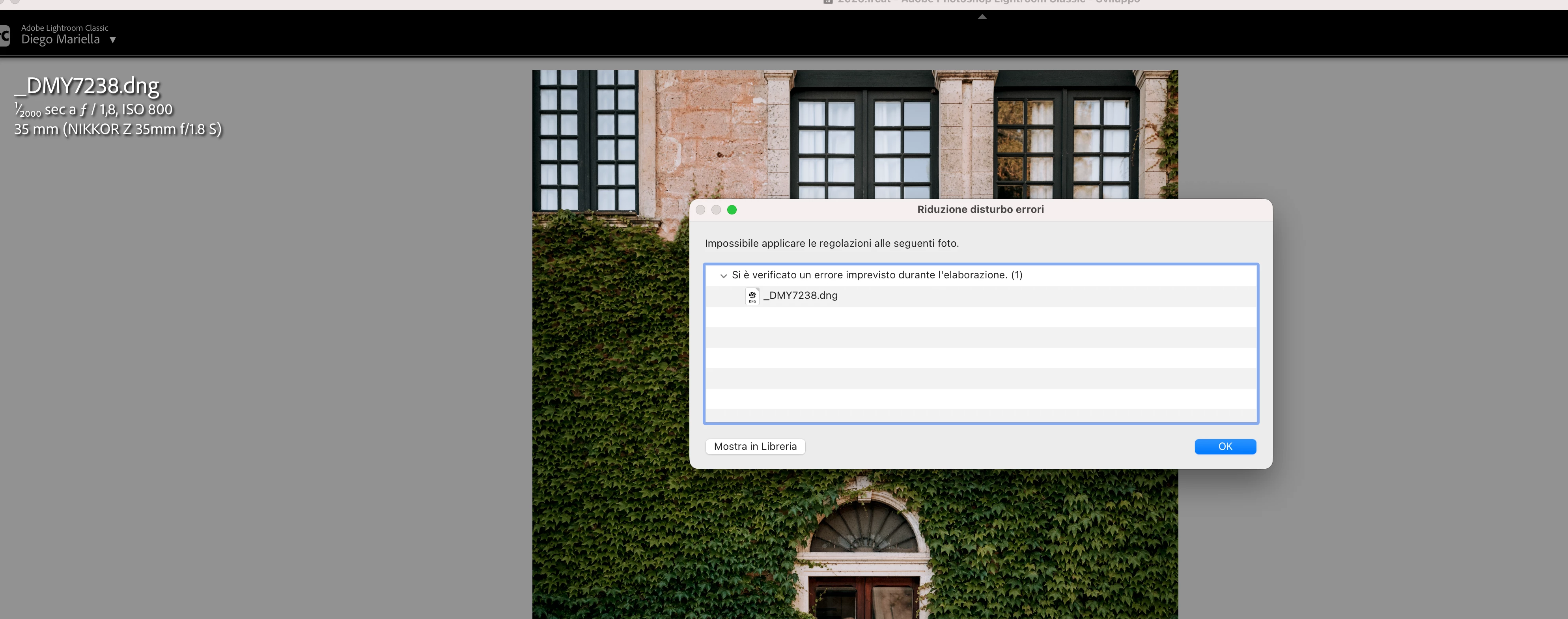
Since this morning, it's been impossible to to use Noise Reduction, even though my internet connection is working perfectly. I've already updated both Lightroom CC and macOS, cleared the cache, and optimized the catalog, but I keep getting this error screen whenever I try to use Noise Reduction.

Has anyone experienced the same issue or knows how to fix it? Any help would be greatly appreciated. Thanks! 🙏
 

    Correct answer Sameer K

    Hi All! Lightroom Classic v15.4.1 is now available for downlaod via the Creative Cloud desktop app with the following critical bug fiixes for the issue reported in this thread and the other: 


    Thanks!
    Sameer K

    117 replies

    Peter_zana
    Participant
    June 20, 2026

    Ciao

    sto cercando di utilizzare la funzione di riduzione disturbo AI in Lightroom Classic ma una volta che provo mi compare questo errore come allegato, inibendo la funzione

    Fino a poco fa funzionava, di punto in bianco ha iniziato a darmi questo errore per tutte le foto della libreria, altre funzioni come Super Resolution funzionano normalmente…

    Qualcuno ha idea come poter risolvere?

    Sto utilizzando ultima versione di MacOS Tahoe Versione 26.5.1 (25F80)

    Lightroom classic è aggiornato all’ultima versione 15.3.1

    Grazie

    Hi,

    I’m trying to use the AI Denoise feature in Lightroom Classic, but every time I attempt it I get the error shown in the attached screenshot, which prevents the function from running.

    Until recently it was working fine, but it suddenly stopped working out of nowhere and now I get the same error on every photo in my library. Other AI features, such as Super Resolution, are still working normally.

    Has anyone experienced this issue or found a way to fix it?

    I’m currently using the latest version of macOS Tahoe (26.5.1, build 25F80) and Lightroom Classic is fully up to date (15.3.1).

    Thanks in advance.

    Participating Frequently
    June 20, 2026

    Thank you very much. I just reinstalled version 18.3 of ACR and now both computers work properly. But why would Adobe published version 18.4 of ACR without version 15.4 of LR-Classic? This makes no sense! Or only some users have no access to LR-Classic 15.4? If so, why?

    The other interesting issue is that I have the three applications marked for manual upgrades in Adobe creative cloud. See the screenshot in attach. For some reason, PS and LR do not automatically upgrade but ACR does it! Now I uncheck the Autoupdate button, at the top!

    Thank you for your kindly help.

    Regards,

    Gil

    GilSantos
    rhilaw
    Participant
    June 20, 2026

    I’m having the same issue so keen to hear how others are resolving.

    JElkins62
    Participant
    June 20, 2026

    It won’t let me upload a screenshot 


    JElkins62
    Participant
    June 20, 2026

    I start editing my RAW file and when I click on denoise it fails. 

    Participating Frequently
    June 20, 2026

    Indeed, I am using version 18.4 of ACR and version 15.3.1 of Lightroom Classic. At the moment I cant’t upgrade to version 15.4 because it is not available in my Creative Cloud window.

    GilSantos
    Breeze2121
    Participant
    June 22, 2026

    I’m in the same boat….

    Into+The+Wild+Imagery
    Participant
    June 22, 2026

    Me too.  I’m LRC 15.3.1 and CR 18.4 and cannot denoise…


    Andthewy
    Participant
    June 20, 2026

    If you download Camera Raw 18.3 from here (Mac) - https://download.adobe.com/pub/adobe/photoshop/cameraraw/mac/18.x/CameraRaw_18_3.dmg

    Run the installer and DO NOT update in Creative Cloud - make sure auto updates are turned off before you start - until Lightroom Classic 15.4 is released.

    Lightroom Classic 15.4 update has been pulled by Adobe due to a serious bug.

    Participant
    June 20, 2026

    this worked for me, thank you

    Participant
    June 20, 2026

    nel modulo di develop, clicco su Denoise e compare l’errore segnalato, per qualsiasi foto

    Community Expert
    June 20, 2026

     Please see here: 


    Moderators, ​@Rikk Flohr_Photography, please lock or merge with the duplicate post:

    lightroom cc denoise issue | Adobe DME


    My System: Intel i7-8700K - 64GB RAM - NVidia Geforce RTX 3060 - Windows 11 Pro 25H2 -- LR-Classic 15 - Photoshop 27 - Nik Collection 9 - PureRAW 6 - Topaz Photo AI
    Community Expert
    June 20, 2026

    Please see here: 


    Moderators, ​@Rikk Flohr_Photography, please lock or merge with the duplicate post:

    lightroom cc denoise issue | Adobe DME


    My System: Intel i7-8700K - 64GB RAM - NVidia Geforce RTX 3060 - Windows 11 Pro 25H2 -- LR-Classic 15 - Photoshop 27 - Nik Collection 9 - PureRAW 6 - Topaz Photo AI
    Participant
    June 21, 2026

    I tried his folder trick and it did not work. I am not downloading a random link from an account created just this month either. Need verification first.