johnrellis
Legend
July 2, 2018
Question

P: Truncated fields and font glitches in Metadata panel

  • July 2, 2018
  • 68 replies
  • 6456 views

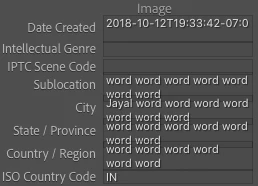
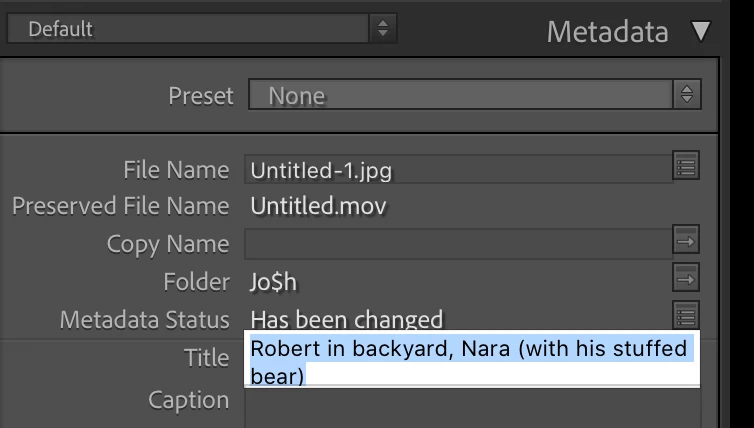
The Metadata panel has some glitches in LR 10 / Mac OS 10.15.5 with the new fonts:
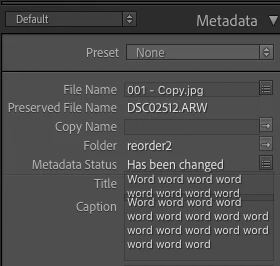


And some fields don't display their last line (off by one error?):
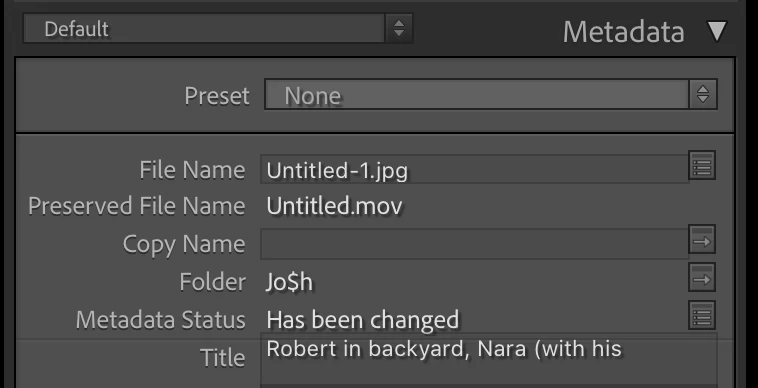
 
To reproduce this, try changing the width of the panel.
 
 
About the fonts in LR 10, the Lightroom Queen wrote: "[T]he font has been updated throughout the app, to use Adobe’s newly standards. While many formatting issues have already been identified and fixed, you might still find a few odd gremlins or spacing issues."
 
 
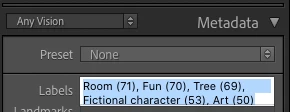
Here's another example, with a custom metadata tagset:
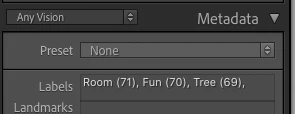
 
Here's the definition of that tagset:
return {title = "Any Vision",id = 'anyvision',items = {
     {"com.johnrellis.anyvision.labels", height_in_lines = -1},{"com.johnrellis.anyvision.landmarks", height_in_lines = -1},{"com.johnrellis.anyvision.locations", height_in_lines = -1},{"com.johnrellis.anyvision.map"},{"com.johnrellis.anyvision.logos", height_in_lines = -1},{"com.johnrellis.anyvision.faces", height_in_lines = -1},{"com.johnrellis.anyvision.text", height_in_lines = -1},{"com.johnrellis.anyvision.safeSearch", height_in_lines = -1},"com.johnrellis.anyvision.dominantColor","com.adobe.separator",{"com.adobe.caption", height_in_lines = -1},"com.adobe.GPS"}}

68 replies

Participating Frequently
May 23, 2021

I'm seeing the same thing. Text boxes such as Title and Caption are sized too small and are cutting off the last line of text.  Only by clicking on a box and selecting the contents and forcibly scrolling the field down can the last line be viewed.  The attached screen grabs show a Caption with the last line cut off, and the same Caption but selected with the last line visible but still partially cut off.  Lightroom Classic 10.2.  This only started when I upgraded to Catalina 10.15.7.

Lightroom Classic version: 10.2 [ 202103041821-226a1211 ]
License: Creative Cloud
Language setting: en-US
Operating system: Mac OS 10
Version: 10.15.7 [19H1030]
Application architecture: x64
Logical processor count: 4
Processor speed: 3.1 GHz
SqLite Version: 3.34.0
Built-in memory: 16,384.0 MB
Real memory available to Lightroom: 16,384.0 MB
Real memory used by Lightroom: 1,196.1 MB (7.3%)
Virtual memory used by Lightroom: 7,116.8 MB
Memory cache size: 79.6MB
Internal Camera Raw version: 13.2 [ 738 ]
Maximum thread count used by Camera Raw: 3
Camera Raw SIMD optimization: SSE2,AVX,AVX2
Camera Raw virtual memory: 162MB / 8191MB (1%)
Camera Raw real memory: 164MB / 16384MB (1%)
Displays: 1) 4096x2304

 
Participating Frequently
May 23, 2021

In grid view, titles of portrait-orientation photos run into the grid frame and are partially obscured.  See attached screen grab. Lightroom Classic 10.2. This only started when I upgraded to Catalina 10.15.7.

Lightroom Classic version: 10.2 [ 202103041821-226a1211 ]
License: Creative Cloud
Language setting: en-US
Operating system: Mac OS 10
Version: 10.15.7 [19H1030]
Application architecture: x64
Logical processor count: 4
Processor speed: 3.1 GHz
SqLite Version: 3.34.0
Built-in memory: 16,384.0 MB
Real memory available to Lightroom: 16,384.0 MB
Real memory used by Lightroom: 1,196.1 MB (7.3%)
Virtual memory used by Lightroom: 7,116.8 MB
Memory cache size: 79.6MB
Internal Camera Raw version: 13.2 [ 738 ]
Maximum thread count used by Camera Raw: 3
Camera Raw SIMD optimization: SSE2,AVX,AVX2
Camera Raw virtual memory: 162MB / 8191MB (1%)
Camera Raw real memory: 164MB / 16384MB (1%)
Displays: 1) 4096x2304

Participating Frequently
May 15, 2021

I just updated to Catalina 10.15.7 and am runing Lightroom Classic 10.2 and just started seeing this problem.  The last line of text in the caption box is cut off.  Also, in grid view, the title of a portrait thumbnail runs into the border of the box.

Inspiring
May 14, 2021

When will this issue be fixed? It's been a few months now. Please fix this.

Rikk Flohr_Photography
Community Manager
March 18, 2021

When originally posted, I was not able to reproduce. Once the thread had multiple posters a bug was written. 

Rikk Flohr: Adobe Photography Org
Inspiring
March 17, 2021

@Rikk Just to be clear, you tried it and couldn't reproduce it? If so, that's strange, since a number of us have it happen 100% of the time...I wonder what makes the difference...

Rikk Flohr_Photography
Community Manager
March 17, 2021

I just checked on this and do not find a bug so I wrote a new bug today. Thanks for the additional information.

Rikk Flohr: Adobe Photography Org
Inspiring
March 16, 2021

@Rikk 

Like @John_R_Ellis and @M_Ushioda, updating to 10.2 did not fix the issue with truncated Titles and Captions.

For me this bug is easily reproducible and fails 100% of the time.  But, to see the issue, it is necessary to enter a long Title or Caption, and then go to another image and come back again.  The field expands while one is typing, and stays expanded after hitting Return, as long as one stays on the same image.  As soon as one selects another image and then comes back to the original one, the fields are truncated.

Catalina 10.15.7, LR 10.2

Inspiring
March 16, 2021

@Rikk I updated it to 10.2 but unfortunately, this update did not fix the issue at all. If you need screenshots or anything, let me know. I'm on Catalina 10.15.7.

johnrellis
Legend
March 16, 2021

Unfortunately, I still see the Title and Caption fields get truncated as I increase the width of the right column:


Lightroom Classic version: 10.2 [ 202103041821-226a1211 ]
License: Creative Cloud
Language setting: en
Operating system: Mac OS 10
Version: 10.15.7 [19H2]
Application architecture: x64
Logical processor count: 16
Processor speed: 2.4 GHz
SqLite Version: 3.34.0
Built-in memory: 32,768.0 MB
Real memory available to Lightroom: 32,768.0 MB
Real memory used by Lightroom: 2,318.3 MB (7.0%)
Virtual memory used by Lightroom: 10,131.5 MB
Memory cache size: 177.5MB
Internal Camera Raw version: 13.2 [ 738 ]
Maximum thread count used by Camera Raw: 5
Camera Raw SIMD optimization: SSE2,AVX,AVX2
Camera Raw virtual memory: 390MB / 16383MB (2%)
Camera Raw real memory: 392MB / 32768MB (1%)
Displays: 1) 3840x2400