

Pattie-F
Legend
August 20, 2020
Question

Quickly convert a photo to black and white using Lightroom Classic

  • August 20, 2020
  • 4 replies
  • 2629 views

Lightroom Classic

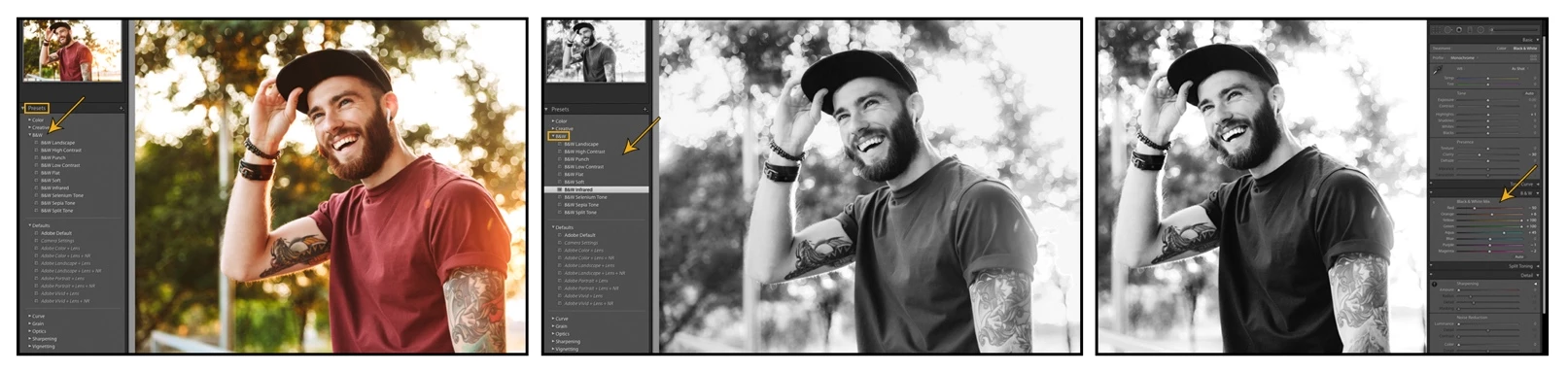
Convert color photos to black and white in Lightroom Classic easily by using a preset. In Lightroom Classic, you can find a list of black and white presets in the B&W section of the Presets panel. Put your own stylized touch on the image by adjusting the B&W sliders on the right side of the Develop module.


Related link:

Use presets to convert color photos to black and white


There are, of course, many different ways to accomplish the task of converting from a color image to black and white. If you are new at this, you can start by trying the method above. Are you feeling adventurous? Try it in several different Adobe apps. Share your preferred method or your favorite black and white photo in the comments section below.


Learn how to convert a photo to black and white using other Adobe apps:

Quickly convert a photo to black and white using Photoshop

Quickly convert a photo to black and white using Photoshop on the iPad

Quickly convert a photo to black and white using Lightroom for mobile

Quickly convert a photo to black and white using Lightroom

This topic has been closed for replies.

4 replies

Participant
August 31, 2021

самый быстрый способ на мой взгляд - можно уменьшить насыщенность в 0.

Anže Barle
Participant
August 21, 2021

There are, by my opinion, at least two ways to convert colout into B&W photo:

1) use a LR preset and perhaps "tweak" it a bit, so the result will match your idea, what kind of monochrome photo you want. Straight-out-the-preset may be OK, or not.

2) first do the basis editing in LR and than move into Photoshop to play with your photo further.


Post-production is like a gaming, if you want to achive an unique results.

josephlavine
Community Expert
Community Expert
July 26, 2021

Presets are a great resource. A good way to make them unique is, to begin with, one of the included Presets, make your style of adjustments, and then resave as a new User Preset.

warmly/j

Participating Frequently
April 26, 2021

I think the developers of Lightroom Classic should include more presets with the installation of the software... While Lightroom Classic primarily aims at professionals, it would still be helpful if there are some presets coming in handy in certain circumstances.