Participant
March 5, 2023
Answered

P: Lightroom launch mfc140u.dll missing file on Windows

  • March 5, 2023
  • 8 replies
  • 22012 views

Error message, mfc140u.dll file not found when launching, tried reinstalling with no sucess 

Correct answer JuanoCO

Hello Sameer, 

I just followed your instructions and now I can open lightroom classic on my new computer.

Thanks a lot 🙂

Juan

8 replies

Participant
May 23, 2025

Simply Update your VC Runtime files by going here VC_Runtimes and download both x32-x64 Runtime adn apply update..

(restart if needed) and you are Done.

esavarese
Participant
August 23, 2023

Thank you... It worked...


You just saved my bacon with this info!!!


Much appreciated

Participant
July 18, 2023

I can't open lightroom on my laptom, reinstalled probably x10 times, could somebody helo please?

Participant
July 8, 2023

I need help my Lightroom does not start up. Not even after reinstalling the creative could itself or lightroom serval times. Also tryed deactivating my anti virus and installing windows and other drivers. Im out of options except for resetting my pc as a whole. 


Participant
June 4, 2023

Please someone help!


I have updated my computer. Uninstalled and reinstalled lightroom.

I tried removing and redownloading all the microsoft visual c ++ files. 

Nothing has helped!

Participant
June 1, 2023

Hi, I can´t open LRc, i only get system error, missing file error. I have tried to uninstall but the same error appers. 4 diffrent windows opens with 1 file missing in each; VCRUNTIME140_.dll, mfc140u.dll, MSVCP140.dll, VCRUNTIME140.dll.

Please help me.

Regards Frida

Participant
March 9, 2023

Error message, mfc140u.dll file not found when launching. I've tried reinstalling with no sucess. Please help me fix this. I'm a photographer and need to edit photos for a client.


Ranjisha Sengupta
Legend
March 9, 2023

Hi @Karla28800091n44v 


Thanks for highlighting the issue that you are seeing with Lightroom. 

Which version of Lightroom are you using? When do you get the error message?

This issue generally get fixed with re-installation. Let's try some other steps, as you still see the issue.

You can try resetting Lightroom's preferences using the steps mentioned here: https://adobe.ly/2JSym5e.

Please back up your presets prior to resetting the preferences.


Let us know how it goes. 


Best,

Ranjisha

Participant
March 10, 2023

Hello, i am also having this issue. I have re-installed and removed my preferences but still no luck.


Sameer K
Community Manager
Community Manager
March 6, 2023

Welcome to the Lightroom Community. I'll help you figure this out. The mfc140u.dll is part of Microsoft Visual Studio.


Please try these steps & let me know how it goes.
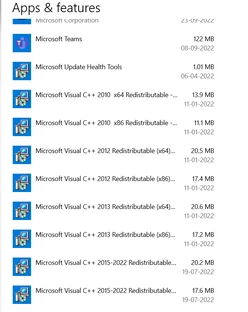
  •  In the Creative Cloud app, press CTRL + ALT + T (Win) to launch Creative Cloud Troubleshooter & select 'Close Creative Cloud and related processes' > click on Go.
  • Go to 'Add or Remove programs' in Windows search & find all the installations of Microsoft Visual C++ Redistributable (all years).


  • Uninstall them completely. Even if there is an option to repair them, please uninstall all the existing MSVC++ packages.
  • Download a fresh package of installers for MSVC++ from this link: Microsoft Learn: Latest Support VC Redist.
  • Right-click the downloaded file and select Extract All.
  • Reinstall all packages (32bit & 64bit) & then restart the computer.

Let me know how it goes from here. Thanks!

Sameer K

Participant
March 20, 2023

Sameer.  I have the same problem.  I have followed your instructions - uninstalled the MSVC++ apps and I have downloaded the new ones.  But I cannot for the life of me work out how to install those new ones.  The only instructions I can find are about downloading from the Windows store.  So how do I install these files which I have already downloaded?  Thanks.  Peter

Participant
March 20, 2023

Sameer.  Update on the above.  I had another look at your suggestion and realised that you were saying that it was the MSVC++ which had to be reinstalled.  So I downloaded the files from the link you gave.  Then I went onto the net and reinstalled the MSVC++ from Microsoft.  Now I have Lightroom back!  This restatement might help others with the same problem.  Thanks for your help. Peter