Welcome to the Lightroom Community. I'll help you figure this out. The mfc140u.dll is part of Microsoft Visual Studio.
Please try these steps & let me know how it goes.
- In the Creative Cloud app, press CTRL + ALT + T (Win) to launch Creative Cloud Troubleshooter & select 'Close Creative Cloud and related processes' > click on Go.
- Go to 'Add or Remove programs' in Windows search & find all the installations of Microsoft Visual C++ Redistributable (all years).
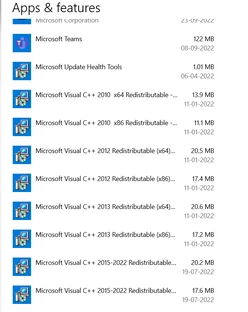
- Uninstall them completely. Even if there is an option to repair them, please uninstall all the existing MSVC++ packages.
- Download a fresh package of installers for MSVC++ from this link: Microsoft Learn: Latest Support VC Redist.
- Right-click the downloaded file and select Extract All.
- Reinstall all packages (32bit & 64bit) & then restart the computer.
Let me know how it goes from here. Thanks!
Sameer K




 AdChoices