


Known Participant
December 24, 2024
Answered

3 problems have popped up in 26.2.0: No tool bar icons, can't select fonts with type tool, +1

  • December 24, 2024
  • 11 replies
  • 1640 views

3 problems have popped up in 26.2.0: No tool bar icons, can't select fonts with type tool, error code when exiting. Tool bar is just a bunch of dots.  Only type tool font avainable is Tahoma - get 

"Could not complete your request because LoadDeepFontCache in GetDeepFontCache failed" error code when trying to choose any other font. When exiting PS, get error code "Can’t write new document presets file"  Been using PS since Ver 7. Been using 26.2.0 since it came out. Uninstalled and reinstalled through Creative Cloud. Tried everything suggested on the web. Windows 10. Looks like I've got to dump PS and start looking at Capture One et al.

Correct answer Ged_Traynor

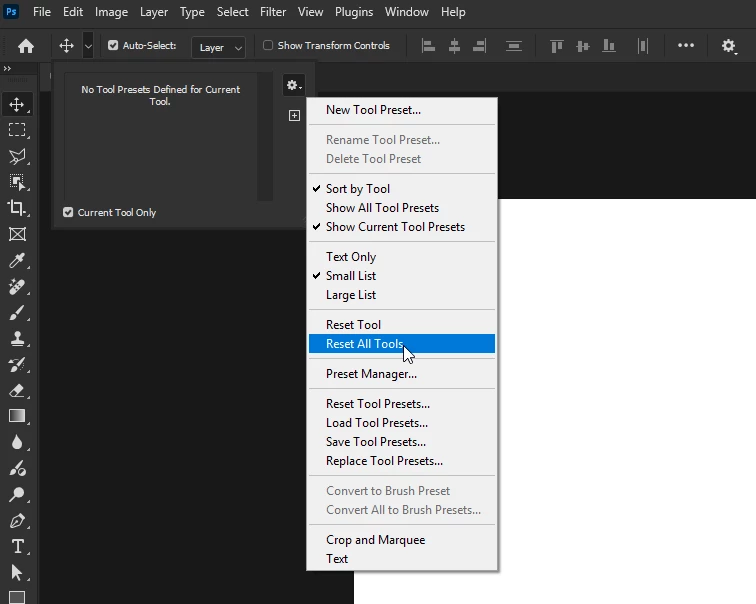
@Thomare what exactly is wrong with the type tool, it works fine for me with Photoshop version 26.3 on Windows 11, have you tried resetting the tools

11 replies

Participating Frequently
May 6, 2025

version 26.6, LoadDeepFontCache error and missing tool icons

jane-e
Community Expert
Community Expert
March 22, 2025
quote

"Could not complete your request because LoadDeepFontCache in GetDeepFontCache failed" error code

By @John C Winger


Try try these steps: 

  • Exit Photoshop
  • Exit Creative Cloud desktop app
  • Navigate to \Users\[user name]\AppData\Roaming\Adobe\Adobe Photoshop <version>
  • Delete the CT Font Cache  and FontFeatureCache folder
  • Empty the Recycle Bin


Jane


Participating Frequently
April 17, 2025

I've tried that at least 20 times. It never works for me. I 've had this problem for monts. I can only get the beta versionof Photoshop to work. 

Participating Frequently
March 15, 2025

I turned off technology previews,and restarted photoshop-- that seems to:have worked. 

CCAnimation
Participant
March 22, 2025

This actually worked for me also

Participant
January 31, 2025

My Type Tool Doesn't Work in Version 26.3.0. Previous Version Worked Just Fine.
We Pay A subscription for ADOBE to fix these things, not for Adobe to tell US How to fix them.

To Reiterate, Please fix this bug without Delay. 

How Hard Can This Be?


Ged_Traynor
Community Expert
Ged_TraynorCommunity ExpertCorrect answer
Community Expert
January 31, 2025

@Thomare what exactly is wrong with the type tool, it works fine for me with Photoshop version 26.3 on Windows 11, have you tried resetting the tools

Participant
February 2, 2025
Hi Ged,

Thanks for your response, I'm Still Running Win 10 Pro. And Resetting the
tools did the trick!

Thank You Most Warmly For Your Help!

ThomAre
Known Participant
December 27, 2024

I went back to 25.12.1 and everything works. I will miss out on the latest AI features, but I'll have a stable platform to process my photography. It's obvious that Adobe is more interested in new AI gadgets, including pop up ads to try to get you to use those gadgets, than they are in providing a program that works. Look at the number of people that have the same problems that I am having, with no aparent way to solve them. After over 20 years of using Photoshop, I am really sad to realize that tecnologically I am at the end.

D Fosse
Community Expert
Community Expert
December 26, 2024
quote

Copied the Adobe Photoshop 2025 Settings folder from it to my desktop


By @John C Winger


Don't do that! The settings do not mean the same things on two different machines.


The preferences contain the whole application configuration, not just your own user settings. It also contains settings for hardware, like the GPU, that are very different.


You can copy the folder for use on the same machine, but not across different machines.


Ged_Traynor
Community Expert
Community Expert
December 26, 2024

@John C Winger have a look at the correct answer in this thread in relation to the missing toolbar icons

https://community.adobe.com/t5/photoshop-ecosystem-bugs/photoshop-tool-icons-are-missing/idi-p/13895953

Known Participant
December 26, 2024

Used PS on my travel laptop. Everything works. Copied the Adobe Photoshop 2025 Settings folder from it to my desktop. The font I was using on my laptop is now the font on my desktop with no way to change it. Tool bar shows up every now and then, but usually is just a bunch of dots.

Known Participant
December 24, 2024

Just did a complete uninstall and reinstall in Creative Cloud withour saving any preferences. Same 3 problems are there. Can I I uninstall and reinstall on an external drive and run the program from there?

Known Participant
December 24, 2024

Didn't fix any of the problems.