Participant
July 30, 2024
Answered

Generative fill

  • July 30, 2024
  • 34 replies
  • 33899 views

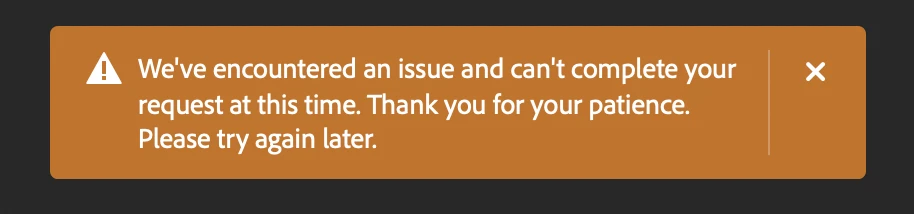
I am unable to use generative ai since morning. It keep propmt error saying "we're facing an issue now" 
 

34 replies

Inspiring
July 31, 2024

Same issue. Please help.

Participant
July 31, 2024

Hi team, 


My Generative Fill suddenly stopped working a few weeks ago, after performing perfectly before this point. It gives this error: 

I get the same error for Generative expand.

Inspiring
July 31, 2024

I have the same issue. Just started this week. Following.

Participant
December 3, 2024

Very Random, but I stopped playing music on my Youtube tab and it started working. I thought since it uses the internet, maybe most of the signal was being used up elsewhere. I have no idea if this will work for others (if you are using your internet in different tabs) but this worked for me.

Kevin Stohlmeyer
Community Expert
Community Expert
July 30, 2024

@ps01 @Sameer K there is a major issue reported at https://status.adobe.com/

Participant
July 30, 2024

@Kevin Stohlmeyer @ps01 @Sameer K experiencing the same issue since yesterday 7/29 and still on going. What's the major issue affecting the generative AI tool? It's not working in photoshop 2024, adobe express, and photoshop web.

Inspiring
July 31, 2024

@Sameer K 

Same issue. I'm on a M2 mac that is managed by my organization's IT department, on an enterprise Adobe account. Was using generative AI and expand tool on a regular basis. Noticed a couple days ago was getting error on desktop version (orange). Just tried photoshop web, getting similar error (blue). I'm thinking I need to contact my IT department to get things whitelisted?

Sameer K
Community Manager
Community Manager
July 30, 2024

Hey, @ps01. Welcome to the Photoshop Community. I've reviewed the account you've used to log in to the community, and I found an active subscription in one of the 3 profiles in your account.


Is this a personal machine, or does an IT team manage the device? If yes, ensure all the Adobe Network endpoints are whitelisted. If it is an individual machine, try to reset the firewall to the default settings & check if that helps.


You can try using Photoshop Web (https://adobe.ly/3WkhVFm) on an alternate device & internet network to rule out it is a network issue. 


Thanks!
Sameer K

(Use '@mention' to tag me when you reply)
