
Participant
November 22, 2024
Answered

Help script select spot Healing Brush Tool with "darken" mode in Photoshop

  • November 22, 2024
  • 1 reply
  • 594 views

Hello!
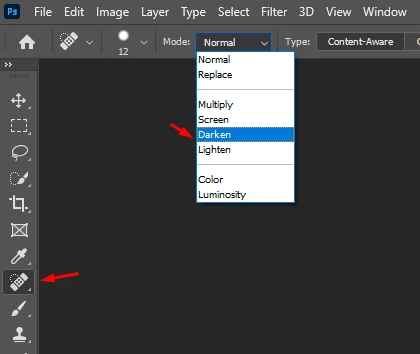
Can someone help me with a script to select the Spot Healing Brush Tool with the "darken" mode in Photoshop? I have been able to select this tool as shown below, but I still can't switch it to the "darken" mode. Thank you very much!

var idslct = charIDToTypeID("slct");
var desc8 = new ActionDescriptor();
var idnull = charIDToTypeID("null");
var ref1 = new ActionReference();
var idspotHealingBrushTool = stringIDToTypeID("spotHealingBrushTool");
ref1.putClass(idspotHealingBrushTool);
desc8.putReference(idnull, ref1);
executeAction(idslct, desc8, DialogModes.NO);
This topic has been closed for replies.
Correct answer r-bin
Run this code after the code for selecting the desired tool. I can't test its functionality because I'm using an outdated version of PS, on which it doesn't work.


try {
    var r = new ActionReference();
    r.putProperty(stringIDToTypeID("property"), stringIDToTypeID("tool"));
    r.putEnumerated(stringIDToTypeID("application"), stringIDToTypeID("ordinal"), stringIDToTypeID("targetEnum"));

    var ret = executeActionGet(r);

    var options = ret.getObjectValue(stringIDToTypeID("currentToolOptions"));           
    var tool = ret.getEnumerationType(stringIDToTypeID("tool"));

    options.putEnumerated(stringIDToTypeID("mode"), stringIDToTypeID("blendMode"), stringIDToTypeID("darken"));

    var r = new ActionReference();
    r.putClass(tool);

    var d = new ActionDescriptor();
    d.putReference(stringIDToTypeID("null"), r);
    d.putObject(stringIDToTypeID("to"), stringIDToTypeID("null"), options);

    executeAction(stringIDToTypeID("set"), d, DialogModes.NO);
} 
catch(e) { alert(e); }


1 reply

r-binCorrect answer
Legend
November 22, 2024
Run this code after the code for selecting the desired tool. I can't test its functionality because I'm using an outdated version of PS, on which it doesn't work.


try {
    var r = new ActionReference();
    r.putProperty(stringIDToTypeID("property"), stringIDToTypeID("tool"));
    r.putEnumerated(stringIDToTypeID("application"), stringIDToTypeID("ordinal"), stringIDToTypeID("targetEnum"));

    var ret = executeActionGet(r);

    var options = ret.getObjectValue(stringIDToTypeID("currentToolOptions"));           
    var tool = ret.getEnumerationType(stringIDToTypeID("tool"));

    options.putEnumerated(stringIDToTypeID("mode"), stringIDToTypeID("blendMode"), stringIDToTypeID("darken"));

    var r = new ActionReference();
    r.putClass(tool);

    var d = new ActionDescriptor();
    d.putReference(stringIDToTypeID("null"), r);
    d.putObject(stringIDToTypeID("to"), stringIDToTypeID("null"), options);

    executeAction(stringIDToTypeID("set"), d, DialogModes.NO);
} 
catch(e) { alert(e); }


Stephen Marsh
Community Expert
Community Expert
November 23, 2024
c.pfaffenbichler
Community Expert
Community Expert
November 23, 2024

@Stephen Marsh , the last link (regarding the Clone Stamp Tool) seems to be the one you already posted regarding the Dodge and Burn Tools.