


MahaB82A
Legend
August 27, 2023
Answered

Make PSD file content visible in Window Explorer

  • August 27, 2023
  • 3 replies
  • 7132 views

I am following a tutorial. In which PSD file is saved in a way inside content is visible. How to do it?
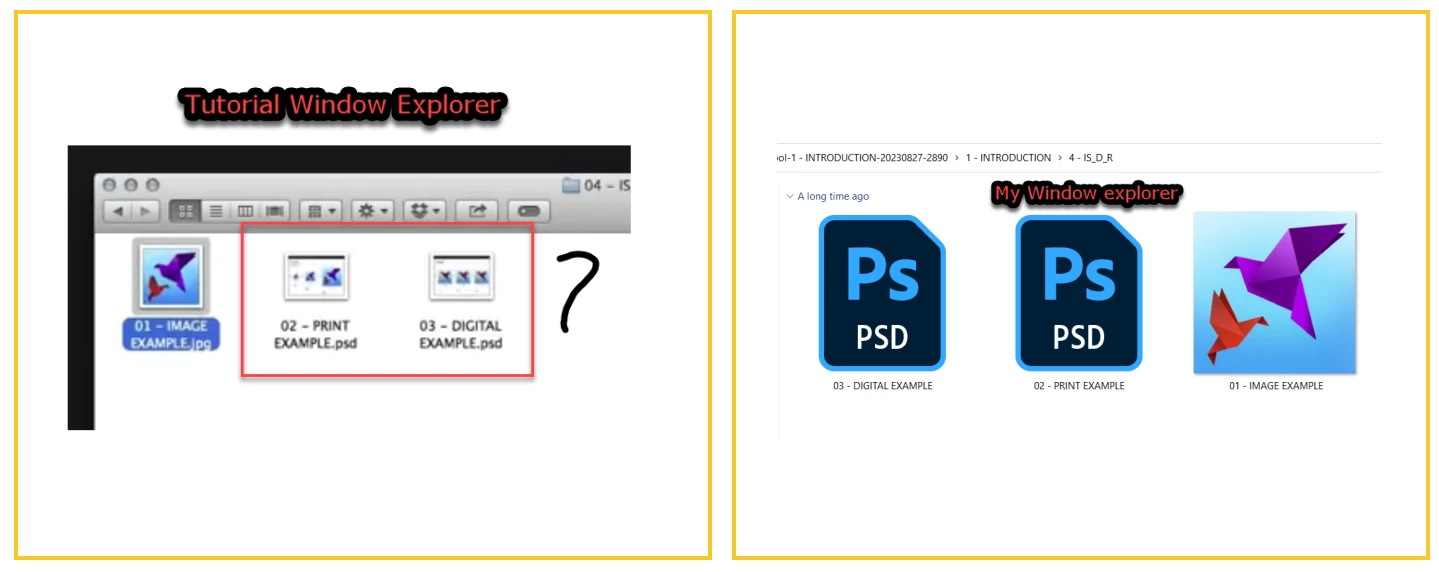
I followed the past record of the form but issue is not clear enogh.

Save only visible layers in psd-format

Where can I find "Delete Hidden Layers"?



This topic has been closed for replies.

3 replies

MahaB82A
MahaB82AAuthor
Legend
August 27, 2023

Thanks for the help.

Jeff Arola
Community Expert
Community Expert
August 27, 2023

The reason your not seeing images on the PSD icons is Windows requires a third party codec to see the psd thumbnail images in Windows Explorer.

MahaB82A
MahaB82AAuthor
Legend
August 27, 2023

Please give me the link.

jane-e
Community Expert
Community Expert
August 27, 2023
quote

Where can I find "Delete Hidden Layers"?

By @MahaB82A


It's in the Layers panel menu.

  • If the Layers panel is closed, open it from the Windows menu
  • The panel menu is the hamburger menu (lines) in the upper right of the panel


Jane

MahaB82A
MahaB82AAuthor
Legend
August 27, 2023

It is grayed out.