
Participant
November 5, 2025
Answered

P: Photoshop 27.0: startup screen display error when clicking the Home button (Windows)
  • November 5, 2025
  • 11 replies
  • 424 views


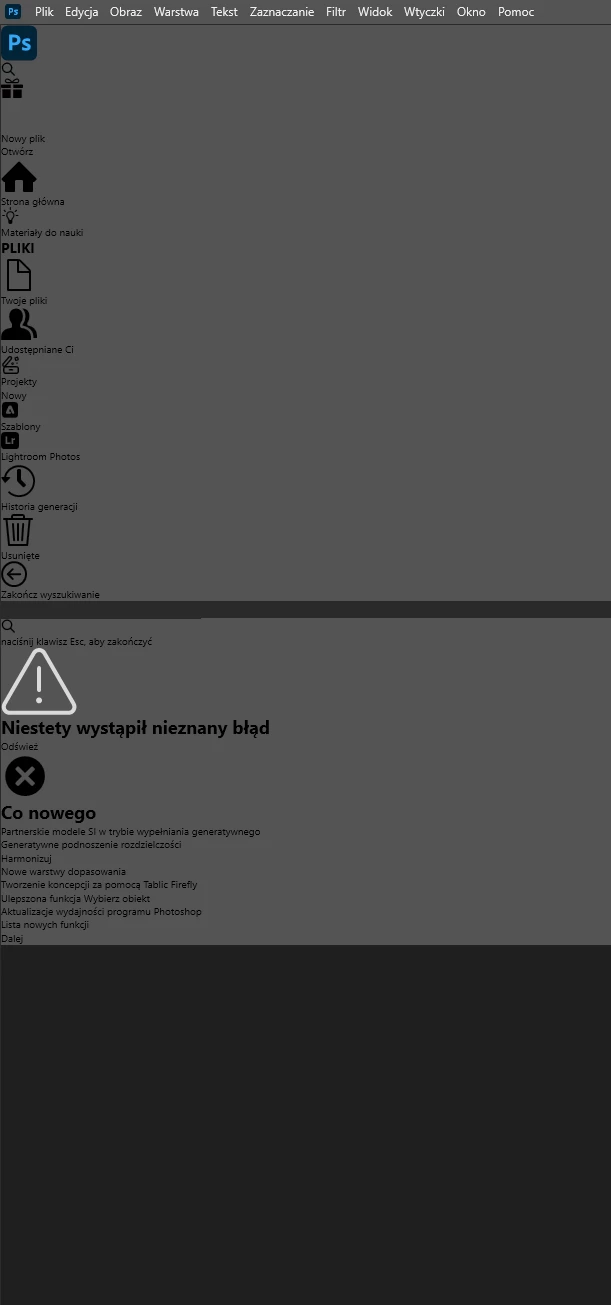
I have a problem with the “home button” in Photoshop after updating to the latest version. Uninstalling and reinstalling didn’t help. Even installing the previous version doesn’t fix it anymore. A dark screen appears with a message about an unknown error. Apart from that, everything

works fine once I get into Photoshop itself to work.

 

Correct answer Anshul_Saini

Hi everyone,


Please try this quick UXP reset; it often fixes Home screen problems.
 • Quit Photoshop and the Creative Cloud desktop app completely.
 • Back up the UXP folder (optional): copy the folder to your Desktop.
 • Rename the UXP folder:
Windows: rename C:\Program Files\Common Files\Adobe\UXP to C:\Program Files\Common Files\Adobe\UXP_backup
macOS: rename /Library/Application Support/Adobe/UXP to /Library/Application Support/Adobe/UXP_backup
 • Restart Creative Cloud, then launch Photoshop and check the Home screen.
 • If the problem is fixed, you can delete the backup folder after a few successful launches. If not, quit Photoshop and rename the folder back to its original name to restore your previous UXP state.


Let us know how it goes.


Thanks,
Anshul Saini

11 replies

Anshul_Saini
Community Manager
Anshul_SainiCommunity ManagerCorrect answer
Community Manager
November 18, 2025

Hi everyone,


Please try this quick UXP reset; it often fixes Home screen problems.
 • Quit Photoshop and the Creative Cloud desktop app completely.
 • Back up the UXP folder (optional): copy the folder to your Desktop.
 • Rename the UXP folder:
Windows: rename C:\Program Files\Common Files\Adobe\UXP to C:\Program Files\Common Files\Adobe\UXP_backup
macOS: rename /Library/Application Support/Adobe/UXP to /Library/Application Support/Adobe/UXP_backup
 • Restart Creative Cloud, then launch Photoshop and check the Home screen.
 • If the problem is fixed, you can delete the backup folder after a few successful launches. If not, quit Photoshop and rename the folder back to its original name to restore your previous UXP state.


Let us know how it goes.


Thanks,
Anshul Saini

Susan Jazzy
Participating Frequently
November 19, 2025

It's work. Illustrator and Photoshop preview home screen and recently files again. Thank you.

Susan Jazzy
Participating Frequently
November 12, 2025

Today I've this problem too. Both illustrator and photoshop. I've removed all app and creative cloud and new install. It's not  work, still the same.

Participant
November 9, 2025

Definitive solution: Uninstall all Adobe programs, then uninstall Creative Cloud, restart your computer, and reinstall Creative Cloud. After reinstalling the programs, the problem should be solved.

Participant
November 8, 2025


Last 2-3 days photoshop is opening in a weird looking page which is grey and with text and  tools logs in black on right side of the page when you try to open a image it says something is wrong.

i have almost 160 GB free space, all drivers are updated . did almost everything found on net.

reinstalled it also.

 
Close
 
Close
 
Close
 
Close
Participant
November 8, 2025

Good Day,

Is there anyone that can assist me with my Illustartor & Photoshop Home Screen:
- It's not loading it just shows icons, that i can't interact with(they are unresponsive)
- It's not showing my cloud files, I have to open them for Creative Cloud and I can't save any new files to the cloud.
- See attached images for reference.


Please can anyone assist, it's driving me crazy.

Ged_Traynor
Community Expert
Community Expert
November 6, 2025
Known Participant
November 7, 2025

Bonjour


J'ai un problème ouverture de Photoshop version 27. 0 de 2025 !


Merci pour votre aide !


(Personal information removed by moderator)

nikunj.m
Community Manager
Community Manager
November 7, 2025

Hi, we're sorry about the trouble! We've seen a couple of reports of this behavior, so I've merged your post with the others. Please try the suggestions in the conversation to check if anything helps. 

If you continue to experience the same behavior, please go to the Help menu in Photoshop, then System Info, and copy the text. You can share the info with us by either pasting it as a reply here or in a text file and sharing the file with us. 


Thanks,
Nikunj

Participant
November 6, 2025

Wersja programu Adobe Photoshop: 27.0.0 20251015.r.25 d1c1320 x64 (final: Release)
Liczba uruchomień: 1
System operacyjny: Windows 10 64 bity
Wersja: 10 10.0.19045.6456
Architektura systemu: AMD rodzina CPU:15, Model:1, Stopień:0, AVX2, HyperThreading
Fizyczny licznik procesora: 12
Logiczny licznik procesora: 24
Szybkość procesora: 3800 MHz
Wbudowana pamięć: 65461 MB
Wolna pamięć: 41983 MB
Pamięć dostępna dla programu Photoshop: 51345 MB
Pamięć używana przez program Photoshop: 70 %
Moduł obsługi awarii: Adobe
DCX Version: 9.11.1
SAM SDK Version: 14.3.4
ACP.local Status:
- SDK Version: 5.8.2
- Core Sync Status: Reachable and compatible
- Core Sync Running: 7.7.0.5
- Min Core Sync Required: 4.3.66.28
Wersja zestawu SDK klienta aktywnej edycji: v5.3.2
Adobe Firefly: Aby wyświetlić najnowszą wersję, użyj dowolnej funkcji opartej na generatywnej SI.
Wersja OpenColorIO: 2.4.2
Wersja biblioteki C2PA: adobe_c2pa/0.14.2 c2pa-rs/0.43.0
Wersja NGL: 1.42.0.5
Tablica: Wył.
Tworzenie dokumentu tablicy: Wył.
Renderowanie wypaczania D3D12: Wył.
Precyzyjne zarządzanie kolorami na potrzeby ekranów HDR: Wył.
Warstwy aliasów: Wył.
Światła długie: Wł.
Rozmiar płytki obrazu: 1028K
Poziomy pamięci podręcznej obrazu: 4
Podgląd czcionki: Duży
Wersja HarfBuzz: 8.4.0
Aparat tekstowy: ATE 7.9.0 (d611361)
======= GPU
Stabilny natywny interfejs API: Prawda
Stabilny interfejs API OpenCL: Prawda
GPUDeny: 0
GPUForce: 0
useGPU: 1
useOpenCL: 1
isGPUCapable: 1
isGPUAllowed: 1
GPUName: NVIDIA GeForce RTX 2080 Ti
GPUVendor: NVIDIA
NVIDIA GeForce RTX 2080 Ti UNKNOWN, NVIDIA
IsNativeGPUCapable: 1
IsOpenCLGPUCapable: 1
HasSufficientRAM: 1
GPU accessible RAM: 11,027 MB
Required GPU accessible RAM: 1,500 MB
UseGraphicsProcessorChecked: 1
UseOpenCLChecked: 1
Windows remote desktop: 0
Windows available feature level: 12.1
Windows required feature level: 12.0
Windows has required feature level: 1
Monitor: 1
Zakres wyświetlacza: (0, 0) > (2560, 1440)
Skala wyświetlacza: 1
Ekran główny
Typ wyświetlacza: SDR
Profil wyświetlacza: CG279X(23385059)10CAL
Monitor: 2
Zakres wyświetlacza: (2560, 0) > (3760, 1920)
Skala wyświetlacza: 1
Typ wyświetlacza: SDR
Profil wyświetlacza: sRGB IEC61966-2.1
------- Sniffer output
[0 ms]
Launch GPUSnifferThread

[1 ms]
Start RunAllAPIs

[1 ms]
C:\Program Files\Adobe\Adobe Photoshop 2026\sniffer.exe -baseTimeMS=23435182 -comment=Photoshop Version: Adobe Photoshop 27.0.0 20251015.r.25 d1c1320 x64

[1 ms]
Start GetSnifferResult

[472 ms]
Start sniffer 2025-11-06 15:59:01
# Photoshop Version: Adobe Photoshop 27.0.0 20251015.r.25 d1c1320 x64
C:\Program Files\Adobe\Adobe Photoshop 2026\sniffer.exe -baseTimeMS=23435182 -comment=Photoshop Version: Adobe Photoshop 27.0.0 20251015.r.25 d1c1320 x64

{46 ms}
Start platform native
# displays: 2
Display 0
Display: \\.\DISPLAY1
Main: TRUE
Built in: FALSE
Stereo: FALSE
Bounds: (0, 0) -> (2,560, 1,440)
Dimensions: (2,560 1,440)
Display scale: 1
Physical size: (0 0)
Pixel size: (0 0)
Dynamic range: (0 1)
Attached Device: (DeviceID name=NVIDIA GeForce RTX 2080 Ti index=0)

Display 1
Display: \\.\DISPLAY2
Main: FALSE
Built in: FALSE
Stereo: FALSE
Bounds: (2,560, 0) -> (3,760, 1,920)
Dimensions: (1,200 1,920)
Display scale: 1
Physical size: (0 0)
Pixel size: (0 0)
Dynamic range: (0 1)
Attached Device: (DeviceID name=NVIDIA GeForce RTX 2080 Ti index=0)

# devices: 1
Device 0
Name: NVIDIA GeForce RTX 2080 Ti
Preferred: TRUE
Power Envelope: UNKNOWN
Attachment: UNKNOWN
# attached displays: 2
\\.\DISPLAY1
\\.\DISPLAY2
GPU accessible RAM: 11,027 MB
VRAM: 11,027 MB
Dedicated System RAM: 0 MB
Shared System RAM: 34,320 MB
API version: 12.1 (12.1)
Device version: 12.0 (12.0)
Vendor name: NVIDIA
Driver date: 2024-12-03 000000.000000-000
Driver age: 11 months
Driver version: 32.0.15.6636
Supports UMA: UNSUPPORTED
D3D-ID: 7687
End platform native
{292 ms}

{292 ms}
Start platform OpenCL
# displays: 0

# devices: 1
Device 0
Name: NVIDIA GeForce RTX 2080 Ti
Preferred: TRUE
Power Envelope: DISCRETE
Attachment: UNKNOWN
# attached displays: 0
GPU accessible RAM: 11,810 MB
VRAM: 11,810 MB
Dedicated System RAM: 0 MB
Shared System RAM: 0 MB
API version: 3.0 (OpenCL 3.0 CUDA)
Device version: 3.0 (OpenCL 3.0 CUDA)
Vendor name: NVIDIA
Driver date: UNKNOWN
Driver age: UNKNOWN
Driver version: UNKNOWN
Bandwidth: 504 GB / s
Compute score: 5,271.59
Device name string: NVIDIA GeForce RTX 2080 Ti
Device vendor string: NVIDIA Corporation
Platform name string: NVIDIA CUDA
Platform vendor string: NVIDIA Corporation
End platform OpenCL
{444 ms}

Exit code kExitNormal
End sniffer 2025-11-06 15:59:01
[kStatusNormal, kExitNormal]

[473 ms]
Finish RunAllAPIs

[475 ms]
Finish GetSnifferResult

------- Sniffer output
======= GPU
Typ licencji: Członkostwo
Numer seryjny: 90970929269687376013
GUIDBucket:
Composite Core GPU (comp_core_gpu): on
Composite Core Threads (MultithreadedCompositing): on
Composite Core UI (CompositingDocumentTabUI): off
Composite Core Feature Prefs (CompCoreFeaturePrefs): off

Folder aplikacji: C:\Program Files\Adobe\Adobe Photoshop 2026\
Tymczasowa ścieżka pliku: C:\Users\Jacek\AppData\Local\Temp\
Magazyn programu Photoshop ma we/wy asynchroniczne włączony
Dyski magazynujące:
Startowy, 186,9 GB, 19,1 GB wolne
Folder wtyczek wymaganych: C:\Program Files\Adobe\Adobe Photoshop 2026\Required\Plug-ins\
Folder wtyczek podstawowych: C:\Program Files\Adobe\Adobe Photoshop 2026\Plug-ins\

Zainstalowane składniki:
ACE.dll ACE 2025/09/11-15:51:06 25.GD09.7f8af3f 25.GD09.7f8af3f
act_tracing.dll Adobe Common Toolkit 1.0.68
AdobeLinguistic.dll Adobe Linguistic Library 792708d
AdobeOwl.dll Adobe Owl 5.5.0
AdobePDFL.dll PDFL 2025/09/08-11:05:36 25.GD09.549207f 25.GD09.549207f
AdobePIP.dll Adobe Product Improvement Program 8.2.0.16
AdobeSVGAGM.dll AdobeSVGAGM 25.1.e3adea7 25.1.e3adea7
AdobeXMP.dll Adobe XMP Core 2025/03/06-19:12:03 79.9690a87 79.9690a87
AdobeXMPFiles.dll Adobe XMP Files 2025/03/06-19:12:03 79.9690a87 79.9690a87
AdobeXMPScript.dll Adobe XMP Script 2025/03/06-19:12:03 79.9690a87 79.9690a87
AGM.dll AGM 2025/09/11-15:51:06 25.GD09.7f8af3f 25.GD09.7f8af3f
AID.dll AID DLL 1.0.0.58
AIDE.dll AIDE 2025/09/10-07:04:31 25.1.33cf818 25.1.33cf818
aifm.dll AIFM 1.0 23.68434
AILib.dll Adobe Illustrator 2026 30.0.0
aiport.dll AIPort 1.0 23.68434
ARE.dll ARE 2025/09/11-15:51:06 25.GD09.7f8af3f 25.GD09.7f8af3f
AXE8SharedExpat.dll AXE8SharedExpat 2025/07/15-10:43:45 25.GD07.3038539 25.GD07.3038539
AXEDOMCore.dll AXEDOMCore 2025/07/15-10:43:45 25.GD07.3038539 25.GD07.3038539
BIB.dll BIB 2025/09/11-15:51:06 25.GD09.7f8af3f 25.GD09.7f8af3f
BIBUtils.dll BIBUtils 2025/09/11-15:51:06 25.GD09.7f8af3f 25.GD09.7f8af3f
CoolType.dll CoolType 2025/09/11-15:51:06 25.GD09.7f8af3f 25.GD09.7f8af3f
CRClient.dll Adobe Crash Reporter Client DLL 26.5.0.202506270759_7140322
DirectML.dll DirectML Redistributable Library 1.13.1+240111-2204.1.dml-1.13.9b0890f
dnssd.dll Bonjour 3,0,0,2
dvaaccelerate.dll Adobe DVA 2025 25.2.0
dvaadameve.dll Adobe DVA 2025 25.2.0
dvaappsupport.dll Adobe DVA 2025 25.2.0
dvaaudiodevice.dll Adobe DVA 2025 25.2.0
dvaaudiotoolkit.dll Adobe DVA 2025 25.2.0
dvacore.dll Adobe DVA 2025 25.2.0
dvacrashhandler.dll Adobe DVA 2025 25.2.0
dvaevefactory.dll Adobe DVA 2025 25.2.0
dvamarshal.dll Adobe DVA 2025 25.2.0
dvamediatypes.dll Adobe DVA 2025 25.2.0
dvametadata.dll Adobe DVA 2025 25.2.0
dvametadataapi.dll Adobe DVA 2025 25.2.0
dvametadataUI.dll Adobe DVA 2025 25.2.0
dvanet.dll Adobe DVA 2025 25.2.0
dvaplayer.dll Adobe DVA 2025 25.2.0
dvascripting.dll Adobe DVA 2025 25.2.0
dvastorage.dll Adobe DVA 2025 25.2.0
dvatemporalxmp.dll Adobe DVA 2025 25.2.0
dvatransport.dll Adobe DVA 2025 25.2.0
dvaui.dll Adobe DVA 2025 25.2.0
dvauxphost.dll Adobe DVA 2025 25.2.0
dvauxpui.dll Adobe DVA 2025 25.2.0
dvavulcansupport.dll Adobe DVA 2025 25.2.0
dvaworkspace.dll Adobe DVA 2025 25.2.0
dynamic-torqnative.dll Unified Extensibility Platform uxp-9.0.2-uxp1-e0d9ef0
dynamiclink.dll Adobe DVA 2025 25.2.0
ExtendScript.dll ExtendScript 2022/08/18-12:50:45 82.4 82.4
filterport.dll FilterPort 1.1 BUILDVERSION
icucnv74.dll International Components for Unicode Build 14.0.1.04ee3a5
icuin74.dll International Components for Unicode Build 14.0.1.04ee3a5
icuuc74.dll International Components for Unicode Build 14.0.1.04ee3a5
ippcc.dll ippCC. Intel(R) Integrated Performance Primitives. Color Conversion. 2021.6 (r0xbffe3c5b)
ippcck0.dll ippCC. Intel(R) Integrated Performance Primitives. Color Conversion. 2021.6 (r0xbffe3c5b)
ippccl9.dll ippCC. Intel(R) Integrated Performance Primitives. Color Conversion. 2021.6 (r0xbffe3c5b)
ippccy8.dll ippCC. Intel(R) Integrated Performance Primitives. Color Conversion. 2021.6 (r0xbffe3c5b)
ippcore.dll core. Intel(R) Integrated Performance Primitives. Core Library. 2021.6 (r0xbffe3c5b)
ippcv.dll ippCV. Intel(R) Integrated Performance Primitives. Computer Vision. 2021.6 (r0xbffe3c5b)
ippcvk0.dll ippCV. Intel(R) Integrated Performance Primitives. Computer Vision. 2021.6 (r0xbffe3c5b)
ippcvl9.dll ippCV. Intel(R) Integrated Performance Primitives. Computer Vision. 2021.6 (r0xbffe3c5b)
ippcvy8.dll ippCV. Intel(R) Integrated Performance Primitives. Computer Vision. 2021.6 (r0xbffe3c5b)
ippi.dll ippIP. Intel(R) Integrated Performance Primitives. Image Processing. 2021.6 (r0xbffe3c5b)
ippik0.dll ippIP. Intel(R) Integrated Performance Primitives. Image Processing. 2021.6 (r0xbffe3c5b)
ippil9.dll ippIP. Intel(R) Integrated Performance Primitives. Image Processing. 2021.6 (r0xbffe3c5b)
ippiy8.dll ippIP. Intel(R) Integrated Performance Primitives. Image Processing. 2021.6 (r0xbffe3c5b)
ipps.dll ippSP. Intel(R) Integrated Performance Primitives. Signal Processing. 2021.6 (r0xbffe3c5b)
ippsk0.dll ippSP. Intel(R) Integrated Performance Primitives. Signal Processing. 2021.6 (r0xbffe3c5b)
ippsl9.dll ippSP. Intel(R) Integrated Performance Primitives. Signal Processing. 2021.6 (r0xbffe3c5b)
ippsy8.dll ippSP. Intel(R) Integrated Performance Primitives. Signal Processing. 2021.6 (r0xbffe3c5b)
ippvm.dll ippVM. Intel(R) Integrated Performance Primitives. Vector Math. 2021.6 (r0xbffe3c5b)
ippvmk0.dll ippVM. Intel(R) Integrated Performance Primitives. Vector Math. 2021.6 (r0xbffe3c5b)
ippvml9.dll ippVM. Intel(R) Integrated Performance Primitives. Vector Math. 2021.6 (r0xbffe3c5b)
ippvmy8.dll ippVM. Intel(R) Integrated Performance Primitives. Vector Math. 2021.6 (r0xbffe3c5b)
JP2KLib.dll JP2KLib 2025/03/06-19:12:03 79.6311509 79.6311509
libcrypto-3-x64.dll The OpenSSL Toolkit 3.0.16
libifcoremd.dll Intel(r) Visual Fortran Compiler 10.0 (Update A)
libiomp5md.dll Intel(R) OpenMP* Runtime Library 5.0
libmmd.dll Intel(R) C/C++/Fortran Compiler Mainline
libssl-3-x64.dll The OpenSSL Toolkit 3.0.16
LogSession.dll LogSession 8.2.0.16
mediacoreif.dll Adobe DVA 2025 25.2.0
Microsoft.AI.MachineLearning.dll Microsoft® Windows® Operating System 1.17.20240223.4.8f5c79c
mkl_avx2.2.dll Intel(R) oneAPI Math Kernel Library 2022.1
mkl_avx512.2.dll Intel(R) oneAPI Math Kernel Library 2022.1
mkl_core.2.dll Intel(R) oneAPI Math Kernel Library 2022.1
mkl_def.2.dll Intel(R) oneAPI Math Kernel Library 2022.1
mkl_mc3.2.dll Intel(R) oneAPI Math Kernel Library 2022.1
mkl_sequential.2.dll Intel(R) oneAPI Math Kernel Library 2022.1
mkl_vml_avx2.2.dll Intel(R) oneAPI Math Kernel Library 2022.1
mkl_vml_avx512.2.dll Intel(R) oneAPI Math Kernel Library 2022.1
mkl_vml_def.2.dll Intel(R) oneAPI Math Kernel Library 2022.1
mkl_vml_mc3.2.dll Intel(R) oneAPI Math Kernel Library 2022.1
MPS.dll MPS 2025/08/19-12:04:54 25.1.befccb1 25.1.befccb1
onnxruntime.dll Microsoft® Windows® Operating System 1.17.20240223.4.8f5c79c
opencv_world4110.dll OpenCV library 4.11.0
pdfport.dll PDFPort 2020/11/19-11:34:27 79.625377 79.625377
Plugin.dll Adobe Photoshop 2026 27.0
PlugPlugExternalObject.dll Adobe(R) CEP PlugPlugExternalObject Standard Dll (64 bit) 12.0.0
PlugPlugOwl.dll Adobe(R) CSXS PlugPlugOwl Standard Dll (64 bit) 12.0.0.14
PSCloud.dll 1.0.0.1
PSRes.dll Adobe Photoshop 2026 27.0
PSViews.dll Adobe Photoshop 2026 27.0
ScCore.dll ScCore 2022/08/18-12:50:45 82.4 82.4
SVGRE.dll SVGRE 25.1.68819c6 25.1.68819c6
svml_dispmd.dll Intel(R) C/C++/Fortran Compiler Mainline
VulcanControl.dll Vulcan Application Control Library 7.2.0.34
VulcanMessage5.dll Vulcan Message Library 7.2.0.34
WinRTSupport.dll Adobe Photoshop Windows RT Support 1.0.1.0
Unified Extensibility Platform uxp-9.0.2-uxp1-e0d9ef0
UPIC 2.6.0


Wymagane wtyczki:

Adaptacyjny szeroki kąt 27.0 — z pliku “Adaptive Wide Angle.8bf”
Akcentowane krawędzi 27.0 — z pliku “Filter Gallery.8bf”
Akwarele 27.0 — z pliku “Filter Gallery.8bf”
Analog Efex Pro 3 NO VERSION — z pliku “NikCollection.8bf”
BackgroundFilter 5.0.5 — z pliku “Background.8bf”
Blask neonu 27.0 — z pliku “Filter Gallery.8bf”
Błyszczące krawędzie 27.0 — z pliku “Filter Gallery.8bf”
BMP 27.0 — z pliku “Standard MultiPlugin.8bf”
Bryły 3D 27.0 — z pliku “Standard MultiPlugin.8bf”
Bryzganie 27.0 — z pliku “Filter Gallery.8bf”
Camera Raw 18.0 — z pliku “Camera Raw.8bi”
Chmury 27.0 — z pliku “Clouds.8bf”
Chmury różnicowe 27.0 — z pliku “Clouds.8bf”
Chrom 27.0 — z pliku “Filter Gallery.8bf”
Ciemne kreski 27.0 — z pliku “Filter Gallery.8bf”
Cienkopis 27.0 — z pliku “Filter Gallery.8bf”
Cineon 27.0 — z pliku “Cineon.8bi”
Color Efex Pro 5 NO VERSION — z pliku “NikCollection.8bf”
Dfine 2 5.0.5 — z pliku “Dfine2.8bf”
Dicom 27.0 — z pliku “Dicom.8bi”
Dodanie tekstury 27.0 — z pliku “Filter Gallery.8bf”
Eksportowanie tabel wyszukiwania kolorów 27.0 — z pliku “Export3DLUT.8be”
Entropia 27.0 — z pliku “statistics.8ba”
Fala 27.0 — z pliku “Standard MultiPlugin.8bf”
Falowanie 27.0 — z pliku “Standard MultiPlugin.8bf”
Filtr Camera Raw 18.0 — z pliku “Camera Raw.8bi”
Filtr do kadrowania i prostowania zdjęć 27.0 — z pliku “Standard MultiPlugin.8bf”
Filtr Pakiet obrazów 27.0 — z pliku “ChannelPort.8bf”
FineStructuresFilter 5.0.5 — z pliku “FineStructures.8bf”
Flara obiektywu 27.0 — z pliku “Standard MultiPlugin.8bf”
Foliowanie 27.0 — z pliku “Filter Gallery.8bf”
Format IFF 27.0 — z pliku “Standard MultiPlugin.8bf”
Formowanie 27.0 — z pliku “Liquify.8bf”
Fresk 27.0 — z pliku “Filter Gallery.8bf”
Gąbka 27.0 — z pliku “Filter Gallery.8bf”
Galeria filtrów 27.0 — z pliku “Filter Gallery.8bf”
Halide Bottlenecks 27.0 — z pliku “HalideBottlenecks.8bx”
HDR Efex Pro 2 5.0.5 — z pliku “HDR Efex Pro 2.8bf”
HDRMergeUI 27.0 — z pliku “HDRMergeUI.8bf”
HotPixelsFilter 5.0.5 — z pliku “HotPixels.8bf”
HSB/HSL 27.0 — z pliku “Standard MultiPlugin.8bf”
Inteligentne rozmycie 27.0 — z pliku “Standard MultiPlugin.8bf”
JPEG 2000 27.0 — z pliku “JPEG2000.8bi”
Kadrowanie i prostowanie zdjęć 27.0 — z pliku “CropPhotosAuto.8li”
Kolorowanie kredkami 27.0 — z pliku “Filter Gallery.8bf”
Kolory NTSC 27.0 — z pliku “NTSC Colors.8bf”
Kontury tuszem 27.0 — z pliku “Filter Gallery.8bf”
Korekcja obiektywu 27.0 — z pliku “Lens Correction.8bf”
Kreda i &węgiel 27.0 — z pliku “Filter Gallery.8bf”
Kredka Conte 27.0 — z pliku “Filter Gallery.8bf”
Kreskowanie 27.0 — z pliku “Filter Gallery.8bf”
Krystalizacja 27.0 — z pliku “Standard MultiPlugin.8bf”
Kserokopia 27.0 — z pliku “Filter Gallery.8bf”
Kurtoza 27.0 — z pliku “statistics.8ba”
Łatki 27.0 — z pliku “Filter Gallery.8bf”
Maksimum 27.0 — z pliku “statistics.8ba”
Maźnięcia farbą 27.0 — z pliku “Filter Gallery.8bf”
Mediana 27.0 — z pliku “statistics.8ba”
Merge to HDR Efex Pro 2 5.0.5 — z pliku “HDR Efex Pro 2.8bf”
Mezzotinta 27.0 — z pliku “Standard MultiPlugin.8bf”
Minimum 27.0 — z pliku “statistics.8ba”
Mokry papier 27.0 — z pliku “Filter Gallery.8bf”
Morskie fale 27.0 — z pliku “Filter Gallery.8bf”
Napylone linie 27.0 — z pliku “Filter Gallery.8bf”
Nik Collection Service NO VERSION — z pliku “NikCollection.8bf”
Nik Selective Tool 2 5.0.5 — z pliku “SelectivePalette.8li”
Obsługa skryptów 27.0 — z pliku “ScriptingSupport.8li”
Obsługa WIA 27.0 — z pliku “WIASupport.8li”
Obsługa wieloprocesorowa 27.0 — z pliku “MultiProcessor Support.8bx”
Odchylenie standardowe 27.0 — z pliku “statistics.8ba”
OpenEXR 27.0 — z pliku “Standard MultiPlugin.8bf”
Operacje w Matlabie 27.0 — z pliku “ChannelPort.8bf”
Papier listowy 27.0 — z pliku “Filter Gallery.8bf”
Parametric Filter NO VERSION — z pliku “MaterialFilter.8bf”
Pastele 27.0 — z pliku “Filter Gallery.8bf”
PCX 27.0 — z pliku “PCX.8bi”
Perspective Efex 5.0.5.47 — z pliku “PhotoshopPlugin-filterPerspectiveEfex64.8bf”
Perspective Efex automation 5.0.5.47 — z pliku “PhotoshopPlugin-automationPerspectiveEfex64.8li”
Pixar 27.0 — z pliku “Pixar.8bi”
Płytki 27.0 — z pliku “Standard MultiPlugin.8bf”
Płytki mozaiki 27.0 — z pliku “Filter Gallery.8bf”
Pociągnięcia pod kątem 27.0 — z pliku “Filter Gallery.8bf”
Podkład 27.0 — z pliku “Filter Gallery.8bf”
Podstawa pomiaru 27.0 — z pliku “MeasurementCore.8me”
Portable Bit Map 27.0 — z pliku “PBM.8bi”
Posteryzacja krawędzi 27.0 — z pliku “Filter Gallery.8bf”
Poszarpane krawędzie 27.0 — z pliku “Filter Gallery.8bf”
Przemieszczanie 27.0 — z pliku “Standard MultiPlugin.8bf”
Punkt zbiegu 27.0 — z pliku “VanishingPoint.8bf”
Punktylizacja 27.0 — z pliku “Standard MultiPlugin.8bf”
Radiance 27.0 — z pliku “Radiance.8bi”
Rastrowanie półtonu.. 27.0 — z pliku “Standard MultiPlugin.8bf”
Relief 27.0 — z pliku “Filter Gallery.8bf”
Rozmycie promieniste 27.0 — z pliku “Standard MultiPlugin.8bf”
Rozmycie soczewkowe 27.0 — z pliku “Lens Blur.8bf”
Ścieżki do Illustratora 27.0 — z pliku “Standard MultiPlugin.8bf”
Ścinanie 27.0 — z pliku “Standard MultiPlugin.8bf”
Ściśnięcie 27.0 — z pliku “Standard MultiPlugin.8bf”
Sferyzacja 27.0 — z pliku “Standard MultiPlugin.8bf”
ShadowsFilter 5.0.5 — z pliku “Shadows.8bf”
Sharpener Pro 3: (1) RAW Presharpener 5.0.5 — z pliku “SHP3RPS.8bf”
Sharpener Pro 3: (2) Output Sharpener 5.0.5 — z pliku “SHP3OS.8bf”
Siatka pęknięć na filmie 27.0 — z pliku “Filter Gallery.8bf”
Siatka wyszukiwania kolorów renderowania 27.0 — z pliku “Export3DLUT.8be”
Silver Efex Pro 3 NO VERSION — z pliku “NikCollection.8bf”
SkinFilter 5.0.5 — z pliku “Skin.8bf”
Skośność 27.0 — z pliku “statistics.8ba”
SkyFilter 5.0.5 — z pliku “Sky.8bf”
Smużenie 27.0 — z pliku “Filter Gallery.8bf”
Solaryzacja 27.0 — z pliku “Solarize.8bf”
SP Substance Suite NO VERSION — z pliku “MaterialSuite.8li”
Spękalina 27.0 — z pliku “Filter Gallery.8bf”
Średnia 27.0 — z pliku “Average.8bf”
Średnia arytmetyczna 27.0 — z pliku “statistics.8ba”
Stempel 27.0 — z pliku “Filter Gallery.8bf”
StrongNoiseFilter 5.0.5 — z pliku “StrongNoise.8bf”
Substance 3D Viewer NO VERSION — z pliku “Substance3DViewerForPs.8bi”
Suchy pędzel 27.0 — z pliku “Filter Gallery.8bf”
Sumi-e 27.0 — z pliku “Filter Gallery.8bf”
Sumowanie 27.0 — z pliku “statistics.8ba”
Szkło 27.0 — z pliku “Filter Gallery.8bf”
Szpachla malarska 27.0 — z pliku “Filter Gallery.8bf”
Sztukateria 27.0 — z pliku “Filter Gallery.8bf”
Targa 27.0 — z pliku “Standard MultiPlugin.8bf”
Układy FastCore 27.0 — z pliku “FastCore.8bx”
Układy MMXCore 27.0 — z pliku “MMXCore.8bx”
Usuń przeplot 27.0 — z pliku “Standard MultiPlugin.8bf”
Viveza 3 NO VERSION — z pliku “NikCollection.8bf”
Wariancja 27.0 — z pliku “statistics.8ba”
WBMP 27.0 — z pliku “WBMP.8bi”
Węgiel drzewny 27.0 — z pliku “Filter Gallery.8bf”
Wiatr 27.0 — z pliku “Standard MultiPlugin.8bf”
Wirówka 27.0 — z pliku “Standard MultiPlugin.8bf”
Witraż 27.0 — z pliku “Filter Gallery.8bf”
Włókna 27.0 — z pliku “Standard MultiPlugin.8bf”
Współrzędne biegunowe 27.0 — z pliku “Standard MultiPlugin.8bf”
Wycinanka 27.0 — z pliku “Filter Gallery.8bf”
Wzór rastra 27.0 — z pliku “Filter Gallery.8bf”
Zakres 27.0 — z pliku “statistics.8ba”
Zapisz dla Internetu (sterownik) 27.0 — z pliku “Save for Web Drover.8be”
Zapisz dla Internetu 27.0 — z pliku “Save for Web.8be”
Ziarno 27.0 — z pliku “Filter Gallery.8bf”
Ziarno błony fotograficznej 27.0 — z pliku “Filter Gallery.8bf”
Zmiękczona poświata 27.0 — z pliku “Filter Gallery.8bf”
Zygzak 27.0 — z pliku “Standard MultiPlugin.8bf”

Wtyczki opcjonalne i innych firm: BRAK


Powielone i usunięte wtyczki: BRAK


Wtyczki, których nie można wczytać: BRAK

Roszerzenia Unified Extensibility Platform:

Home Screen (Wczytano) 10.3.1.2 — z pliku „C:\Program Files\Common Files\Adobe/UXP/Extensions\com.adobe.ccx.start-10.3.1\”
CmdN: 1.27.12
FMS: 1.12.4
UAM: 1.5.0
UAB: 2.18.0-17
UAB4: 5.47.0
AXT: 1.0.7
Moment wczytania: 196 ms; zmiana czasu uruchamiania: 2 ms
Discover Panel (Wczytano) 2509.131.0.7 — z pliku „Wymagany folder”
Moment wczytania: 214 ms; zmiana czasu uruchamiania: 22 ms
ccx-timeline (Przygotowano) 3.1.12.0 — z pliku „Wymagany folder”
CCX Commenting UXP Webview (Wczytano) 30.20.1.0 — z pliku „Wymagany folder”
Moment wczytania: 6505 ms; zmiana czasu uruchamiania: 0 ms
CCX Sharesheet UXP (Przygotowano) 30.31.8.0 — z pliku „Wymagany folder”
Share Panel (Wczytano) 1.0.24.0 — z pliku „Wymagany folder”
Moment wczytania: 215 ms; zmiana czasu uruchamiania: 0 ms
In app notifications (Wczytano) 10.0.113.0 — z pliku „Wymagany folder”
Moment wczytania: 217 ms; zmiana czasu uruchamiania: 0 ms
Content Credentials (Wczytano) 0.51.4.0 — z pliku „Wymagany folder”
Moment wczytania: 6122 ms; zmiana czasu uruchamiania: 0 ms
CC Libraries Panel (Przygotowano) 4.12.61.0 — z pliku „C:\Program Files\Common Files\Adobe/CEP/Extensions\CC_LIBRARIES_PANEL_EXTENSION_4_12_61\”
CAPTURE: 2.0.41 STOCK: 4.2.7
Filtr parametryczny (Przygotowano) 1.0.0.0 — z pliku „Wymagany folder”
Photoshop Adjustments Panel (Wczytano) 2.3.13.0 — z pliku „Wymagany folder”
Moment wczytania: 6506 ms; zmiana czasu uruchamiania: 1 ms
Photoshop UXP Export-As (Przygotowano) 5.12.8.0 — z pliku „Wymagany folder”
Photoshop In App Messaging (Wczytano) 4.8.8.0 — z pliku „Wymagany folder”
Moment wczytania: 6507 ms; zmiana czasu uruchamiania: 0 ms
Information Alert (Przygotowano) 0.5.0.0 — z pliku „Wymagany folder”
Photoshop Selection Feedback (Przygotowano) 0.5.0.0 — z pliku „Wymagany folder”
Plugins Panel (Przygotowano) 1.6.9.0 — z pliku „Wymagany folder”
Substance 3D Viewer Plugin for Photoshop (Przygotowano) 1.0.0.0 — z pliku „C:\Program Files\Common Files\Adobe/UXP/Extensions\com.adobe.substance-3d.viewer.ps\”
IC popup message (Wczytano) 1.0.0.0
Moment wczytania: 6123 ms; zmiana czasu uruchamiania: 0 ms
Multilayer Protection (Wczytano) 1.0.0.0
Moment wczytania: 6124 ms; zmiana czasu uruchamiania: 0 ms
Neural Filters (Zarejestrowane) 1.15.0.102 — z pliku „Wymagany folder”
Czas skanowania: 0 ms - liczba wpisów: 50

Rozszerzenia:

Biblioteki 1.0.0 — z pliku “C:\Program Files\Common Files\Adobe\CEP\extensions\CC_LIBRARIES_PANEL_EXTENSION_4_12_61\index.html”
com.adobe.stock.panel.licensing-embedded 4.0.35 — z pliku “C:\Program Files\Common Files\Adobe\CEP\extensions\CC_LIBRARIES_PANEL_EXTENSION_4_12_61\extensions\stock-panel-licensing\index.html”
com.adobe.capture.extension 2.0.41 — z pliku “C:\Program Files\Common Files\Adobe\CEP\extensions\CC_LIBRARIES_PANEL_EXTENSION_4_12_61\extensions\capture\capture.html”
Eksportowanie jako 4.8.16 — z pliku “C:\Program Files\Adobe\Adobe Photoshop 2026\Required\CEP\extensions\com.adobe.photoshop.crema\index.html”
com.adobe.cclibraries.manager 1.0.0 — z pliku “C:\Program Files\Common Files\Adobe\CEP\extensions\CC_LIBRARIES_PANEL_EXTENSION_4_12_61\manager.html”

Zainstalowane urządzenia TWAIN: BRAK

nikunj.m
Community Manager
Community Manager
November 7, 2025

Hi @Studio X Pres, let us know the steps suggested in the community thread Ged shared helped. 

If not, looking at the system information you've shared, the Nvidia drivers are almost a year old. Try installing the latest Studio drivers from Nvidia's website and check if that makes a difference. 


Thanks,
Nikunj

Participant
November 6, 2025

Unfortunately, resetting the preferences didn’t help — the startup screen error still appears. Everything else in Photoshop works fine once I get past the startup screen.

Ged_Traynor
Community Expert
Community Expert
November 6, 2025

@Studio X Pres try manually resetting your Photoshop preferences
https://helpx.adobe.com/ie/photoshop/using/preferences.html#Manually
Remember to back up your settings before doing the preference reset
https://helpx.adobe.com/ie/photoshop/using/preset-migration.html

nikunj.m
Community Manager
Community Manager
November 6, 2025

Hi, thanks for reaching out! 

Please go to the Help menu in Photoshop, then System Info, and copy the text. You can share the info with us by either pasting it as a reply here or in a text file and sharing the file with us. 

Meanwhile, you can try to reset the preferences of Photoshop using the steps mentioned here: https://adobe.ly/3XermFD

Please backup your settings prior to resetting the preferences. You can check: https://adobe.ly/3XgG2nC


Let us know how it goes!

Thanks,
Nikunj