
Participant
July 5, 2024
Question

P: Remove Tool missing on Windows ARM

  • July 5, 2024
  • 40 replies
  • 5338 views

I'm using Photoshop 25.9.1 on one of the newly released copilot+ PC with SnapDrag. So far the software is working fine but I can not find "remove tool" anywhere. Is this a bug or that feature has not been yet ported on ARM?


This is the menu displayed at the moment:
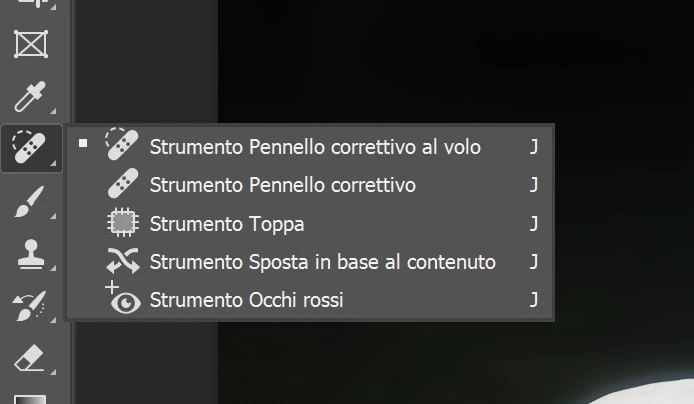
 

40 replies

Participant
November 27, 2024

After talking on the online chat, Harshit recommended submitting this on here.

After hours of searching why I was missing features within Photoshop, I found that the reason is because my device has a Windows ARM Processor. So far the features I've wanted to try out and realised I am missing are the remove tool and the remove distractions tool. Turns out they are within the web-based version which I can access on my Windows ARM Processor device, but they are not within the app version for my device.

Adobe currently has no date to add these features in for Windows ARM Processor devices, so I'd like to push that this is looked into and a development released which has this functionality. I specifically purchased my device for photo editing and not having full Photoshop functionality totally undermines why I bought the device and have the Adobe subscription...


PLEASE develope this for us Windows ARM Processor device users!


Thanks.

Participating Frequently
November 18, 2024

Hello Sameer


Any idea when this will finally be supported? This is really important for everyone's workflow.

Participating Frequently
October 25, 2024

I am also curious about a timeline for use with ARM machines. 

Participating Frequently
October 21, 2024

The remove tool is missing in both the BETA and the regular version of Photoshop. 


Photoshop 26+

Windows ARM (Snapdragon)

I have uninstalled both completely and it is still missing upon reinstall.

CShubert
Community Manager
Community Manager
October 21, 2024

Hi @Joseph38057343i59p we see you have an EDU account, please make sure your IT Admin is not blocking the update or any feature(s)


https://community.adobe.com/t5/enterprise-teams-discussions/photoshop-beta-not-available-in-creative-cloud-desktop-application/td-p/13834355


Thanks,

Cory - Photoshop Product Manager

Participating Frequently
October 21, 2024

Hello,

Just for my own knowledge, should the tools be available on a Windows ARM machine? I can access them on other PCs, but not the Windows ARM machine.

Joey


[personal information removed as per forum guidelines]

Participant
October 18, 2024

Do you have an estimated timeline? Im loving this computer for work on the road but the remove tool has become essential. 

Sameer K
Community Manager
Community Manager
October 2, 2024

Hi All! 


Sorry for the trouble. The current iteration of the Remove tool is unavailable on ARM-based Windows Devices. 

So, this is expected behavior for now. 


Thanks!
Sameer K

Participant
November 4, 2025

When is it "expected" to behave like it does on all of the other computers? This known bug has been out there for some time now and would be great to be able to use all of the great new features you all are releasing! Very frustrating - I could understand if we were on some old machine that isn't capable of handling the requests but more and more windows machines will have ARM processors - what will it take to get a fix for us?!? 

David Nicho
Participating Frequently
November 5, 2025

You are absolutely right! I'm so pissed off with Adobe not taking action in fixing this. What are they expecting? Microsoft, Samsung, Lenovo and many many more brands are selling laptops and computers based on ARM proccessors. This is not stopping. It's time for Adobe to adapt or die.

Christian_Forrer
Participant
July 13, 2024

The remove tool is not available in the ARM version of Photoshop. I have it on my x86 computer, where it appears in the toolbar, but it's absent in both the regular and beta ARM versions. As the original poster mentioned, this is not related to resetting the toolbar; the tool simply isn't there.

Christian_Forrer
Participant
September 20, 2024

I am wondering if the issue raised by another user a while ago has been resolved (see link to thread below).

The remove tool is not available on ARM computers. It's not hidden as part of a workspace setting or anything (see screenshot below). I am fairly convinced that it has to do with the Photoshop version on new ARM devices, as highlighted by other users. On my standard Windows computer (which I also have), the tool is visible and works fine.

I would like to know if this issue has been acknowledged or is being handled. Thank you!


Re: Windows ARM - "remove tool" missing - Adobe Community - 14720719


Christian_Forrer
Participant
September 21, 2024

BTW - for the tech team:

  • Photoshop Version: 26.0 beta (issue also present in non-beta and prior beta versions)
  • System Type: 64-bit OS, ARM-based processor
  • Windows Version: Windows 11 Home - 24H2
  • OS Build: 26100.1742
  • Processor: Snapdragon X 12-core X1E80100 @ 3.40 GHz 3.42 GHz
Ged_Traynor
Community Expert
Community Expert
July 5, 2024

@loremi this is the only info I can find about running Photoshop on Copilot+ PCs, it should be compatible according to the article

https://helpx.adobe.com/ie/download-install/kb/arm-processors.html

Maybe try resetting the Photoshop preferences

https://helpx.adobe.com/ie/photoshop/using/preferences.html#Manually
Remember to back up your settings before doing the preference reset
https://helpx.adobe.com/ie/photoshop/using/preset-migration.html


If that doesn't help, try contacting Adobe support, type agent in the chatbot to speak to a real person

Chat support: https://helpx.adobe.com/contact.html?rghtup=autoOpen
You will need to be on a browser that allows pop-ups and cookies, or the icon won't show
Twitter: @AdobeCare https://twitter.com/AdobeCare

loremiAuthor
Participant
July 5, 2024

Nope, I don't see it listed 😞


Ged_Traynor
Community Expert
Community Expert
July 5, 2024

@loremi go to Edit > Toolbar, is the remove tool listed there