
Participating Frequently
February 28, 2020
Question

Photoshop CC 21.1.0: Cursor jumping away after mouse release for some tools

  • February 28, 2020
  • 9 replies
  • 7550 views

Now this is driving me insane! Running 21.1.0 on an HP Elitebook running x64 Win7.

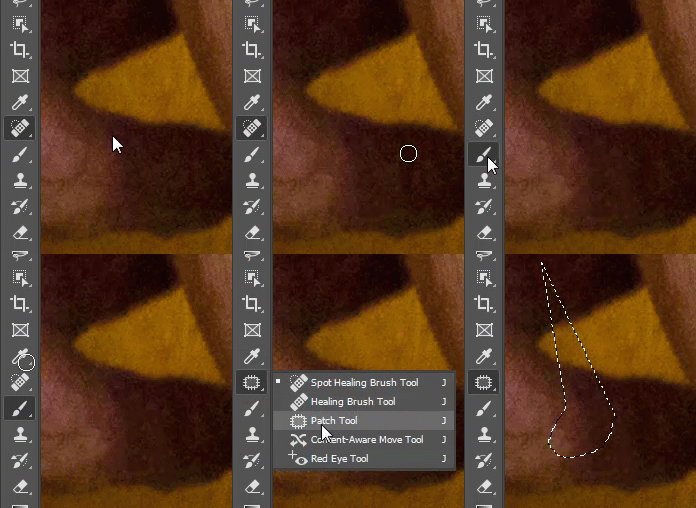
With some tools including Clone Stamp, Spot Healing/Healing Brush, Blur, Eraser, and Patch, the stroke jumps up and left about 4 inches after I release the cursor. However, this "jump" doesn't occur with the Brush tool.

This wasn't happening yesterday. I have tried messing with the GPU settings, restarting, un/reinstalling, begging, exorcism, everything. GIF of issue below.
This topic has been closed for replies.

9 replies

Participant
July 27, 2024

PSUserConfig.txt is problem (edited it long time ago)
Delete and solved

 
Participating Frequently
March 28, 2022

I'm habing this probem in every Adobe program--Photoshop, Illustrator and InDesign. Can't work on anything. I have new MacBook M1 and a MackBook Pro from 2016--both have the same issue and its getting worse. Come on Adobe! This is unacceptible.


Participant
April 3, 2022

This just started for me... I thought it was my computer, and I ran through the every option I could find to fix it.  But it seems to be isolated to just adobe products.  LRC and Photoshop are absolutley unusable.  It's so incredibly frustrating.  Why am I paying for a program every month when I cant even use it.  Anyone find a solution?  I've tried everything I can find out there to no avail.

Participant
August 6, 2022

Hi, did anyone get a fix on this issue? Only in PS, all updated programs on my mac. My mouse jumps to the top left corner of my monitor- I have tried different mouse, different monitor. All on Mac- anyone have the fix yet? I can't even get to the preference tab because my mouse jumps away and freezes. Monteray version 23.4.2.

This did not happen until Monteray

golauree
Known Participant
December 13, 2021

I'm on 23.0.2 running MacOS Monterey and this bug is still occurring! 

Participating Frequently
December 19, 2021

......I'm having this problem with the mixer paintbrush.....keeps jumping and I'm having to command Z every 8-10 brush strokes!!.....it's impossible to work like this and I'm losing money.....please help!!!

Participating Frequently
November 18, 2021

I'm having this problem as well. On a Macbook Pro 2021. Only for me the cursor jumps the other way: to the top right. 

Participant
September 27, 2021

Hi all,


I also had this problem! But I found out that the problem only occurs when screen scaling isn't on 100%.

In my case I have a Notebook with 4K resolutions. Due to the high resolution i have to scale up the screen Size to 200%. In this case I have to problem with the "moving mouse". If i set the scaling to 100% it works fine.


So to tackle the probelm I tried different things and I guess i found the solution:

Make sure "Programm DPI" and "High DPI Scaling Override" is uncked. It works now fine for me even with 200% Scaling!


kind regards


mwilson315
Participant
November 18, 2021

I'm having the same problem, but only when I edit an image in Photoshop from Lightroom. Cursor jumps on the toolbar, and when using brushes and other tools. I have the DPI options unchecked. However, if  I start Photoshop and open an image from Photoshop, it works properly. It's like Windows is ignoring the DPI settings when Lightroom opens Photoshop. 

Known Participant
November 30, 2020

Has anyone found an answer to this problem.  I have updated to the 2021 version and was not having any problems other than slow boot up (2-3 min).  When I logged in this morning (having changed nothing) My cursor is jumping around when I click on a tab.  For instance, if I click on the filter dropdown, the cursor jumps to type!  Any ideas?  Did I inadvertantly change a setting or something?

Known Participant
November 30, 2020

I may have figured it out.  I have reset my preferences and so far am not having the issue....

Chuck Burke
Participant
October 7, 2020

I had this issue once....it was killing me...I tried everything...it turned out I had set something on my tablet and that was causing the issues. 

Participant
October 25, 2020

I am having the same issue but my curser jumps at everything. I can't pick colors, I can't even pull anything from the drop down menus. I don't have a tablet plugged in. I cannot get anything done. Please Adobe help..


Participant
October 7, 2020

this is an extremely frustrating issue that i've been having for months.  My work flow is slowed down and i am beyond back logged now as a result.  It appears to happen in both PS and LR.  If i increase the size of my brush it makes it worse.  Please help Adobe!

February 28, 2020

Hi

It's a known issue with 21.1 and has been reported to Adobe

https://feedback.photoshop.com/photoshop_family/topics/ps-21-1-every-drawing-action-snaps-to-upper-l...

You can revert back to version 21.0.3 from the CC app until Adobe fixes the issues with this new update

Participant
April 1, 2020

I'm experiencing the same issue. I tried updating the GPU and Display Tablet drivers but it didn't fix it.

Another thing to mention is that in my case, it does happen with the brush tool as well.

Just as for OP, only click + drag will trigger this issue. Just clicking seems to work fine.

Also, this happens only with the mouse, the tablet pencil works just fine, which makes PS usable 🙂

inetgrafx
Participating Frequently
June 10, 2020

This bug is still present in the latest 21.1.3. Any updates or progress on this issue or work around?
It happens even with a color picker in any color range or selection mode - not allowing to select an area since the cursor jumps to a complete random position. 
The worst occurence is when using the hand tool to pan with the mouse, it jumps sometimes across the screen panning at a complete random spot making Photoshop totally useless when using the mouse.
Any operation with the Wacom tablet works fine - currently i just use the pen in photoshop, since the mouse is unusable for almost 90% of the time.

Would be awesome to see this fixed as soon as possible,

Thanks!