Participating Frequently
June 27, 2023
Answered

Photoshop tool icons are missing

  • June 27, 2023
  • 139 replies
  • 41455 views

Recenlty my Photoshop tool icons simply do not appear on the toolbar. they function fine but it is troublesome to find the right tool. The only way I could solve this is to reinstall photoshop but I cannot possibly do that every day.

Correct answer Sameer K

Hey, @Stefan31701036zdnm. Welcome to the Photoshop Community. I'll help you figure this out.

What version of Photoshop are you working on? Moving this to discussions for now.


Try this:

  • Go to the following location on Windows 10/11: Users/[user name]/AppData/Roaming/Adobe/UXP/PluginsStorage/PHSP
  • Press Windows + R & type this is the Run Window - %APPDATA%\Adobe\UXP\PluginsStorage
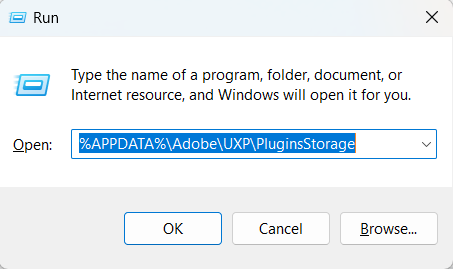
    image.png


  • In the PHSP Folder, rename the 26 folder by adding a .old at the end. ('26' > Rename > '26.old')

These changes will give a refresh to panels in Photoshop. Let me know how it goes.

Thanks!

Sameer K

139 replies

Participant
October 15, 2025

Galera, quem poder me ajudar...  atulizei photoshop para versao 26.10.0 ta presentando Barra de ferramenta .Nao aparece os icones de cada ferramenta, somente um ponto, para mostrar a ferramenta, tem que clicar com botao direito do mause.Agradeço quem poder me ajudar. 

Ged_Traynor
Community Expert
Community Expert
October 15, 2025
Participant
September 26, 2025

Many of my icons are now missing from my toolbars in Photoshop. I have tried the fixes from the 2023 posts, like renaming the "24" folder to "~24" but that did not fix it. Pease help.

Peru Bob
Community Expert
Community Expert
September 26, 2025

Try resetting the tools and/or preferences.
To restore preferences quickly using a keyboard shortcut:

Press and hold Alt+Control+Shift (Windows) or Option+Command+Shift (Mac OS) as you start Photoshop. You are prompted to delete the current settings. The new preferences files are created the next time you start Photoshop.
Note: Using the keyboard shortcut, preference files for custom shortcuts, workspaces, and color settings will also be reset to default.

from here:

https://helpx.adobe.com/photoshop/using/preferences.html#restore_preferences

Participant
September 18, 2025

Same. Frustrating to a point I'm looking for alternatives and say goodbye to Adobe for good.


Participant
September 14, 2025

The fix offered by @7411280 has not worked for me. Using version 26.10.0. I've had this problem consistenly through several "updates"


Missbee
Known Participant
September 2, 2025

My tools disappear too. They're usuable if I click the position or use shortcuts. No predicting when this happens. 

nikunj.m
Legend
September 2, 2025

Hi, thanks for reaching out! 

Please check out the solution suggested here: https://adobe.ly/4n20Drn


Let us know if it helps! 
Thanks,
Nikunj

Participant
September 2, 2025

At some point, the icons on the left side disappeared. When this happens, some tools still work normally (such as the Eyedropper, Zoom, Lasso, Magic Wand, and Canvas tools), but for others (like the Brush or Eraser), even if I switch to them, the function doesn’t change.

When I’m using the Brush tool and switch to the Eraser, the Eraser icon appears selected (the icon looks pressed/active), but it still behaves as a Brush. Conversely, if I’m using the Eraser and this issue occurs, switching back to the Brush still only works as an Eraser. Also, when I change colors, it keeps painting with the previously used color instead of the new one.

I’m currently using the latest version of Photoshop, and I’m wondering if there’s a solution for this issue. Restarting Photoshop temporarily fixes the problem, but since it keeps happening repeatedly, it’s very inconvenient


Pixel D
Participant
September 2, 2025

Bonjour,
j'utilise depuis plusieurs années le meme pc et photoshop mais de temps en temps, j'avais ce bug d'affichage des outils et maintenant il est toujours là. 

- J'ai essayé de revenir sur une ancienne version, cela a corrigé le souci mais le probleme est revenu le lendemain. J'ai supprimé et re installé mais pareil. 


- Cote PC, j'ai de la place sur mon disque dur et c'est un pc qui tourne bien et assez equipé pour ca.
- J'ai essayé de changé les parametre des outils dans "espace de travail", cela corrige la disposition mais pas l'affichage.

C'est urgent, impossible de travailler. Auriez vous deja vu cela ?

Merci à vous


Participant
August 23, 2025

Yep, I have had the same problem with PS2025 version

I just stopped using that version, my favorite is PS2021 version.

Participant
August 20, 2025

@Sameer K 

thank you sameer bhai

Participant
August 1, 2025

Big Thanks


